



Most people who have Microsoft 365 Copilot use it as a chat box. They ask it to summarise an email, get an answer, and move on. Meanwhile the product around that chat box has grown into something much bigger: Copilot inside Excel and Word, Copilot Cowork that carries out multi-step tasks, and Copilot Studio where you build your own agents.
So on December 20 and 21, 2026, from 6:30 PM to 8:30 PM IST, we are running a live, hands-on workshop on all of it. It is our first Microsoft Copilot cohort, it is two evenings of two hours, and it needs no code. Reserve a seat on the workshop page.
TL;DR: the Microsoft Copilot workshop in one table
| Question | Answer |
|---|---|
| When? | Sun Dec 20 and Mon Dec 21, 2026, 6:30 to 8:30 PM IST, on Zoom. |
| How long? | Two live sessions of two hours each. |
| Session 1 | Exploring Copilot, Copilot in Excel and Microsoft apps, a live Copilot Cowork demo. |
| Session 2 | Copilot Cowork use cases, then Copilot Studio agents and automations. |
| Do I need to code? | No. |
| Do I need a licence? | Best to have Microsoft 365 Copilot. You can watch the demos without one. |
| What do I get? | Recordings, prompt and workflow templates, Melo support, a certificate. |
| Who teaches it? | Yash Thakker. |
Why teach Microsoft Copilot as a workshop and not a video?
Because the product changes faster than a recorded course can keep up with, and because the hard part is judgment, not clicking. Copilot Cowork reached general availability on June 16, 2026, after a preview that began on March 30, according to Microsoft's announcement. Its documentation on Microsoft Learn was updated as recently as this week.
A live session lets us work with what is on screen today, answer the question you actually have, and show you where Copilot gets something wrong. Those moments teach more than a polished demo does.
If you want the reasoning behind how we teach, read our guide to how to choose Microsoft Copilot courses and workshops. If you want to understand the most talked-about feature before you join, read our explainer on Copilot Cowork: what it does, what it costs and how to try it.
Session 1: Copilot, Excel, Microsoft apps and a Cowork demo
The first evening is about getting a clear map and then using it on real work.
Exploring Microsoft Copilot
The Copilot family is confusing. There is Microsoft 365 Copilot, Copilot Chat, agents, Copilot Cowork and Copilot Studio, and each has different licensing and different limits. We start by sorting these out in plain words: who gets what, where each one lives, and how to write prompts that work in each place.
Copilot inside Excel
Excel is where most of the working hours in finance, operations and sales are spent, so it gets the most time. You will see how to ask questions of your data, clean messy columns, draft formulas, summarise trends and produce charts.
We are careful about reliability. Copilot in Excel works best on data that is in a proper table, and you must still check every formula it writes. Our written guide to Copilot in Excel goes through the prompts and the limits, and the workshop turns those into practice on a sample file.
Copilot in Word, PowerPoint, Outlook and Teams
Next we take one short brief and turn it into three things: a Word document, a PowerPoint deck and an Outlook email. Then we reverse the direction and summarise a long thread and a meeting. The skill here is keeping your voice and your facts under control, which is why the exercise ends with an edit pass, not a send button. See our notes on Copilot in Word and the Teams meeting recap guide for background.
A live Copilot Cowork demo
The last block of Session 1 is a live Copilot Cowork run. You describe a task, Cowork makes a plan, works across your Microsoft 365 data and returns finished files for your review. We do it live so you can see the pauses, the questions it asks and the approvals it requests.
What we saw when we ran Copilot Cowork ourselves
We do not teach from press releases, so before announcing this workshop we ran Cowork on real tasks. This is what happened.
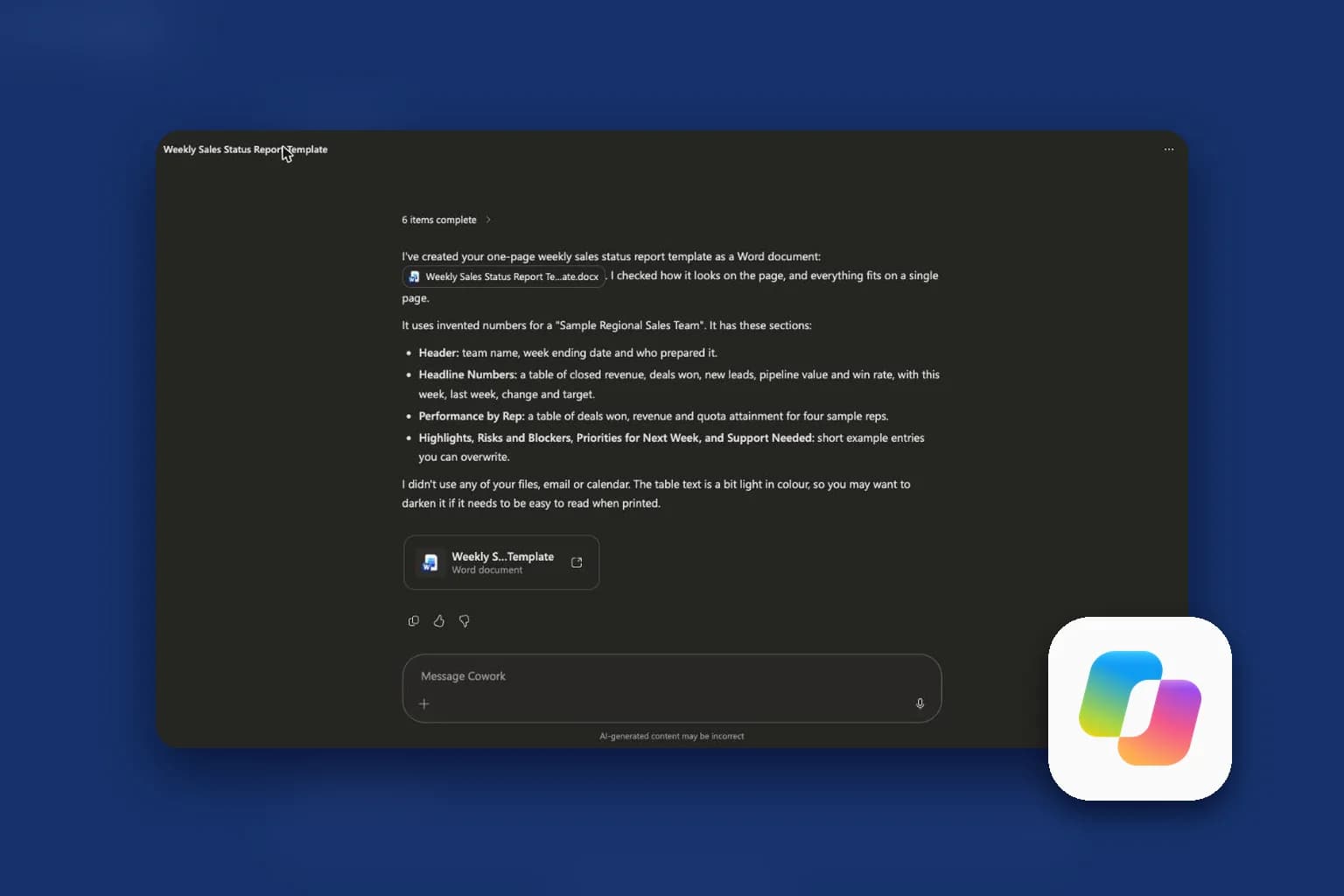
We asked for a one-page weekly sales status report template as a Word document, using made-up numbers and none of our files. In under a minute it prepared the Word tooling, created and edited the file, checked how it looked on the page, and reported back with a summary of the sections it had built. It also flagged its own weak spot: the table text was a little light in colour, so it suggested darkening it for print.
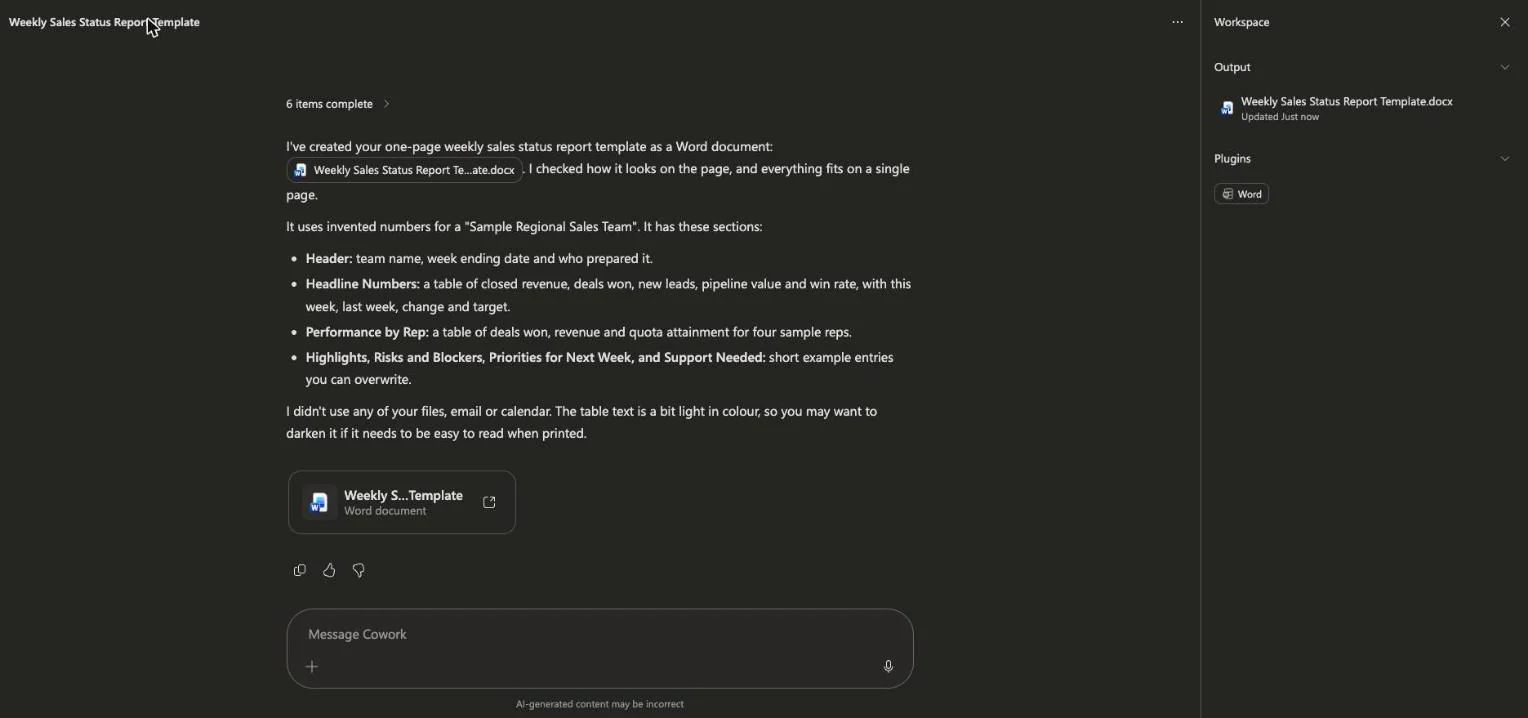 Copilot Cowork finishing a one-page weekly sales report template as a Word document and summarising its sections
Then we asked for a five-slide pitch deck for an invented coffee subscription startup. That took a few minutes. Cowork generated an image, made around 64 edits to the presentation, rendered the result to check it, and returned a deck we could open in PowerPoint on the web. Its closing note was honest: every number was invented, and two spots had text sitting very close to the edge of a box, which it had not adjusted.
That last point is the lesson of the whole workshop. The output is good, and the output is not finished. The skill is knowing what to check.
We also looked at the rest of the Cowork screen. The home page offers suggested starters such as catching up on your day, organising an inbox and preparing for a meeting. An Automations page lists recurring tasks, with suggestions such as a daily briefing, a weekly business review, a subscription check and customer follow-ups.
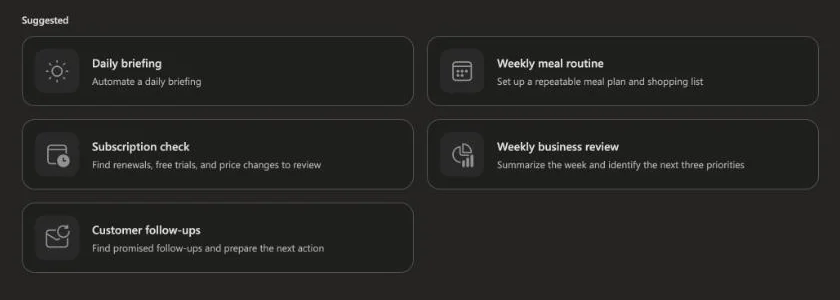 Suggested Copilot Cowork automations including a daily briefing and a weekly business review, shown on the Automations page
Session 2: Cowork use cases and Copilot Studio
The second evening moves from using Copilot to extending it.
Copilot Cowork use cases
We work through meeting preparation, weekly reports, inbox triage, research packs and follow-ups. For each one you learn how to brief Cowork so the result is usable, how to read its plan, and how to approve what it does. Microsoft's documentation states that Cowork asks for permission before actions such as sending an email, posting a Teams message or scheduling a meeting, and that you can pause or cancel a task at any time. We practise using those controls so they become habit.
Safe delegation
What do you hand to an agent, and what do you keep? We cover permissions, review steps and how to check output before it reaches a customer or a manager. This part draws on lessons from the wider agent world, including our coverage of whether a Cowork-style agent is safe.
Copilot Studio: build an agent, then automate
Copilot Studio is where you build your own agent without code. You give it instructions and knowledge, test it, and fix its weak spots. Then you connect it to a trigger and an action so a repeat task runs without you. We finish by reading the run history and setting limits, because an automation you cannot inspect is an automation you cannot trust.
What you need before you join
Be honest with yourself about access, because access is the part that takes time.
- A Microsoft 365 work or school account. Copilot features depend on your plan.
- A Microsoft 365 Copilot licence, if you want to follow along in Excel and the apps. Without one you can still watch.
- Copilot Cowork access. Microsoft says Cowork requires the Microsoft 365 Copilot licence, is off by default, and must be enabled by an administrator. Usage is billed in Copilot Credits. Ask your IT team early.
- A Copilot Studio trial, for Session 2. Trial and licensing rules change often, so check Microsoft's page.
- A laptop and a non-confidential spreadsheet. We also share a sample file.
If you cannot get Cowork or Studio access in time, the live demos still show you the full workflow, and the recording stays available.
Who this workshop is for, and who it is not for
It is for people who open Excel, Outlook and Teams every day: operations, finance, HR, sales, managers and consultants. It is also for people who will roll Copilot out to a team and need to show what is possible and what is safe.
It is not for developers looking for an engineering course on the Microsoft agent stack. If you build with code, our AI Builder Bootcamp guide is a better fit. And if you already use Copilot daily, treat Session 1 as a refresher and join for Session 2.
Price, early bird and the first-cohort deal
This is the first run of the workshop, so the group is small and you get direct access to the instructor. Your feedback shapes the next cohort. Because of that, and because the content covers three products, it is priced above our standard two-session workshop. At launch it is $129, or 3,199 rupees in India, with 20 percent off until December 12. Check the workshop page for the live price in your currency.
Included are two live sessions, recordings, prompt and workflow templates, a private community channel, Melo learning support before and after the class, and a completion certificate.
What people are asking about this workshop
Is this just a tour of menus? No. Every block ends in something you produce: an Excel analysis, a document-deck-email set, a Cowork workflow and a Copilot Studio automation.
Can I use my company data? Please do not. We use sample files, and we cover how to check your company's AI policy first.
Will it teach Microsoft's licensing? Only what you need to ask the right questions of your IT team. Licensing changes quickly and varies by organisation, so we point you to current Microsoft guidance.
Does it compare Copilot with Claude? Briefly, where it helps you choose. Cowork can use Anthropic models, which we covered in Microsoft and Anthropic: the Copilot numbers, claimed versus verified. If you want the Claude side in depth, see the Claude for Work guide.
Related reading
- Copilot Cowork explained: what it does, what it costs, how to try it
- How to choose Microsoft Copilot courses and workshops in 2026
- Microsoft Copilot in Excel: what it can actually do
- Microsoft Copilot in Word: a 2026 guide
- Microsoft Copilot in Teams: meeting recap guide
- Top 10 Claude Cowork use cases
- What are agent skills? A complete guide
- Official: Get started with Copilot Cowork on Microsoft Learn
Dates, prices and product details are accurate as of November 6, 2026. Microsoft changes Copilot features and licensing often, so check the workshop page and Microsoft's documentation before you enrol.