



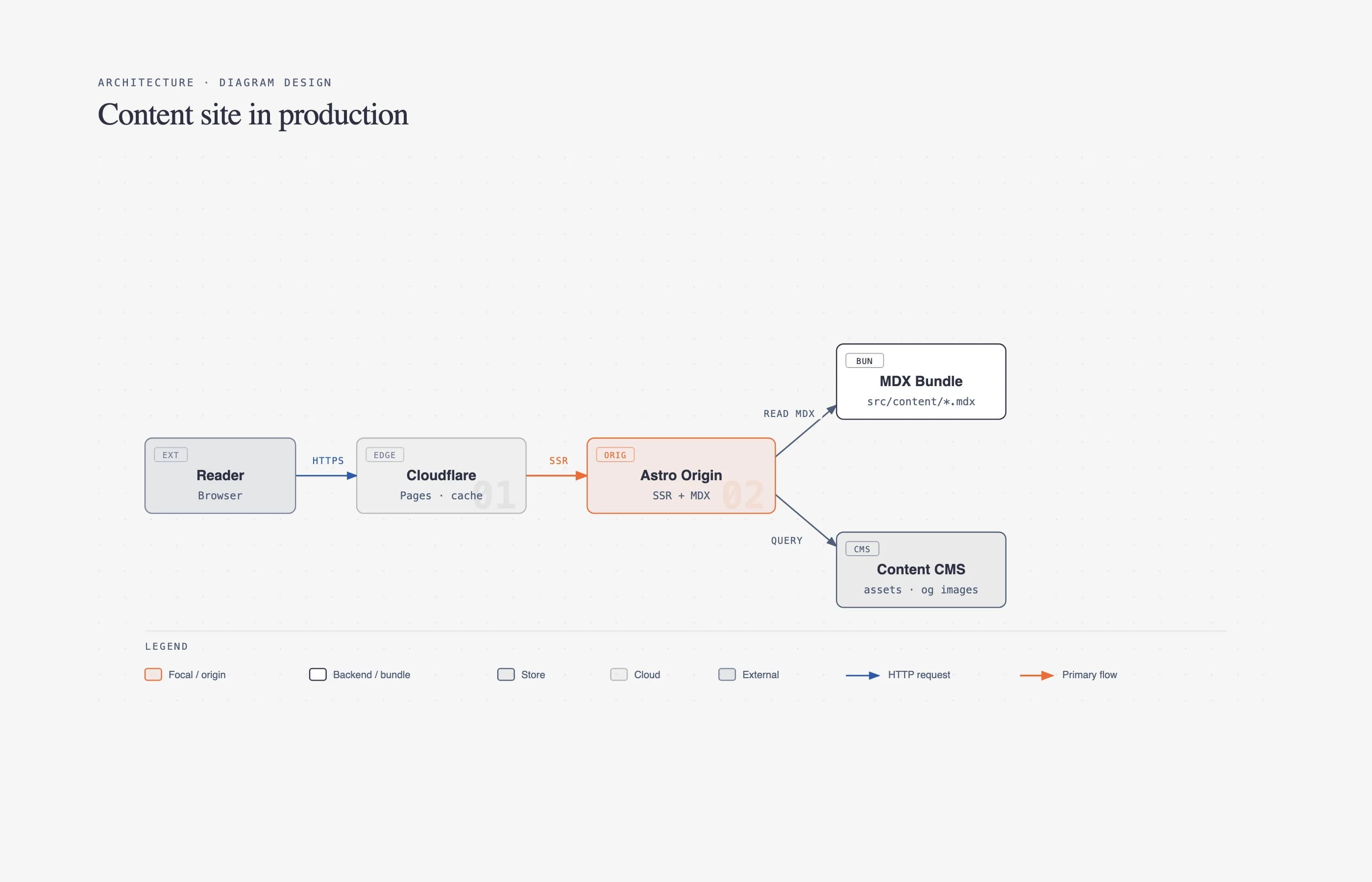
How do you get an architecture diagram out of Cursor or Claude Code that you would actually attach to a pull request?
Most agents still answer that request with Mermaid slop: rounded boxes, auto-layout arrows, and a picture nobody can prove against the repo. Archify is the other contract. It is an agent skill for Cursor, Claude Code, Codex CLI, and OpenCode. The agent writes typed JSON IR. A Node.js renderer validates that IR, then atomically delivers self-contained HTML/SVG. Interactions stay grounded in authored nodes and edges. Architecture Delta compares two snapshots as Before / Delta / After with exact added, removed, changed, moved, and rerouted facts.
What's changed since we first published
Checked against the Archify GitHub repo and releases on 27 October 2026:
- Adoption: the repo now shows about 90k stars and 6.1k forks, up from the 23,547 stars and 1,519 forks quoted below.
- v2.16.0 (30 Aug): viewer and rendering fixes, localized viewer UI, reproducible ZIP builds, and a notification-only update reminder.
- v3.0.0 (28 Sep): a redesigned diagram reader, clearer Architecture and Workflow layout and routing, Lifecycle v2, and delivery checks that verify generated artifacts before returning them.
- v3.1.0 (13 Oct): five more diagram types (ERD, Class/interface, Tree, Timeline, Waterfall), so there are now ten, with Live motion on by default.
- v3.2.0 (19 Oct, latest stable): one-page explainer answers built from Markdown, with interactive diagrams, citations, and PNG, WebP, JPG, or PDF export.
- DeepSeek Harness plugin: the community plugin is now
dsh plugin --profile web add @tt-a1i/archify-dsh@1.0.0(bundles Archify 3.0.1).
Install and compare architecture commands are unchanged. Figures in the sections below are as of 28 August unless noted.
The repo is not a same-day launch. tt-a1i/archify landed on 15 April 2026. What changed is adoption: about 23,547 stars and 1,519 forks as of 28 August 2026, MIT licensed, latest stable v2.15.0 (17 August), main at v2.16.0-dev.0. This guide is how to install it, prompt it, and use the delta receipt in a PR — plus the limits the README is honest about.
TL;DR: will this diagram survive a PR review?
| Question | Answer |
|---|---|
| What is it? | Agent skill: typed JSON IR → deterministic HTML/SVG system maps |
| Is it free? | Yes. MIT. No hosted account. |
| Do I need API keys? | No extra keys. It uses whichever coding agent you already run. |
| Do I need Node? | Yes. The packaged skill is a zero-npm-install Node runtime. doctor checks it. |
| How is this not Mermaid? | Validated IR, fail-closed delivery, no invented topology. Mermaid auto-parse is out of scope. |
| Can I review a diff? | Architecture Delta: Before / Delta / After plus a machine receipt |
| Where does it install? | Cursor, Claude Code, Codex CLI, OpenCode; Raven via ZIP; optional DeepSeek Harness community plugin |
| First prompt | Use archify to map this repository's runtime architecture. |
Install, then ask. The rest of this post is why the HTML is safer to ship than a Mermaid block.
npx skills add tt-a1i/archify -g
Then:
Use archify to map this repository's runtime architecture.
Browse other installable skills on explainx.ai's skills directory when you are comparing harness packaging — not when you just need this one command.
How do I install Archify in Cursor vs Claude Code?
The README's default install is one command. The agent switcher on the project page covers cursor, codex, claude-code, and opencode.
Global install (any supported agent):
npx skills add tt-a1i/archify -g
Explicit, non-interactive Cursor install (from the README):
npx -y skills add tt-a1i/archify --skill archify --agent cursor --global --copy --yes
Try without installing (Codex):
npx skills use tt-a1i/archify@archify --agent codex
Install locations once the skill is on disk:
| Surface | Where it lands | Full renderer + validation? |
|---|---|---|
| Claude Code | ~/.claude/skills/ or .claude/skills/ | Yes |
| Codex CLI | ~/.agents/skills/ or .agents/skills/ | Yes |
| OpenCode | ~/.config/opencode/skills/, .opencode/skills/, or .agents/skills/ | Yes |
| Cursor | Via the skills CLI (--agent cursor) | Yes |
| Raven | Extract archify.zip into ~/.raven/workspace/skills → .../skills/archify | Yes (manual ZIP; not a switcher target) |
| Claude.ai | Upload archify.zip under Settings → Capabilities → Skills | Only if the sandbox has Node |
Raven and Claude.ai are fallbacks, not the happy path. If you are new to skill files, how to build your first agent skill explains the SKILL.md contract Archify itself ships.
After install, sanity-check the runtime from the skill package:
node bin/archify.mjs doctor
node bin/archify.mjs demo /tmp/archify-demo
doctor is the first-hand check that Node can see the bundled validators. demo writes a ready-to-open example. If doctor fails, stop — the agent cannot deliver a trustworthy artifact without that runtime.
What should I paste as the first prompt?
The README's one-liner is enough to start:
Use archify to map this repository's runtime architecture.
For a PR-ready first pass, bound the view so the agent does not dump every file as a node:
Analyze this repository, then use archify to create a high-level runtime architecture diagram.
Show 8–12 core components, one primary path, external dependencies, and trust boundaries.
Put supporting detail in cards instead of adding more edges.
For a single path instead of a system map:
Use archify to draw this login flow: Browser -> Web App -> API -> JWT validation ->
Redis session lookup -> PostgreSQL fallback. Keep the cache-miss path secondary.
Then iterate in chat the way the skill expects: add Redis, move auth to the left, highlight the rollback path. Archify keeps the typed source so the agent edits IR, not a drawing canvas.
If you are not sure which diagram type fits, ask the CLI instead of guessing:
node archify/bin/archify.mjs guide "Show an API request with Redis cache miss"
node archify/bin/archify.mjs guide "Map Kafka topics, consumer groups, replay, and DLQ" --json
How does typed JSON IR become a diagram I can trust?
Archify's product line is blunt: truth before spectacle. The pipeline is five steps.
| Step | What happens |
|---|---|
| Generate | The agent authors typed JSON IR from the repo or your description. |
| Validate | Schema, layout, route, and label-to-route checks run. Failures return stable rule codes. |
| Preview (optional) | A loopback session on 127.0.0.1 watches one JSON file and keeps the last-good HTML if a save is invalid. |
| Deliver | Render into a same-directory candidate. Only a passing artifact atomically replaces the target. |
| Iterate | The agent patches the source. Unrelated structure stays stable. |
That is the opposite of "emit Mermaid, hope GitHub renders it." Delivery is fail-closed. validate --json and deliver --json still emit exactly one JSON object on failure. Read diagnostics[], change only the named subject using supportedFixes, and do not rewrite the whole diagram. The skill budget is two focused correction rounds. If those do not reduce the error count, the agent must stop and report the unresolved codes — not invent a prettier layout.
Useful commands once the skill is unpacked:
cd archify
node bin/archify.mjs validate workflow examples/agent-tool-call.workflow.json --quality showcase --json
node bin/archify.mjs preview workflow examples/agent-tool-call.workflow.json /tmp/workflow.html --quality showcase
node bin/archify.mjs deliver workflow examples/agent-tool-call.workflow.json /tmp/workflow.html --quality showcase --open --json
preview is an explicit desktop authoring mode, not a background service. It binds only to 127.0.0.1 on a random port, watches one named JSON file, and stops with Ctrl-C. It never ships into the generated HTML.
deliver --open is off by default. It hands the OS opener the exact committed HTML path only after every gate passes. If the opener is missing, delivery still succeeds; JSON stays on stdout and the manual path goes to stderr.
Showcase quality is stricter than a casual map. A receipt with only four artifact checks is basic validation. A showcase pass must report all nine artifact checks with zero composition errors and zero warnings. That is why an Archify HTML file is a better PR attachment than a screenshot of a chat.
The same "typed spec, deterministic compile" idea shows up in other agent artifacts — Flint for charts, DESIGN.md for UI tokens. Archify is that pattern for runtime topology.
How do I review architecture changes before merge?
This is the feature that earns the PR use case.
Architecture Delta compares two already validated architecture snapshots:
node archify/bin/archify.mjs compare architecture base.json head.json architecture-delta.html --json
The HTML is a three-state canvas: Before / Delta / After. Pairing is by authored stable IDs, not by "the model thinks these boxes are the same service." The receipt classifies semantic, evidence, scope, topology, geometry, provenance, and presentation changes separately. Removed nodes keep baseline geometry. Moved nodes keep a MOVE FROM phantom. Endpoint changes show old and new routes. Markers (+ / ~ / − / ↔) keep meaning independent of color.
What it will not say: impact, blast radius, merge safety, or verified GitHub PR risk. The proof labels itself AUTHORED SNAPSHOTS, or REVISION-PINNED INPUTS only after both repository-evidence gates pass. Treat it as a diagram diff, not as CI for production risk.
For a production-ownership review, Architecture can opt into deployment-ownership. That profile fails closed when owners, single-region placement, private database scope, or named boundary crossings are missing. It is never enabled silently, and it validates authored facts — not live cloud state.
If you already use Understand Anything to explore a knowledge graph of files and functions, Archify is the complementary artifact: a bounded, presentable map of runtime components and the exact routes between them.
Which diagram type should I ask for?
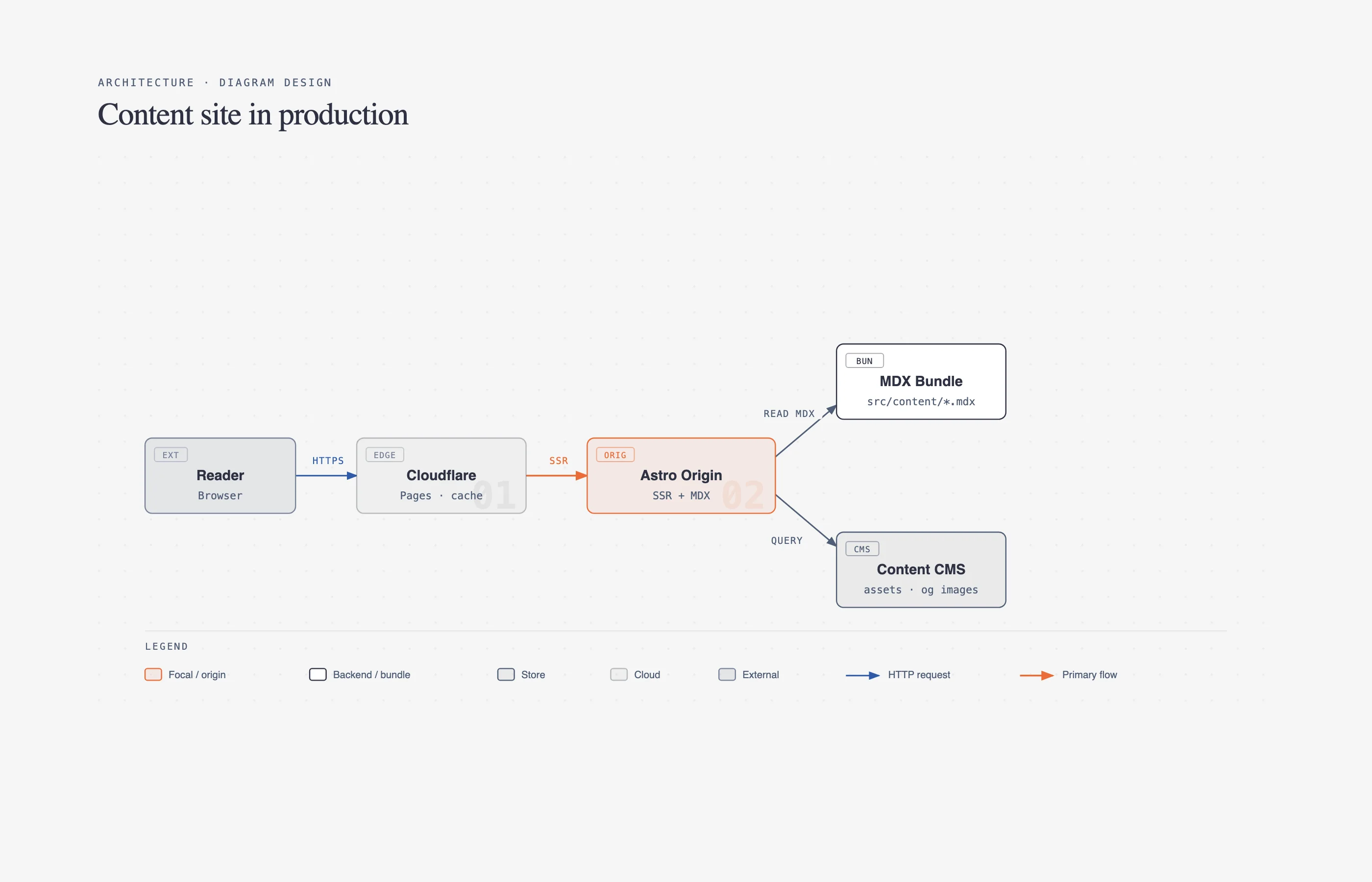 Labeled architecture-style system map with components and routes — the kind of artifact Archify compiles from typed JSON IR for PR review
Five renderer-backed types when we first published; v3.1.0 added ERD, Class/interface, Tree, Timeline, and Waterfall, for ten in total. The table below lists the original five. Pick in the prompt, or let archify guide choose.
| Type | Best for | Put this in the prompt |
|---|---|---|
| Architecture | Components, services, storage, trust boundaries | Scope, 8–12 core components, one primary path |
| Workflow | CI/CD, approvals, tool calls, runbooks | Participants, order, branches, exceptions |
| Sequence | API calls, cache fallback, auth, async traces | Callers, callees, returns, timing |
| Data Flow | Pipelines, lineage, PII, consumers | Sources, transforms, stores, boundaries |
| Lifecycle | States, retries, waits, terminal outcomes | States, events, retry and cancellation paths |
Four visual presets share one geometry contract: Classic (default), Signal Flow, Blueprint, and Editorial. Dark and light themes switch together. Optional brand marks (v2.15.0) sit as a compact badge — they never replace node type, label, or topology.
Motion is finite and reader-controlled. Canonical exports (PNG, SVG, WebM, 1200×630 share cards) strip temporary viewer state. After you trace a route or authored reach, Route Share Card and Reach Share Card download that scoped reading as a 1200×630 PNG with the full diagram kept as dimmed context. Reach is authored upstream/downstream closure, not runtime blast radius.
Keyboard shortcuts worth knowing once the HTML is open:
| Action | Control |
|---|---|
| Find a node | / |
| Probe a directed route | R |
| Upstream / downstream reach | Focus a node, then those actions |
| Compare semantic roles | L |
| Play a guided story | P |
| Export | E |
Stable hash links restore #focus=, #route=source~target, #lens=, and #view= so you can drop a URL in the PR instead of "see the screenshot above."
How is this different from Mermaid — and from Diagram Design?
Mermaid is the default because models have seen it in every README. Layout is automatic. There is no schema that fails the build when an arrow crosses an unrelated box. That is why Mermaid slop became a named problem: technically valid syntax, low-information pictures.
Archify's own README: "Archify is not a general-purpose drawing editor or a Mermaid theme." You can paste Mermaid into chat as a topology hint. The agent must re-author typed JSON. It does not mechanically render Mermaid styling. Automatic Mermaid parsing is on the out-of-scope list next to general-purpose auto-layout, hosted sharing, and WYSIWYG editing.
Diagram Design (explainx.ai coverage) solves a different slice of the same pain: editorial, brand-matched diagrams (27 types) so the picture matches your site. It can redraw existing Mermaid or draw.io into that design system. Archify solves verifiability: typed IR, composition gates, atomic delivery, Architecture Delta, revision-verified source beacons when you opt in. Use Diagram Design when the artifact is a blog figure. Use Archify when the artifact is a system map a reviewer should be able to search, route-probe, and diff.
Neither skill replaces MCP. Archify is not a live cloud inventory. It does not call AWS. Evidence-backed Architecture nodes can open Git-verified files pinned to one public commit when you pass --repo-root — ordinary artifacts stay source-free.
On the harness side, pair Archify with the same Claude Code skills and hooks you already use for review, and with a DESIGN.md so UI generation and runtime maps do not drift from two different agent guesses.
What people are asking
Do I need to learn the JSON schema?
Not to start. The skill tells the agent to read one matching schema and one example, write a candidate, then validate. You review HTML. If you are debugging a stubborn showcase failure, the repair receipt names the subject and the supported fix — you should not hand-edit coordinates in prose.
Why did delivery fail after a "pretty" render?
Because pretty is not the gate. Clean Flow rejects an edge through an unrelated node. Showcase rejects cramped turns, ambiguous corridors, and labels that mask another route. The last-good HTML stays on disk. That is the point.
Can Claude.ai run this?
Only if the sandbox has Node. The README lists Claude.ai and Project Knowledge as degraded paths (upload archify.zip). Desktop agents with a real shell are the supported workflow.
Is the 23.5k star count the product?
No. Stars measure curiosity. The product claim to check is the Proof Lab: 11 checked-in scenarios, JSON sources, named views, and validation receipts on the project page. There is also a real-repo proof: Archify traced public mco-org/mco at commit 9f1a1cf into a validated architecture HTML. Ask your agent to map your repo the same way; do not copy that JSON.
Who sponsors this, and does that change the skill?
The README lists APINEBULA and EverMind's Raven harness as sponsors. Raven is also a documented ZIP install target. That is distribution, not a hosted Archify cloud. Prefer the GitHub repo and project page over any sponsor signup link.
What shipped recently if I already starred it months ago?
v2.15.0 (17 August 2026) added authored brand marks, sequence column_fit: "spread", and a DeepSeek Harness community bundle (dsh plugin --profile web add @tt-a1i/archify-dsh@0.1.0 — community integration, not an official DeepSeek product). Unreleased v2.16.0-dev.0 adds meta.locale of en or zh-CN for viewer UI only — it never translates your authored labels. First-class Cursor onboarding landed in v2.13.0.
Honest limitations
- Not a Mermaid replacement with auto-parse. Paste Mermaid as a hint; the agent rewrites IR. There is no import-and-beautify pipeline.
- Node is required. No Node, no validator, no atomic delivery. Claude.ai is conditional on sandbox Node.
- The agent must produce valid IR. Hallucinated IDs, missing relationship IDs on a delta compare, or repository mismatches fail closed. The skill will not "just make it look nice."
- Out of scope by design: automatic Mermaid parsing, general-purpose auto-layout, hosted sharing, WYSIWYG editing, GitHub API merge checks, runtime blast-radius claims.
- Preview is loopback-only.
127.0.0.1, one file, last-good artifact on failure. Not a collaboration server. - Two correction rounds. After that, stop and report diagnostics. Infinite retry is not the contract.
- Desktop-first. Narrow screens get containment, not a separate mobile product.
- Architecture Delta is a snapshot diff. It will not tell you the change is safe to merge.
If you need live tools (cloud APIs, tickets, metrics), that is MCP, not this skill. If you need a repeatable review loop around the skill, wrap it using how to turn agent skills into loops.
Copy-paste checklist
Archify first-run checklist
□ npx skills add tt-a1i/archify -g
□ Cursor: npx -y skills add tt-a1i/archify --skill archify --agent cursor --global --copy --yes
□ node bin/archify.mjs doctor
□ Prompt: Use archify to map this repository's runtime architecture.
□ Bound the view: 8–12 components, one primary path, trust boundaries
□ Open the HTML locally; search a node; probe one route with R
□ For a PR: save base.json and head.json, then
  node archify/bin/archify.mjs compare architecture base.json head.json architecture-delta.html --json
□ Attach the HTML or a Route/Reach share card — not a chat screenshot
□ Do not claim merge safety from the delta receipt
Related on explainx.ai
-
Anatomy: Claude Code skill for interactive isometric figures
-
Diagram Design: The Claude Code Skill That Ends Generic AI Diagrams
Official sources: Archify on GitHub · Archify project page · explainx.ai skills directory
Star count (23,547), fork count (1,519), latest stable tag v2.15.0 (17 August 2026), and development identity v2.16.0-dev.0 reflect the public GitHub repository and changelog as of 28 August 2026. Install commands and out-of-scope items are taken from README_EN.md. Check the repo before you pin a version in CI.