



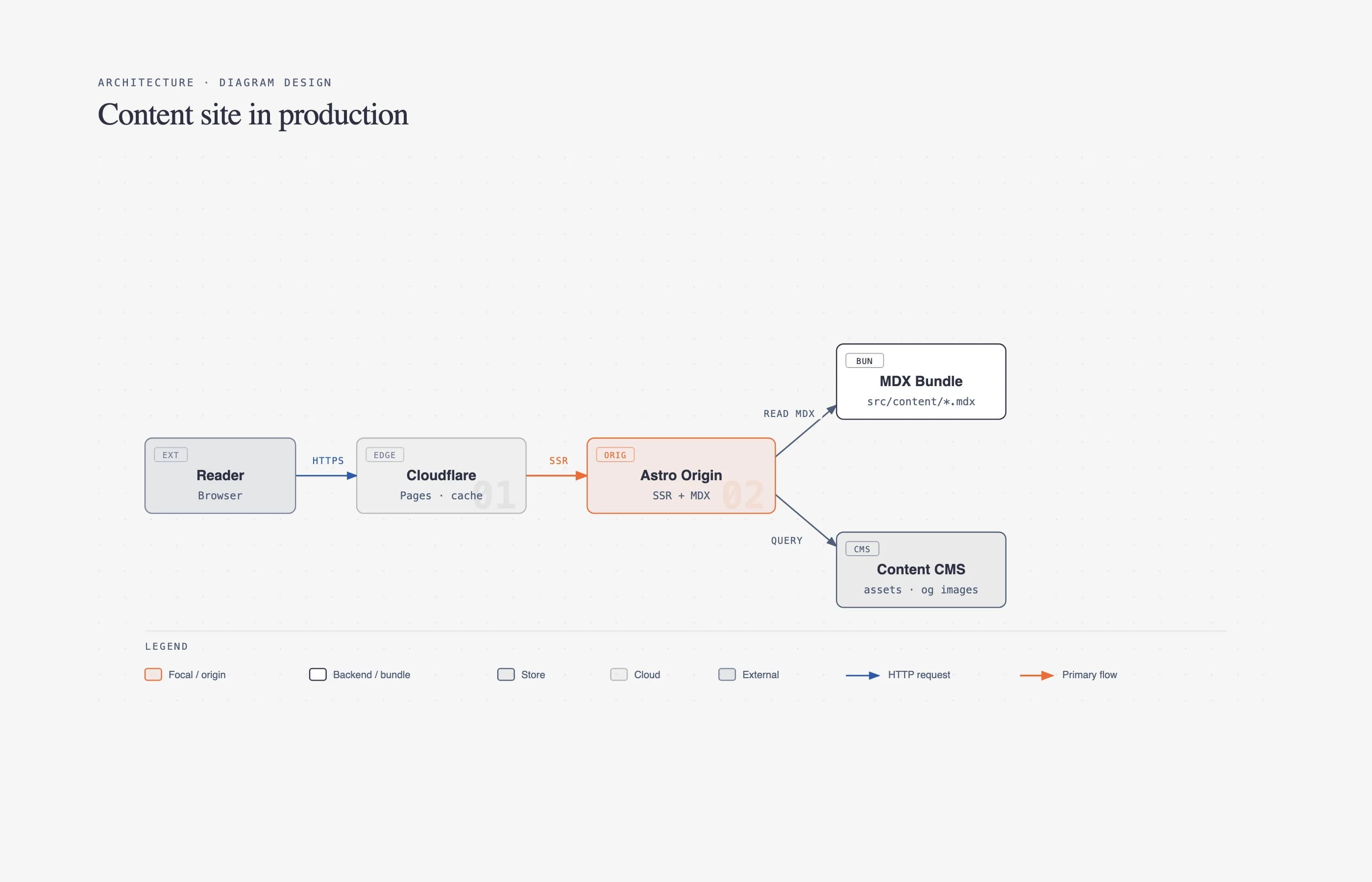
Every time Cathryn Lavery needed a diagram — an architecture sketch, a flowchart, a "what matters most" pyramid — for her blog at littlemight.com, she'd ask Claude and get back the same generic rounded-box thing that looked nothing like the rest of her site. The alternative was a 30-minute Figma session to make it match. So she built Diagram Design, a free Claude Code skill that now sits at 11.5K GitHub stars and 726 forks — enough traction that it's worth a real look at what it does differently.
The pitch is specific: 27 editorial diagram types, self-contained HTML/SVG output, zero build step, and a 60-second onboarding flow that reads your actual website and matches every diagram to your brand automatically. No generic AI look, no Mermaid auto-layout, no manual color picking.
TL;DR
| Question | Direct answer |
|---|---|
| What is it? | An Agent Skill for Claude Code, Codex, and Pi that generates 27 types of editorial diagrams as static HTML/SVG |
| Is it free? | Yes — MIT license, free plugin install |
| Do I need an API key? | No — it rides on whatever model access your coding agent already has |
| Does it match my brand? | Yes — point it at your website URL and it extracts your colors and fonts automatically |
| Can it import existing diagrams? | Yes — redraws draw.io and Mermaid sources into the same design system |
| What's the output? | A single .html file, opens double-clicked, offline, no framework |
| Where does it fall short? | PNG export needs a separate Python/Playwright install; Cowork needs an org repo mirror; Pi updates are manual |
Diagram Design is listed on explainx.ai's skill directory — see it there alongside details on installing it directly.
The 27 types, and why the count matters
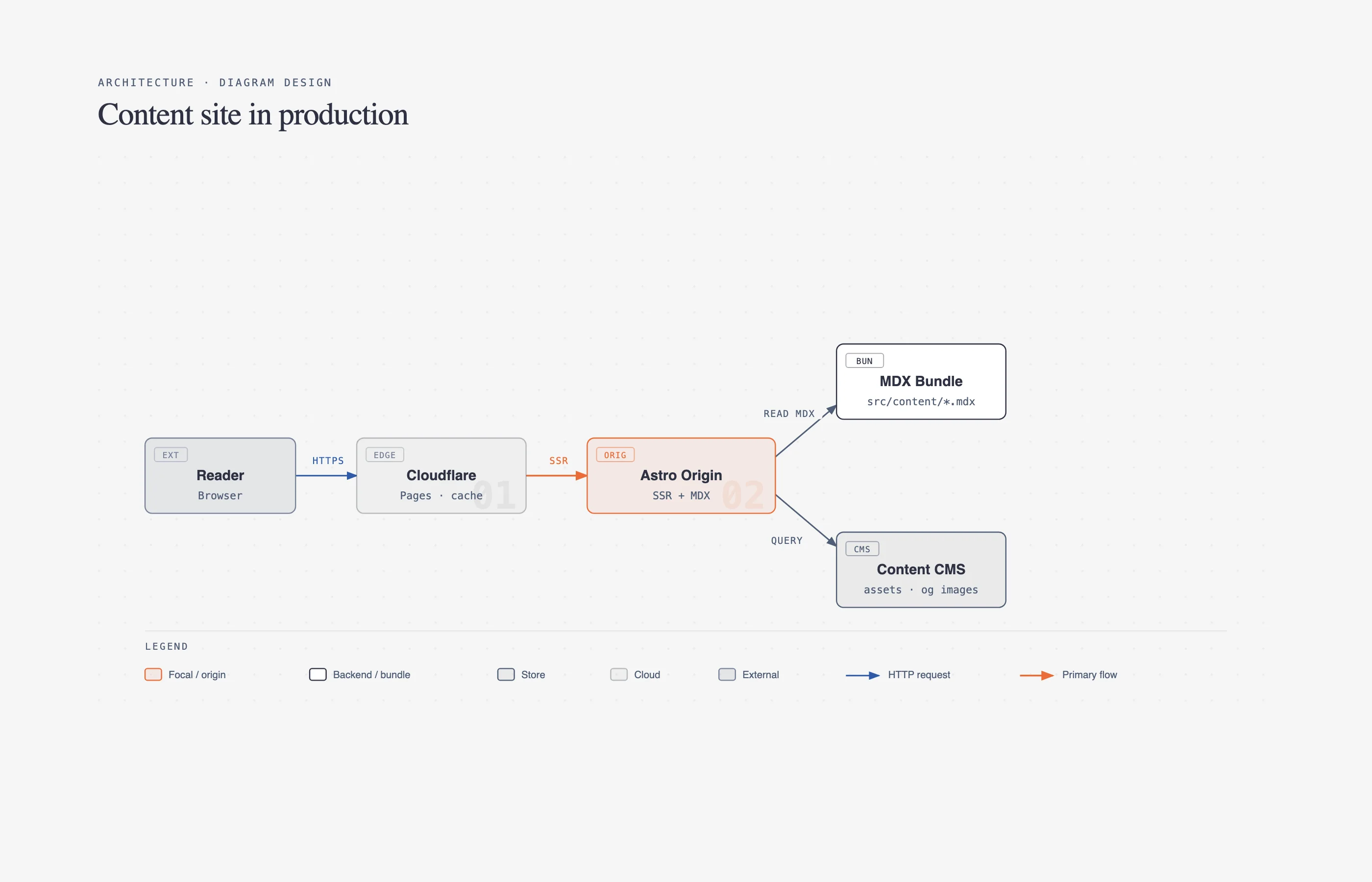 An example architecture diagram generated by the Diagram Design skill, showing components and connections in the project's editorial style with hairline borders and a single accent color
Most "AI diagram" tools give you one flexible-but-generic shape language. Diagram Design instead ships 27 named, purpose-built types — architecture, flowchart, sequence, state machine, ER/data model, timeline, swimlane, quadrant, nested hierarchy, tree, org chart, Venn, layer stack, pyramid/funnel, consultant 2×2, radar, loop/flywheel, IT current-state, high-level stack, bar/line/scatter charts, Gantt, multi-actor process, medallion architecture, data flow, and two data-platform-specific types (integration and security matrix).
That's a lot of surface area for a single skill file to carry, and the project's answer is progressive disclosure: at startup, an agent sees only the skill's name and description. A request like "make me a flowchart" loads the core SKILL.md plus exactly one type reference file — not all 27. Add a 28th type tomorrow and every existing request's context footprint stays identical. It's the same context-discipline principle behind well-designed MCP servers and Agent Skills generally — load only what the current task needs, not the whole reference library.
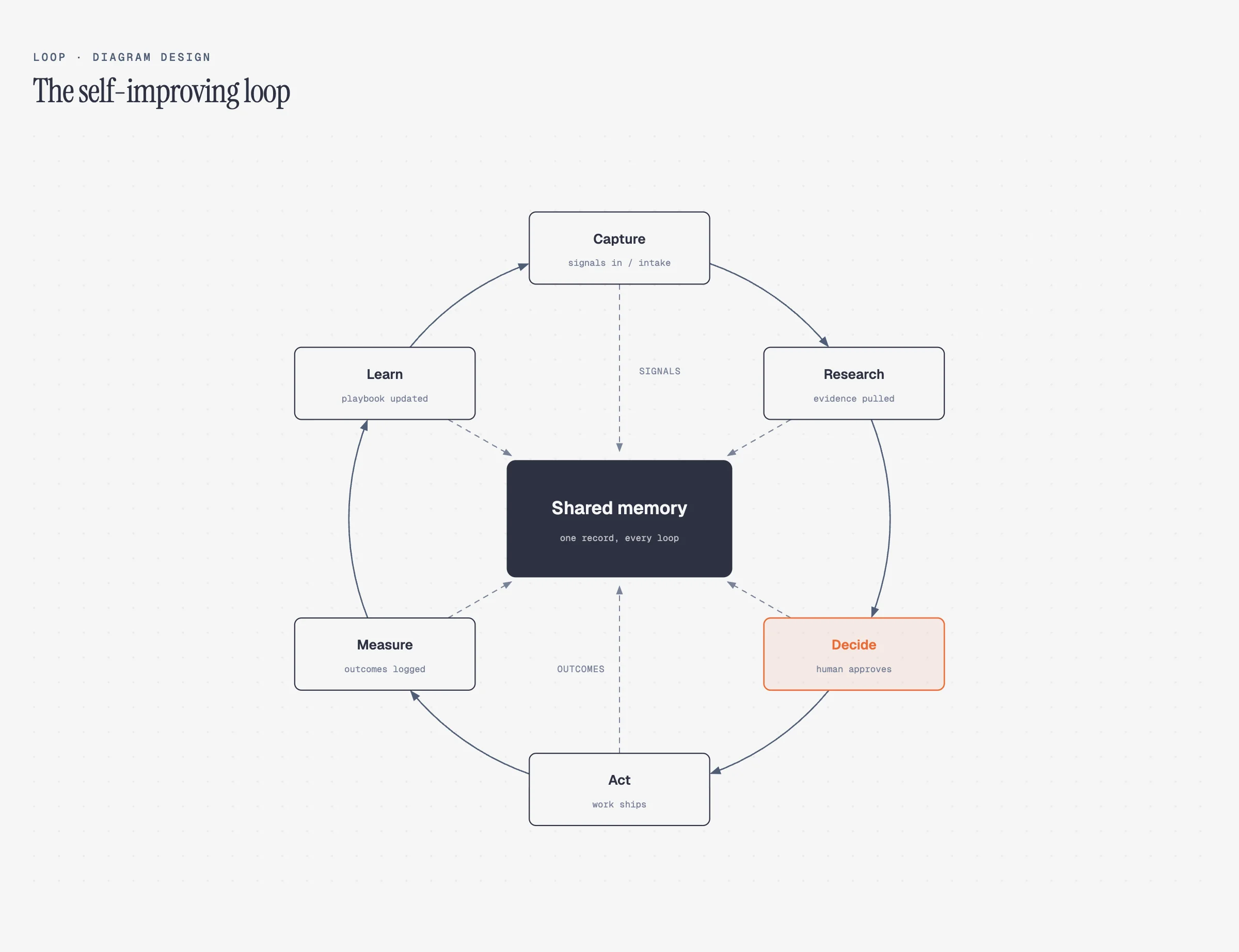 An example loop/flywheel diagram generated by the Diagram Design skill, showing stations arranged around a shared-memory hub with dashed write-back lines
Version 2.3 (the current release as of this writing) added semantic patterns on top of the 27 types: seven routed behavior patterns — fan-in queues, repeated stage slots, policy traces, trust boundaries, governance catalogs, and compensating security layers — that describe behavior separately from layout, so a new use case maps onto the nearest existing visual type instead of forcing a 28th type into existence. That's a deliberate anti-sprawl decision, and one the project documents in its own ADRs (architecture decision records) rather than leaving implicit.
The design system, in one paragraph
The project states its own rules plainly: one accent color reserved for the 1–2 things a reader should look at first, three font families (Instrument Serif for titles, Geist Sans for node names, Geist Mono for technical sublabels), 1px hairline borders, no shadows, max 10px border-radius, and — the detail that actually matters most — every coordinate, width, and gap divisible by 4. That last constraint is called out explicitly as "non-negotiable, it's what keeps the diagrams from feeling AI-generated." It's a small, verifiable rule that's doing a lot of the visual-quality work other AI design tools skip.
Target density is stated at 4 out of 10 — deliberately restrained, in service of the project's stated philosophy that "the highest-quality move is usually deletion." There's even an explicit "when not to use this skill" section: quick unicode sketches for a tweet, plain lists, before/after comparisons, or a single labeled box that a sentence would explain better. That kind of documented restraint is rarer in agent-skill READMEs than it should be.
Brand matching: the actual differentiator
The headline feature is onboarding. You tell your agent "onboard diagram-design to https://yoursite.com," and it fetches the homepage, extracts the dominant palette and font stack, and maps detected values to five semantic roles: paper (background), ink (primary text), muted (secondary text), accent (your CTA/link color), and a matched font stack for titles, node labels, and technical sublabels. It shows a diff before writing anything, runs a WCAG AA contrast check on ink-over-paper automatically, and — if your site has a color that fails contrast at diagram sizes (9–12px) — proposes an adjusted value and explains why, rather than silently shipping something unreadable.
Every onboarded diagram after that ships with a fidelity receipt: sampled URLs, the exact color roles extracted, font families and weights, font source URLs, and any fallback used. That's the kind of provenance detail that makes a design-automation claim checkable instead of just asserted — worth comparing against how DESIGN.md templates approach the same "make agent output match my brand" problem from the UI-generation side rather than the diagramming side.
There's also a first-run gate: if a project's style guide is still at default values, the skill pauses before drawing anything and asks whether you want to onboard, paste tokens manually, or proceed with the default palette. That's a small but meaningful guardrail against silently shipping off-brand diagrams into a project that clearly has a brand.
Import: draw.io and Mermaid go in, editorial output comes out
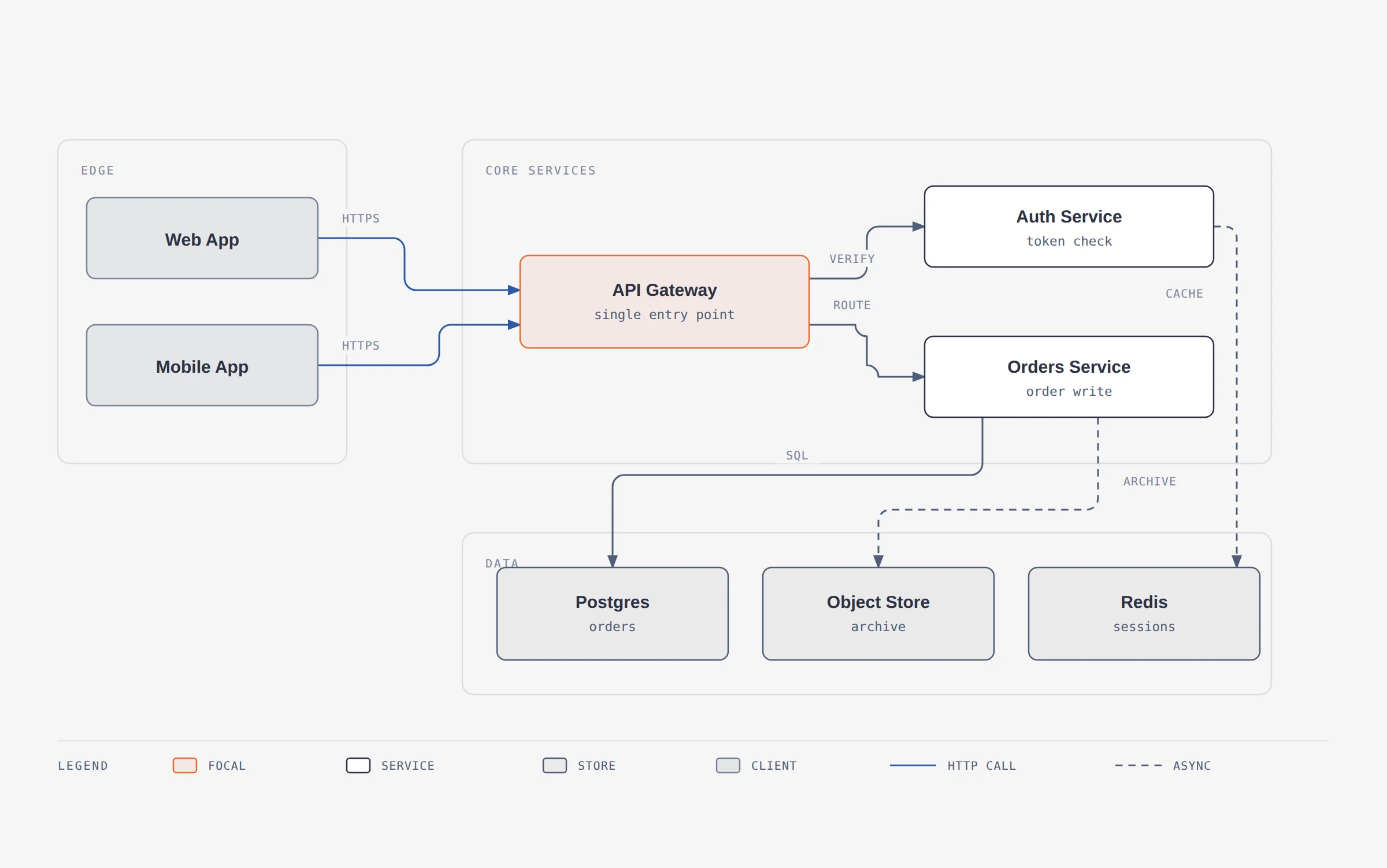 An example of a draw.io diagram redrawn by the Diagram Design skill into its editorial system, with the original diagonal connectors and pastel fills replaced by hairline borders on a 4px grid
If you already have diagrams in draw.io/diagrams.net or Mermaid, the skill redraws them into its own design system rather than requiring you to start over. It reads .drawio, .drawio.xml, .drawio.png (embedded diagram data), and .drawio.svg files — including the compressed payloads that look like base64 garbage in a text editor — and parses Mermaid from .mmd, .mermaid, or fenced code blocks inside Markdown. Critically, it's stated to parse text only — no rendering, no JavaScript execution, no network calls, no followed click targets — which matters for anyone pasting in diagram sources from an untrusted document.
Four dials control the redraw: format (html/svg/png/html+png), size (from doc-inline up through slide and print formats), detail (faithful/balanced/simplified, via a fixed degrade ladder that drops decorations first, then duplicates, then leaf clusters, then infrastructure), and audience (engineer/mixed/executive, which changes wording, not node count). Every import ends with a fidelity ledger listing exactly what got merged, collapsed, or dropped — so you're not left guessing what the redraw quietly changed. This is a genuinely different value proposition than the raw Mermaid syntax most agents default to — it's positioned explicitly against "Mermaid-slop" in the project's own GitHub description.
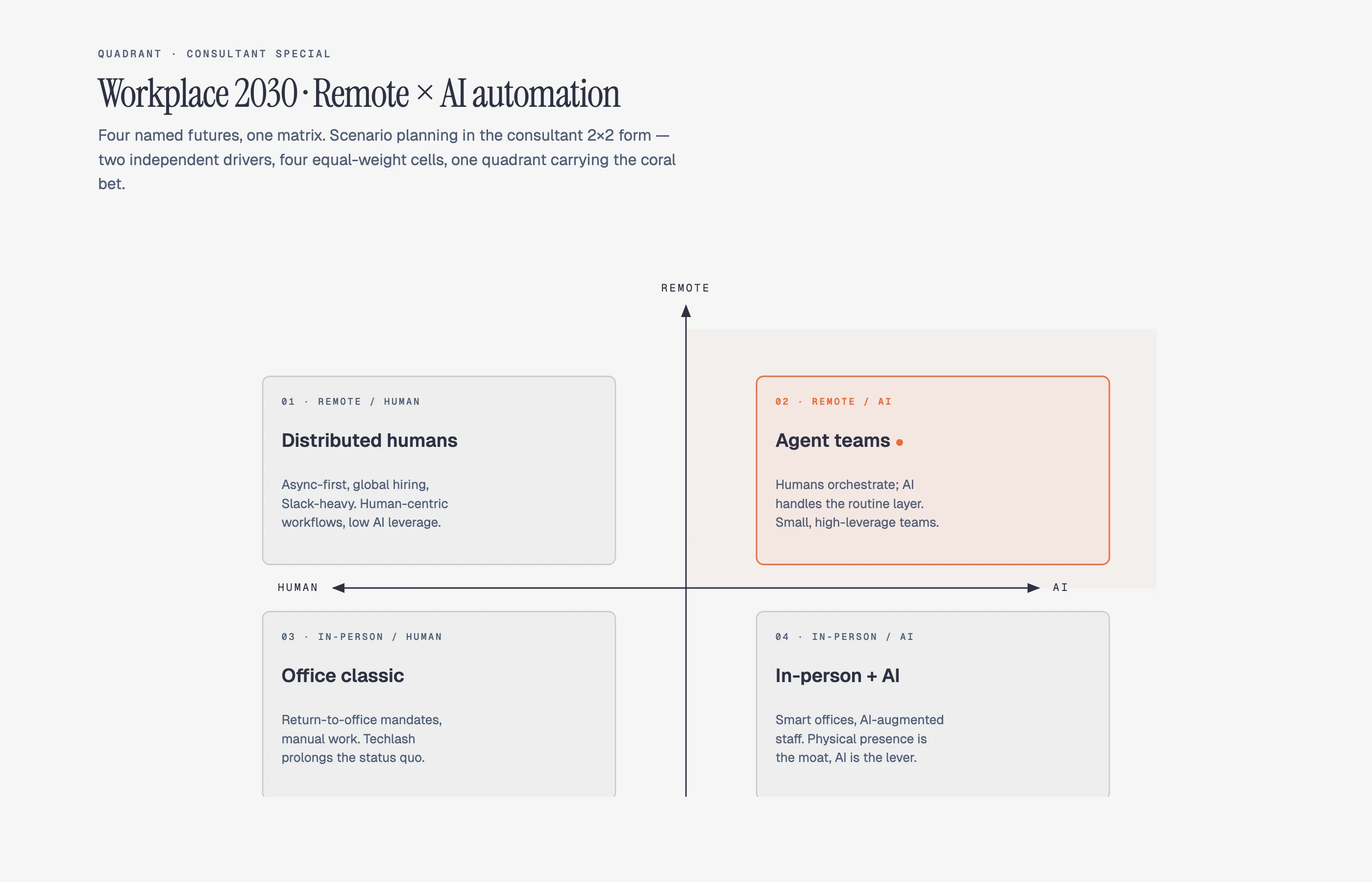 An example consultant 2x2 quadrant diagram generated by the Diagram Design skill, showing a scenario matrix with named cells in the project's editorial style
Installing it: three real agents, one workaround for a fourth
| Agent | Install |
|---|---|
| Claude Code | /plugin marketplace add cathrynlavery/diagram-design then /plugin install diagram-design@diagram-design |
| Codex | codex plugin marketplace add cathrynlavery/diagram-design then codex plugin add diagram-design@diagram-design |
| Pi | pi install https://github.com/cathrynlavery/diagram-design |
| Claude Cowork | Requires mirroring the public repo into a private/internal org-owned repository first — org marketplaces don't support public repos directly |
Worth knowing before you install: Claude Code disables auto-update for third-party marketplaces by default, so there's a one-time toggle (/plugin → Marketplaces → Enable auto-update) needed to get background updates at all. Pi's install is an unpinned Git checkout with no automatic refresh — updates require manually running pi update --extensions. If you're coming from an older standalone npx skills add install or a personal Cowork copy, the project explicitly says those won't auto-follow the new marketplace paths — you have to remove and reinstall through the marketplace flow once.
Motion is optional, and the security posture around it is unusually careful
Version 2.3 also added optional accessible motion — none, reveal, step, and loop modes — but static output remains the default, and every motion-enabled diagram still ships a complete static first frame. prefers-reduced-motion shows that static frame and disables playback controls entirely, which is the correct default rather than an afterthought.
The more interesting detail is what the project's linter actively rejects: motion HTML must use the exact reviewed controller shipped in the template, and CI rejects arbitrary or modified inline scripts, remote assets, CSS @import, non-fragment CSS url(), and executable attributes like onclick or srcdoc. For a skill whose whole output is HTML files an agent generates and a user opens directly in a browser, that's a meaningfully more careful security posture than "the AI wrote some HTML, trust it" — worth noting given how much attention agent-generated code security gets when the output is a script versus, here, a static document that still has a script-injection surface if the guardrails weren't there.
Where this fits, and its real limits
Compared to the Agent Plugins standard OpenAI shipped in August — a packaging format for agent tooling across multiple clients — Diagram Design is a concrete example of exactly that packaging problem solved end to end: one skill, shipped natively across Claude Code, Codex, and Pi's own marketplace/package systems, with a documented (if manual) path for Cowork. It's also a useful comparison point for Oh My Pi users specifically, since Pi's skill discovery model is exactly what Diagram Design's package layout targets.
The honest limitations: PNG export depends on a separate pip install playwright && playwright install chromium step, so it's not zero-setup if you need rasterized output for slides. Claude Cowork support is real but requires operational overhead (mirroring into an org repo) that Claude Code and Codex don't need. And per the project's own engineering discipline — geometry-gated CI that fails builds when a label mask would be clipped by a node drawn later in the document, docs-sync verification, adversarial mutation tests on the motion controller — this is a skill built with unusually rigorous testing for something in the "AI agent skill" category, which is itself a signal worth reading: the team treats diagram correctness as a testable property, not a vibe.
Summary
Diagram Design solves a narrow but real problem — AI-generated diagrams that look nothing like the site they're going into — with 27 named visual types, a 60-second brand-onboarding flow with a WCAG contrast check and fidelity receipt, and the ability to redraw existing draw.io or Mermaid diagrams into the same editorial design system. It ships free and MIT-licensed across Claude Code, Codex, and Pi, with a manual path for Claude Cowork. The real costs are a separate Playwright install for PNG export and some update friction on Pi — small next to what 11.5K stars and 726 forks suggest about how many people were tired of the same generic rounded boxes.
Related reading
-
Anatomy: Claude Code skill for interactive isometric figures
-
What Is Mermaid Slop? The Generic AI Diagram Problem, Explained — the term this project's own pitch coined, explained in full
-
Archify: Architecture Maps You Can Trust in a PR — complementary agent skill: typed IR, atomic validation, and Architecture Delta for PR-ready system maps
-
Agent Plugins: OpenAI's New Open Standard for Packaging AI Agent Tooling
-
DESIGN.md Templates: The Professional UI Blueprint for AI Agents
Official source: github.com/cathrynlavery/diagram-design · Live gallery · Listed on explainx.ai's skill directory
Example diagrams in this post are from the project's own docs/screenshots/ directory (MIT-licensed), used to illustrate output quality.
Star/fork counts, version number, and feature details reflect the repository as of August 13, 2026. Check the repo directly for the current release and any changes to install commands.