



Edge robots and warehouse cameras hit power limits long before they run out of model ideas. On November 13, 2026 NVIDIA’s technical blog showed how cuda.bindings.cudla brings Deep Learning Accelerator (DLA) runtime control into Python on Jetson AGX Orin, using hybrid CUDA streams so GPU preprocessing and DLA inference share one pipeline without C++ glue code.
The same API also applies to NVIDIA RTX Spark AI laptops, widening DLA beyond embedded boards. This guide compresses NVIDIA’s nine-step lifecycle, trtexec compile flags, and error-handling patterns for developers already running Matic-style on-device stacks or Isaac Sim robot workflows.
TL;DR
| Stage | Action |
|---|---|
| Install | pip install "cuda-bindings>=13.3.0" on JetPack |
| Compile once | trtexec --useDLACore=0 --buildDLAStandalone ... |
| Runtime | cudla.create_device(0, CUDA_DLA mode) |
| Load | module_load_from_memory(bytes) |
| Buffers | cudaMalloc + mem_register |
| Execute | submit_task on CUDA stream |
| Cleanup | unregister, unload, destroy_device |
When DLA beats GPU on Orin
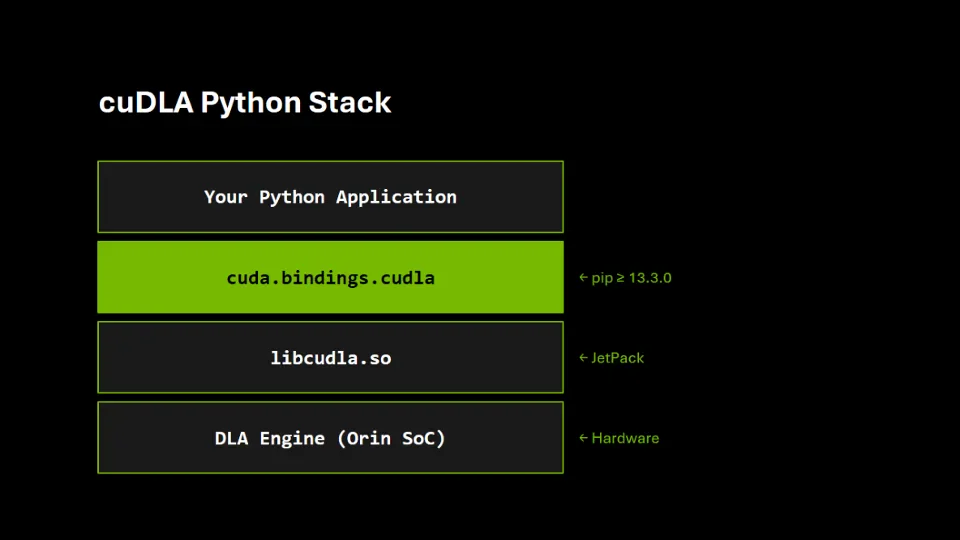 CUDA Python cuDLA stack from application to DLA hardware on Jetson
Image: NVIDIA
DLA is a fixed-function accelerator for supported convolutions and pooling layers. It does not replace the GPU, but offloads subgraphs so the GPU can run dynamic preprocessing or graph portions DLA cannot compile.
NVIDIA points builders to Getting Started with DLA on Jetson Orin documentation for layer support matrices. Expect to trim incompatible heads and tails in ONNX before compilation—common in detection networks where custom postprocessing stays on GPU.
Install and Python version caveats
JetPack ships libcudla.so; no separate cuDLA SDK install is required on device. CUDA Python needs Python 3.10+; NVIDIA’s post notes JetPack defaults may lag and recommends Python 3.12 from deadsnakes if needed.
pip install "cuda-bindings>=13.3.0"
Hardware-free tests live in the NVIDIA/cuda-python repository under cuda_bindings/tests/cudla/.
Compile a standalone loadable (TensorRT 11)
Example flags from the post (FP16 CHW16 ONNX):
trtexec \
  --onnx=your_model_fp16.onnx \
  --useDLACore=0 \
  --inputIOFormats=chw16 \
  --outputIOFormats=chw16 \
  --memPoolSize=dlaSRAM:1 \
  --saveEngine=model.bin \
  --buildDLAStandalone
Key points:
--buildDLAStandalonedrops TensorRT dependency at inference time--useDLACore=0targets the first DLA engine on Orin- TensorRT 11 derives precision from tensor types; legacy
--fp16flags are gone
Nine-step Python inference loop
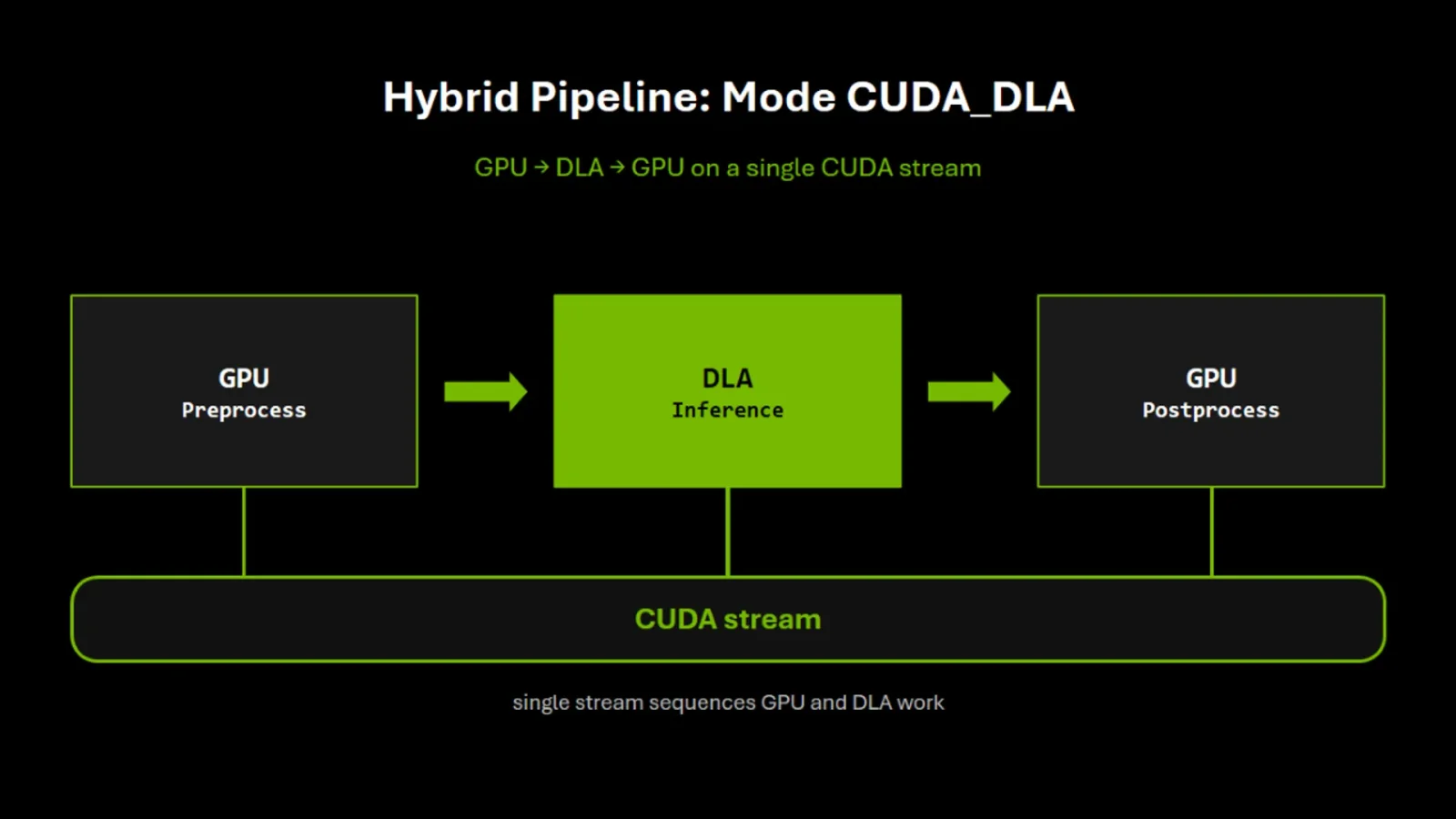 Hybrid CUDA DLA mode with GPU preprocess and DLA inference on one stream
Image: NVIDIA
Imports:
import numpy as np
from cuda.bindings import cudla
from cuda.bindings import driver, runtime
1. Hybrid device — cudla.create_device(0, int(cudla.Mode.CUDA_DLA))
2. Load bytes — module_load_from_memory
3. Introspect — query NUM_INPUT_TENSORS, descriptors with size_, n,c,h,w
4. Allocate — runtime.cudaMalloc(desc.size_) per tensor
5. Register — cudla.mem_register bridges GPU pointers to DLA
6. H2D copy — preprocessing output copied async on a stream
7. Task submit — populate cudla.Task, submit_task on stream
8. Sync + D2H — cudaStreamSynchronize, memcpy outputs to NumPy
9. Cleanup — unregister, unload, free, destroy stream
Standalone DLA mode is unsupported in this release; attempts raise CudlaError(ErrorUnsupportedOperation).
Error handling pattern
cuDLA raises cudla.CudlaError with e.status matching cudla.Status. NVIDIA recommends try/finally because device handles are native resources Python will not auto-close.
Sample output semantics
For a ResNet-style loadable the blog prints tensor names like resnetv17_pool0_fwd with shapes (1,64,56,56) inputs and (1,2048,7,7) outputs. Your postprocessing reads output_descs[0].data_type, stride, and shape rather than hard-coded class counts.
RTX Spark angle
NVIDIA states the Python API is identical on RTX Spark Windows AI laptops—relevant if you prototype on a desk machine then deploy on Orin. See also tensorfold Zig inference APIs for cross-platform local inference trends.
Related reading on explainx.ai
- Matic home robot on Jetson Orin Nano
- NVIDIA Isaac Sim 6.2 pick-and-place agent demo
- BirdDreams driving world model
- Cactus on-device vision model
- InferSSD 800B consumer hardware claim
- DeepX edge 2nm chip claim
Debugging hybrid pipelines
When submit_task succeeds but outputs look wrong, work through this list before blaming DLA math:
- Tensor layout —
input_descs[0].data_formatand stride fields must match your NumPy preprocessing. CHW16 layouts are not NCHW defaults in every vision library. - Registration lifetime — unregister only after synchronization; premature
mem_unregisterraces the stream. - Output memset — NVIDIA zeroes output buffers async before submit; confirm you memcpy after both sync points.
- Wrong loadable core — Orin has multiple DLA engines;
useDLACore=0versus1must match compile flags. - Partial graphs — if trtexec had to leave layers on GPU, ensure your Python code still runs those nodes; DLA loadable alone may be only a subgraph.
Log module_get_attributes names on boot and store them beside your model version hash so field robots do not silently deploy the wrong model.bin.
Power and robotics context
DLA exists because Orin devices face watts budgets, not just TOPs marketing. Offloading steady conv blocks lets the GPU burst on lidar preprocessing or SLAM updates. Pair this guide with NVIDIA Isaac Sim agent demos when you simulate first and deploy second.
Warehouse and home robot startups often prototype in PyTorch on x86, then compile ONNX for Jetson. cuDLA Python means the orchestration layer can stay Python end-to-end—important for teams already using Hugging Face Trellis 3D guides on edge boxes.
RTX Spark and Windows developers
NVIDIA explicitly markets identical cuDLA Python on RTX Spark laptops. That lets Windows developers validate DLA loadables on a desk machine before flashing Jetson fleets. Watch driver and TensorRT version skew between Spark and JetPack; compile once per target unless NVIDIA documents binary compatibility.
Testing without hardware
Run pytest cuda_bindings/tests/cudla/ -v from the cuda-python repo for API coverage. Add on-device integration tests in your CI farm because libcudla behavior is not fully emulated on CPU-only runners.
Multi-input and multi-output models
The blog uses a single-input classifier for clarity. Production networks often expose several input tensors (image plus metadata) or multiple heads. Extend step 3 by looping input_descs and output_descs, allocating and registering one GPU buffer per descriptor. The task builder accepts lists on input_tensor and output_tensor; sizes always come from desc.size_ rather than constants in code.
Memory and SRAM pool notes
trtexec example sets --memPoolSize=dlaSRAM:1 to target DLA SRAM pools on Orin. Wrong pool settings fail at compile time or produce empty loadables. Log compile stdout in version control next to each model.bin hash.
Security and supply chain
Treat model.bin like firmware: sign artifacts in CI, verify on device before module_load_from_memory. Edge robots are physically accessible; unsigned loadables are a tamper surface.
Performance expectations
DLA raises throughput per watt on supported layers but adds compile rigidity. Teams needing dynamic shapes may keep those layers on GPU and still win power by offloading the static backbone.
Learning path for new Jetson developers
If you are new to Jetson, read NVIDIA DLA layer support docs first, then this Python path, then TensorRT release notes for JetPack 7.2. Pair with llama.cpp v1 stability if your stack mixes LLM hosts and vision DLA sidecars on one board.
JetPack version matrix (check before you ship)
NVIDIA tied the sample compile to JetPack 7.2.2+, TensorRT 11.4.1, and CUDA 13.4 Update 1. Older JetPack releases may lack matching TensorRT DLA standalone flags. Pin versions in your OTA manifest so field devices do not mix loadables built on mismatched toolchains.
Observability hooks
Wrap each cuDLA step with timestamps and log CudlaError statuses to your robot telemetry bus. DLA timeouts (ErrorDlaErrEngineTimeout in the post) indicate thermal or power throttling—correlate with fan curves before blaming model accuracy.
When to skip DLA entirely
If your network changes input resolution every frame, recompiling loadables may cost more than GPU-only inference. DLA rewards fixed-shape production models—inspection, license-plate classifiers, always-on person detectors—not arbitrary dynamic graphs.
Hybrid pipeline pattern in production
A typical robot vision stack might run GPU debayer and resize kernels, enqueue a DLA ResNet backbone, then run GPU NMS and tracking on the same stream. The Python loop in NVIDIA’s post is the middle third. Profile each segment with tegrastats on Orin: if DLA utilization is low, your graph may be incompatible or starving the accelerator with tiny tensors.
Porting from C++ cuDLA samples
Teams already shipping C++ should not rewrite orchestration overnight. Migrate incrementally: keep C++ postprocessing, call Python for module_load_from_memory experiments, then port stream sync once numbers match. NVIDIA’s Deep Learning Accelerator samples remain the reference for compile scripts.
Power budgeting worked example
Suppose a 15 W DLA job frees 8 W on the GPU for SLAM. Fleet planners multiply that across dozens of units in a warehouse. The blog’s power angle is operational, not benchmark bragging—DLA wins when duty-cycled perception runs continuously.
Common beginner mistakes
Forgetting int() on registered pointers when building cudla.Task lists, reusing a stream destroyed early, and compiling FP32 ONNX when DLA path expects FP16 CHW16 layouts are the top three support-forum failures. Keep compile logs beside JetPack versions in your internal wiki.
Future Jetson plus Spark maintenance
When NVIDIA updates cuda-bindings, pin versions in requirements.txt per fleet wave. Mixed 13.2 and 13.3 agents on one OTA channel can break create_device signatures silently.
Closing integration advice
Treat DLA loadables like firmware artifacts: versioned, signed, deployed with rollback. The November 13 cuDLA Python API lowers the bar to orchestrate them, not to skip compile discipline.
Container and fleet deployment tips
Bake libcudla.so expectations into OTA image tests the same way you pin CUDA driver versions. Containers that mount host JetPack drivers must expose DLA device nodes to the namespace or hybrid mode fails at create_device with errors newcomers misread as bad loadables.
Sample integration test outline
On device, assert that running the nine-step loop twice with identical input tensors yields bit-identical outputs within FP tolerance. Then change preprocessing normalization by 1% and confirm outputs move—guards against silent layout bugs. Record numInputTensors and tensor names in CI artifacts so regression triage does not require SSHing into robots.
When migrating from legacy C++ cuDLA samples, line up this Python sequence with NVIDIA’s Deep Learning Accelerator sample repo so teammates can diff behavior across languages during code review.
Ecosystem links on explainx.ai
- Tensorfold Zig CUDA inference
- Cactus on-device vision
- Edge0 laptop agent model
- InferSSD consumer hardware claims
Official: NVIDIA cuDLA Python blog, cuda-python GitHub.
API steps and TensorRT flags follow NVIDIA’s November 13, 2026 publication.