



NVIDIA has published a hands-on tutorial that puts AI agents to work on the boring half of robot learning: building the simulated world. In Using AI Agents to Teach Robots Like Microduck to Walk in Simulation, published October 23, 2026, agents turn a text prompt into a plan, generate 3D assets, assemble an obstacle course in Isaac Sim, and then Isaac Lab trains a policy for the small open-source Microduck robot to walk it.
The interesting claim is not that a robot learned to walk; reinforcement learning has done that for years. It is that the scaffolding around training, which usually costs a robotics engineer days, can be delegated to an agent chain on a local machine. Below is what each stage does, what the post proves, and what it leaves out.
The short version
| Stage | Who does it | Where it runs |
|---|---|---|
| Plan the course | Hermes with Nemotron 3.5 Bolt | Local RTX Spark |
| Concept image and asset inventory | A local image model, analyzed by the agents | Local RTX Spark |
| Build 3D assets | Astra, driving FreeCAD and Blender | Local, with cloud image editing |
| Assemble the scene | Astra in Isaac Sim (Omniverse libraries, Newton physics) | Local |
| Train the policy | Isaac Lab, 4,096 parallel environments | RTX PRO 6000 Blackwell Workstation GPU |
| Validate | Isaac Sim | Local RTX Spark |
The workflow, step by step
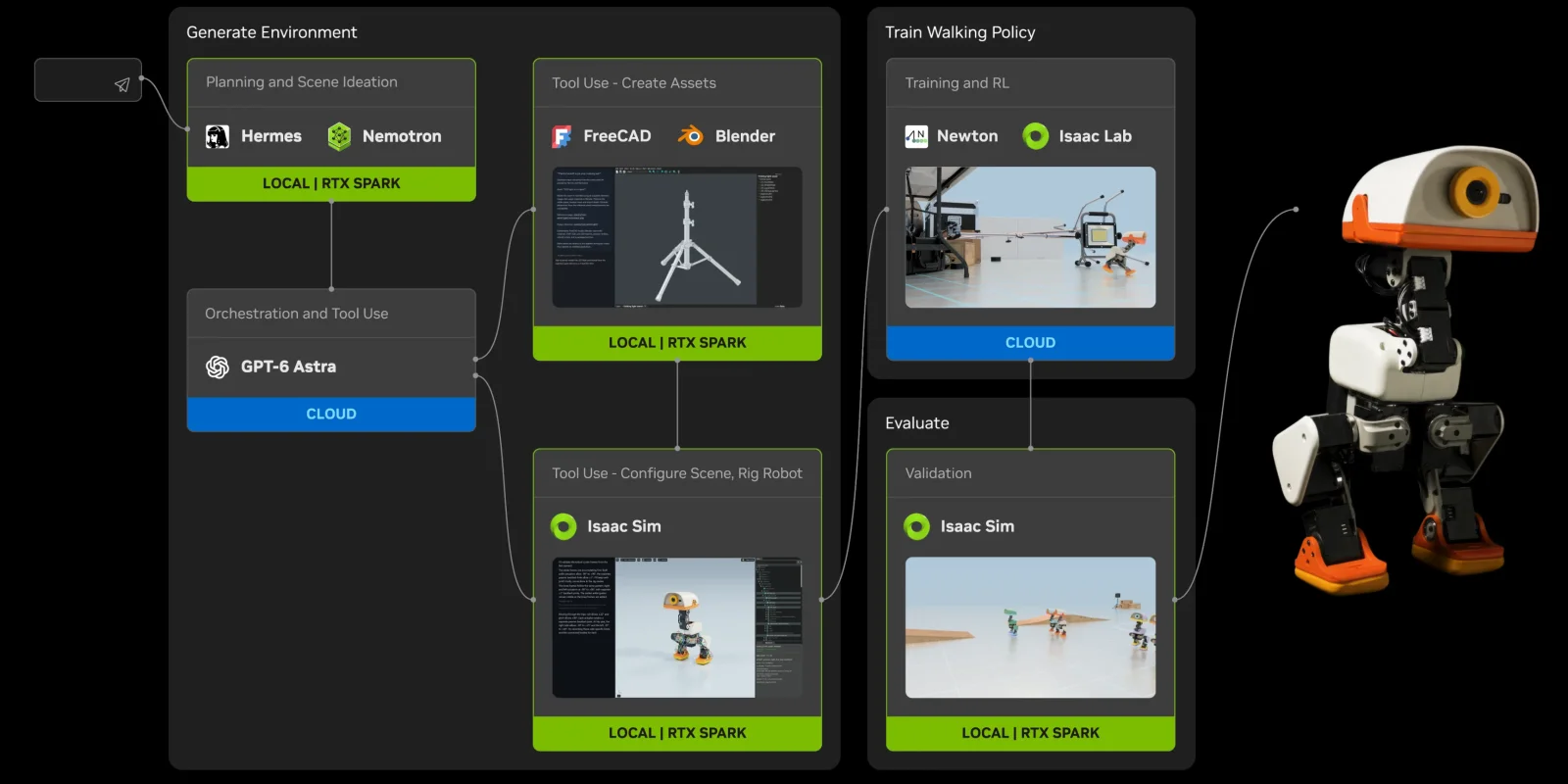 NVIDIA Microduck simulation workflow from agent planning on RTX Spark to Isaac Lab training
Image: NVIDIA
NVIDIA Microduck simulation workflow from agent planning on RTX Spark to Isaac Lab training
Image: NVIDIA
1. A prompt becomes a project plan
The starting prompt asks for a simulated Microduck obstacle course with navigation and locomotion challenges, a photorealistic concept image, and an agent to build and test it. Hermes, running with NVIDIA's open Nemotron 3.5 Bolt model on RTX Spark, expands that into numbered stages: research and plan, generate the concept, identify assets, prepare the handoff, create and verify assets, assemble and test. One line in the prompt matters for safety: the agents are told not to operate physical hardware.
The agents begin by reading the Microduck repository and documentation to list the robot's capabilities, constraints and unknowns. That is a sensible habit for any agent workflow: make the model state what it does not know before it starts building. For background on the agent runtime, see our post on NVIDIA's pairing of Hermes with RTX Spark desktops.
2. A concept image and an asset inventory
A local image-generation model draws the course. Hermes and Nemotron then examine the picture and list each reusable object, such as ramps, platforms, mats and a work light, giving each an identifier, a description and a cropped reference. The inventory also records where objects are cut off, so later stages can tell what was visible from what was assumed. NVIDIA calls that out as a design choice: unseen dimensions and hidden surfaces become recorded "modeling assumptions" instead of silent guesses.
Everything is bundled into a handoff package (plan, source links, concept image, inventory, crops, instructions) and delegated automatically to Astra, the asset-building agent in the workflow.
3. Astra builds the assets
Crops of a generated image are small and blurry, so Astra first uses cloud image editing to isolate each object and produce a higher-resolution reference, then compares it against the original crop for silhouette, proportions and color. It then drives FreeCAD to build editable base geometry and Blender to add detail and materials, both through programmatic execution on the local machine. Outputs are saved as editable models and exported USD files with previews and checks.
You can skip some of that work. NVIDIA points to the free SimReady Central Library of more than 2,000 simulation-ready OpenUSD assets; see our write-up of NVIDIA's SimReady Central release on Hugging Face.
4. Assembly in Isaac Sim
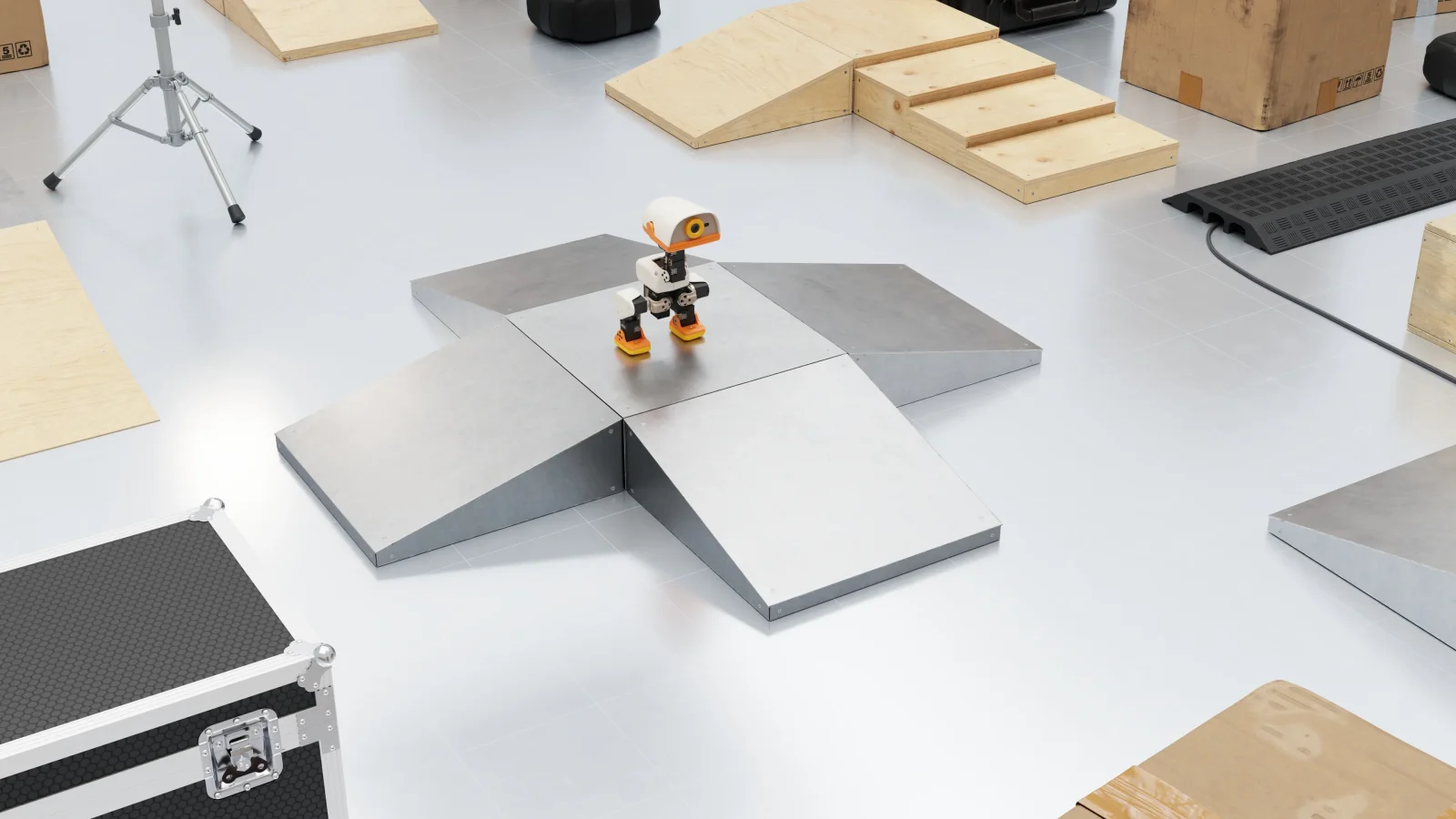 Microduck robot in an Isaac Sim obstacle course built with agent-generated assets
Image: NVIDIA
Microduck robot in an Isaac Sim obstacle course built with agent-generated assets
Image: NVIDIA
Astra composes the course in Isaac Sim, which supplies rendering and sensor simulation from NVIDIA's Omniverse libraries, while Newton, an open-source GPU physics engine, models how Microduck's body moves and balances. The post explains the basics: links are bodies, joints constrain their motion, actuators drive them, and agents can help configure those. The outcome is what the post calls a complete learning environment: a robot that can act, a course it can touch, and a simulator that returns feedback on posture, progress and falls.
5. Training in Isaac Lab
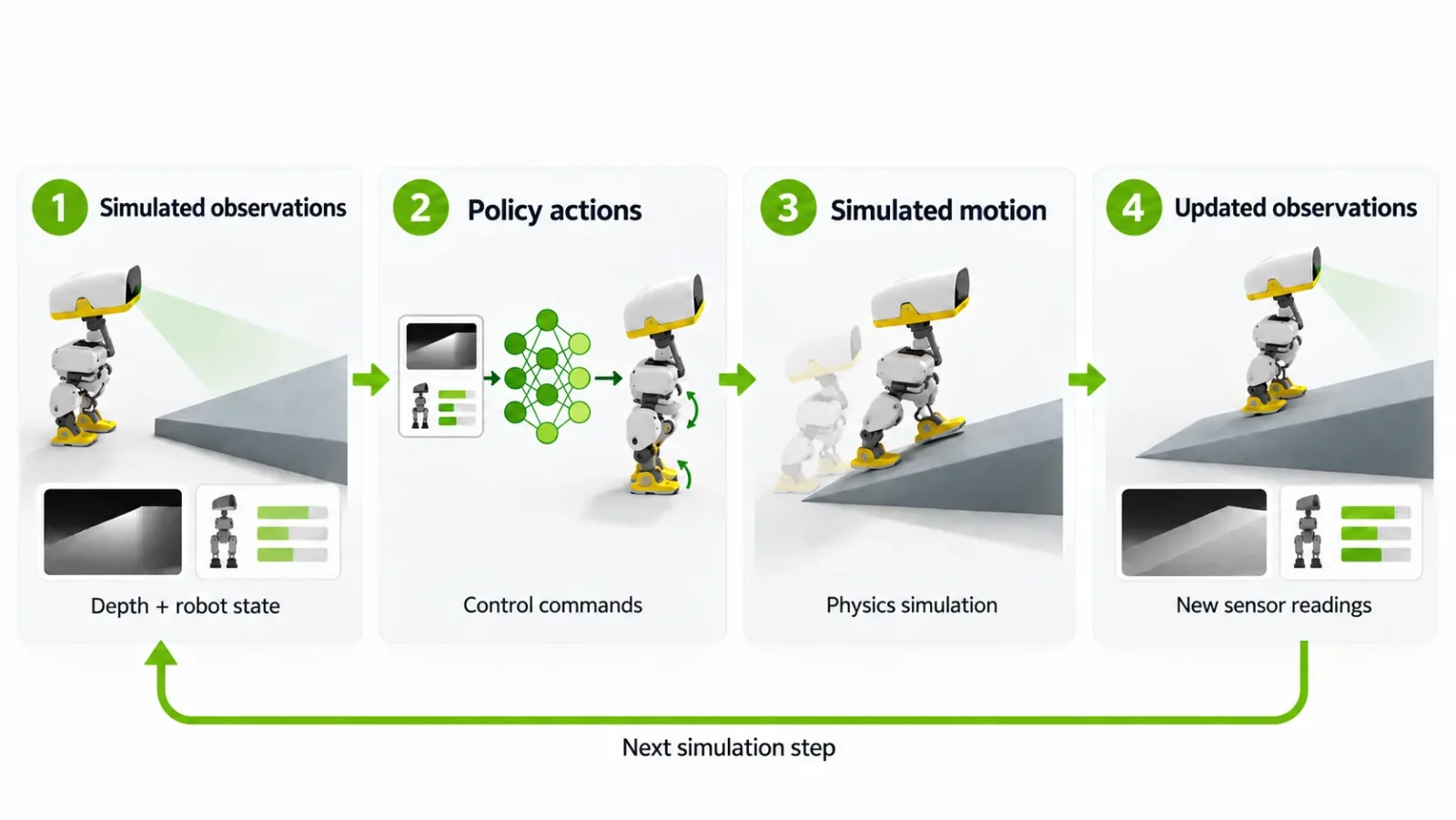 Reinforcement learning loop from depth observations to policy actions for Microduck in Isaac Lab
Image: NVIDIA
Reinforcement learning loop from depth observations to policy actions for Microduck in Isaac Lab
Image: NVIDIA
Isaac Lab, NVIDIA's open-source robot-learning framework (see the Isaac Lab documentation), runs many Microduck simulations at once and feeds the collected experience to an RL algorithm that improves one shared policy. The loop is the standard one: simulated observations lead to policy actions, which produce simulated motion and new observations.
The specifics NVIDIA gives:
- Task: traverse a curved ramp and uneven surfaces while keeping balance and avoiding falls.
- Start point: a locomotion policy pretrained in Isaac Lab's Microduck example environment, then fine-tuned for ramps and obstacles.
- Observations: head-camera depth plus robot-state readings.
- Scale: 4,096 parallel environments on a single NVIDIA RTX PRO 6000 Blackwell Workstation Edition GPU.
6. Validation on RTX Spark and the road to hardware
The trained policy returns to the local RTX Spark, where Isaac Sim replays it: does Microduck see obstacles, adjust, and finish the course? NVIDIA suggests recording course completion, falls, collisions and the points where progress stops, paired with rollout videos, to guide the next iteration.
For the real robot, the post covers two tools for narrowing the sim-to-real gap. Better Actuator Models describe servo behavior including command delay, mechanical backlash and voltage sag as motors share a battery, and domain randomization varies physical parameters and sensor noise so the policy does not overfit one idealized world. A figure shows a physical Microduck walking with a policy trained in Isaac Lab, but NVIDIA states that hardware deployment details are out of scope.
What the post proves, and what it does not
Shown: a coherent agent pipeline, with named tools and files at each handoff, that ends in a trained policy and a running robot clip. Using it as a template for your own robot is realistic, because every component (Isaac Sim, Isaac Lab, Newton, the asset library) is documented and the agent steps are ordinary scripting tasks.
Not shown:
- No quantitative result. There is no success rate, fall rate, completion time or number of training steps for the ramp policy. The only figures are the environment count and the GPU.
- No comparison against a human-built setup. The post does not say how long the agent chain took or how it compared with a person doing the same job, so the productivity claim is implied, not measured.
- No agent failure analysis. Tutorials show the clean path. Agent-built CAD and USD assets often need cleanup, and the post does not report how many attempts it took.
- The real-robot clip is not the same policy. The physical Microduck figure shows "a locomotion policy trained in Isaac Lab", not necessarily the camera-based ramp policy built in this walkthrough.
- Vendor context. It is a technical marketing post for RTX Spark, Isaac Sim and Isaac Lab, written by NVIDIA staff. The tools are real and downloadable, but the framing favors NVIDIA hardware: training used a workstation Blackwell GPU, and the Windows binaries run on the Arm-based RTX Spark through x86 emulation.
Why it matters
Robot learning has two bottlenecks: the policy and the world it practices in. Papers focus on the policy; engineers spend time on the world, making meshes, setting joints, adding collision shapes and tuning physics. If agents can reliably handle those chores, the cost of trying a new task falls, which benefits small teams and hobbyists using cheap open robots like Microduck. It also fits NVIDIA's broader push to make a local RTX Spark box a place where agents code, test and deploy, as covered in our post on the RTX Spark one-machine local coding agent workflow.
It also keeps agents away from hardware. The workflow puts the agents in the simulator and leaves the physical robot to a human-reviewed step, a design that avoids the failure mode of unsupervised agents acting in the real world.
Try it yourself
- Get the robot. Microduck is the open-source build we covered in Hugging Face's $399 RL duck. Start with the Isaac Lab Microduck example environment.
- Install Isaac Sim. NVIDIA offers Windows x86 binaries that run on RTX Spark through emulation; Linux installs follow the Isaac Sim documentation.
- Pull assets. Use SimReady Central for ramps, platforms and props before generating your own.
- Add an agent. Give any coding agent the staged prompt and tell it to document assumptions, verify each file exists before handing off, and never touch hardware.
- Measure. Record completion rate and falls over a fixed number of rollouts. That is the evidence NVIDIA's post omits.
- Randomize. Add actuator models and domain randomization before any real-robot test.
Related reading
- Microduck: Hugging Face's $399 open-source RL duck
- Were the GTC Berlin Microducks human-piloted? Claimed vs verified
- NVIDIA SimReady Central: 2,000 OpenUSD assets
- NVIDIA pairs Hermes with RTX Spark desktops
- RTX Spark: code, test and deploy on one machine
- Nemotron 3.5 Bolt 74B-A9B
- Menlo Asimov-1 open locomotion policy
- Sources: NVIDIA Technical Blog, Isaac Lab documentation
Details are accurate as of October 23, 2026, based on NVIDIA's published post. Follow @explainx_ai for updates.