




Microsoft at Ignite 2026 repositioned Office as a human-led, agentic system of work, shipping Copilot Today for proactive inbox and calendar triage, Copilot Pages for prompt-driven canvases, and Copilot Workspaces as the successor to Copilot Notebooks—while making full Word, Excel, and PowerPoint editing inside the Copilot app generally available.
For builders and IT admins, the shift matters because Microsoft is no longer treating Copilot as a chat sidebar bolted onto legacy apps. It is bundling creation, briefing, and multiplayer agent context into the same surface where Autopilot already rolls out to Frontier tenants, and it is doing so with existing sensitivity labels and compliance controls on every file.
explainx.ai covered MAI specialist models at the same Ignite keynote, the transparency initiative, and how GitHub Copilot pricing layers already mix seat plus usage—this post focuses on Today, Pages, Workspaces, and Office-in-Copilot, which change daily workflows for sellers, finance, and legal teams enrolled in Frontier.
What Microsoft announced on November 17, 2026
Sumit Chauhan's Office Ignite post and the Copilot leadership blog frame three parallel tracks:
| Surface | What it does | Availability (per Microsoft) |
|---|---|---|
| Office in Copilot | Chat beside live Word, Excel, PowerPoint files saved to OneDrive | Generally available Nov 17, 2026 |
| Copilot Today | Proactive briefing across mail, calendar, Teams, meetings with prefilled drafts | Frontier private preview in Copilot app and Outlook |
| Copilot Pages | Prompt-to-canvas documents, briefs, dashboards with agent refreshes | Frontier public |
| Copilot Workspaces | Shared team context evolved from Notebooks; live presence and diff summaries | Frontier public |
| Copilot for sales | CRM-connected skills for decks and pipeline risk | Frontier public plugin |
Microsoft's messaging is consistent across both posts: AI should move work forward without removing human approval. Today prepares drafts; Pages and agents refresh data; people still own the final send or publish action.
Copilot Today: morning briefing without prompts
Copilot Today is Microsoft's answer to the first-hour tax—sorting mail, scanning Teams, and reconstructing meeting context before real work starts.
According to the Home in Copilot app post, Today:
- Pulls email, calendar, Teams threads, meetings, and Cowork tasks into one prioritized view.
- Prepares email drafts, chat messages, and scheduling proposals for review rather than auto-sending.
- Ships without agent setup or workflow configuration inside Outlook and the Copilot app.
That last point matters for admins comparing Today against custom Power Automate flows or third-party inbox agents. Today is a first-party briefing layer, not an open-ended agent you wire from scratch.
Access caveat: Microsoft lists Today as Frontier private preview. Tenants not enrolled in Frontier will not see it immediately even if they already pay for Copilot seats.
How Today differs from Autopilot
Microsoft's Autopilot rollout describes an always-on agent with its own identity that can follow channels and run recurring work. Today is narrower: it surfaces and drafts, it does not own long-horizon projects unless you pair it with Autopilot or Cowork later.
Think of Today as situation awareness, Autopilot as delegated execution, and Workspaces as shared project memory.
Copilot Pages: prompt-native canvases
Copilot Pages turn prompts and attached sources into interactive content—reports, briefs, dashboards, even animations—without forcing every artifact through a static Word export on day one.
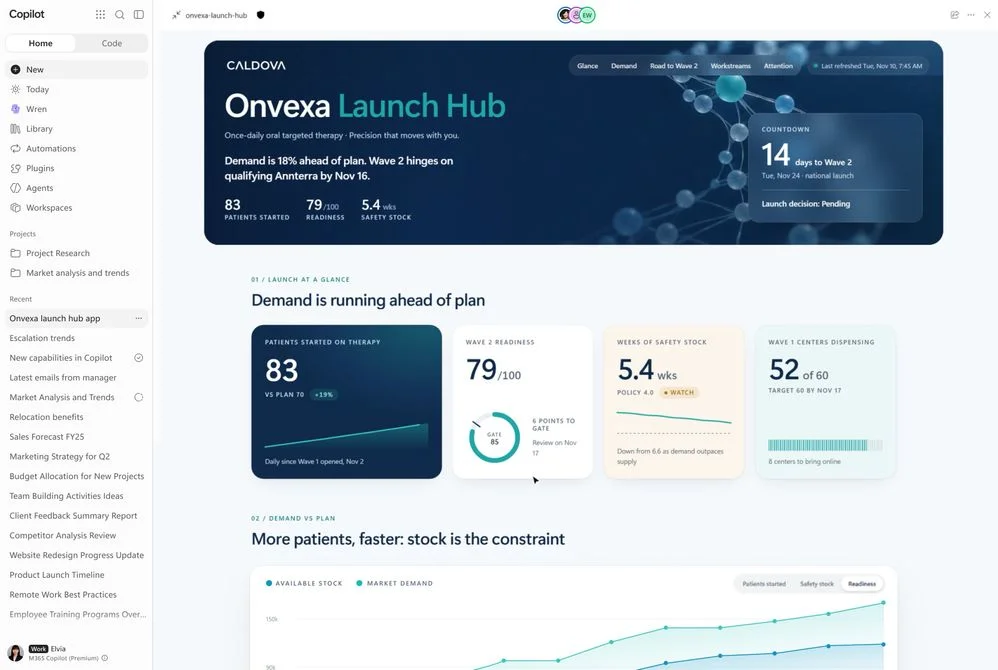 Copilot Pages interactive dashboard canvas in Microsoft agentic Office Ignite 2026
Image: Microsoft
Microsoft says teams can:
- Edit directly on the Page or ask Copilot to refine sections.
- Collaborate live with teammates on the same canvas.
- Let background agents refresh data so dashboards stay current.
Pages sit between chat and files: they are more structured than a thread, more flexible than a fixed PowerPoint template. For organizations already standardizing on Copilot in Excel and PowerPoint, Pages are the staging area where agents assemble narrative plus numbers before you promote content into branded Office formats.
Copilot Workspaces: multiplayer context after Notebooks
Copilot Workspaces are the planned replacement mental model for Copilot Notebooks. Instead of one person chatting with isolated snippets, Workspaces bundle:
- Suggested workspaces tied to active workstreams.
- Live team presence across documents.
- Copilot summaries of what changed, what is unresolved, and which actions need owners.
Microsoft's Ignite copy promises Autopilot inside Workspaces soon, so people and agents share one room. That aligns with broader industry pressure—APEX-Harm showed shared agent environments amplify injection risk—meaning enterprises should pair Workspaces rollouts with permission reviews, not just feature flags.
Workspaces are Frontier public, so they are earlier to trial than Today for many tenants, even though both require Frontier enrollment.
Office in Copilot: GA editing with compliance inheritance
The other half of the keynote is simpler to operationalize: Office inside the Copilot app is GA.
Microsoft says you can:
- Ask Copilot to turn research notes into a Word launch brief that opens beside the chat.
- Build Excel models or PowerPoint decks without leaving the Copilot shell.
- Coauthor with teammates, then jump into full Office when you need deep formatting.
Every file inherits Microsoft 365 permissions, sensitivity labels, and compliance controls from creation—critical for regulated teams comparing Copilot against OpenAI Enterprise connectors or Google Workspace agent flows.
Microsoft also highlights that Office creation inside Copilot does not spin a separate meter beyond existing Copilot subscription entitlements—a pricing contrast to some API-only coding stacks covered in our Perplexity Orchestrator API post.
Copilot for sales and OneNote creation skills
The same Ignite wave adds Copilot for sales skills that pull CRM and Work IQ context into PowerPoint and Cowork, with connectors spanning Zendesk, HubSpot, Seismic, DocuSign, ZoomInfo, and others listed in Microsoft's post.
Copilot in OneNote (Frontier public) can synthesize meeting notes into Word, Excel, or PowerPoint starters, reducing duplicate copy-paste between apps—a pattern sellers already attempt manually with coding-agent note pipelines.
What this means for builders and admins
| Role | Practical takeaway |
|---|---|
| IT / security | Frontier enrollments now gate three different UX layers (private Today, public Pages/Workspaces, GA Office-in-Copilot). Map each to data residency and DLP policies before wide rollout. |
| App builders | Pages reward structured data connectors; if your SaaS feeds clean tables, you are a better Pages backend than a PDF dump. |
| Agent developers | Workspaces plus upcoming Autopilot integration mirror multi-agent orchestration patterns—test prompt-injection and over-permissioned MCP tools before agents can edit shared canvases. |
| Everyday users | Start with Office-in-Copilot GA if you already have licenses; add Workspaces for team projects; pilot Today only after privacy review because it reads cross-app signals by default. |
Microsoft is explicitly competing with vendors that ship standalone AI documents. Its bet is that enterprise buyers already pay for Office and will prefer agentic layers that respect existing ACLs—a strategy that only works if Frontier rollouts stay disciplined.
Rollout checklist for Frontier admins
Microsoft's Ignite posts name Frontier on almost every new surface, so enrollment—not licensing alone—becomes the gate. A practical rollout sequence:
- Confirm Copilot seat coverage and whether your tenant already runs Autopilot pilots.
- Enable Office-in-Copilot GA for a pilot security group before exposing Pages, because Pages will inherit the same OneDrive ACL model.
- Stand up one Workspace tied to a real program—product launch, quarter close, or customer rollout—so live presence and change summaries have a defined owner.
- Delay Today org-wide until legal reviews cross-app signal collection; Today reads mail, calendar, Teams, and meetings by default.
- Log which CRM connectors sales skills activate; the Ignite list spans more than a dozen SaaS tools, each with its own OAuth scope.
Document who approves agent-sent mail before granting Today access to executives. Microsoft's copy stresses review-and-approve, but identity policies should enforce the same for Autopilot once it joins Workspaces.
How Today, Pages, and Workspaces compare to rivals
| Vendor pattern | Microsoft Ignite answer |
|---|---|
| Standalone AI docs (Notion-like) | Pages with Office handoff |
| Inbox agents that auto-send | Today drafts only |
| Shared project chats | Workspaces with Notebook lineage |
| IDE-embedded agents | Office-in-Copilot GA beside Word/Excel/PPT |
Google's parallel push—Gemini Tasks in more countries and temporary chat retention policies—targets consumers and Workspace admins. Microsoft's bundle targets enterprises already standardized on M365, which is why compliance inheritance is repeated in every paragraph of the Ignite posts.
Pricing and metering notes
Microsoft repeats that Office creation inside Copilot does not spin a separate meter beyond Copilot subscription entitlements. That is a positioning shot at API-metered coding stacks and some third-party agent platforms that bill per document generation.
It does not mean Frontier features are free forever. Frontier itself is an early-access channel; features can graduate to GA with different packaging. Track Copilot enterprise discount mechanics when forecasting FY spend, especially if sales skills pull CRM data that triggers downstream API charges from Salesforce or HubSpot.
Security and governance considerations
Shared canvases raise the same risks APEX-Harm highlighted for script injection in collaborative agent environments. Before agents can refresh Page data or edit Workspace files:
- Restrict MCP connectors and third-party skills to least privilege.
- Require human approval on external sends even if Today prefilled the draft.
- Mirror DLP labels on Pages exports the same way you already treat Word attachments.
Microsoft's Ignite language—“human led by design”—is policy, not enforcement. Your tenant still needs conditional access, export rules, and logging on OneDrive paths Pages and Workspaces touch.
 Microsoft Copilot agentic Office rollout checklist for enterprise IT teams
Related reading
- Microsoft Copilot Autopilot Frontier rollout
- MAI Code 2 and specialist models at Ignite
- Microsoft AI Transparency Initiative
- Copilot enterprise discount structure
- Shared workspace agent safety benchmarks
- Google Gemini Tasks agent expansion
Sources: Microsoft Tech Community — Office at Ignite 2026, Microsoft Copilot blog — Ignite 2026, Home in the Copilot app. Secondary context: Microsoft Ignite keynote blog.