




Amazon Web Services shipped a broad AWS Quick update on November 20, 2026 that turns one person's spreadsheet ritual into a shared, chat-built flow, keeps agents running after you close the browser, and answers complex questions by orchestrating multiple specialized agents at once. The AWS Machine Learning blog post frames the release as closing the gap between individual speed and team process: what one analyst knows should become what the whole finance or product org can run reliably.
This is a different angle from the November 9 skills and catalog guide explainx.ai already published. That post covered SKILL.md folders, progressive disclosure, and publish-then-share mechanics. Today's shipment is about flows as first-class business automation, web Mission Control, multi-agent synthesis, and MCP connectors for Meta ads and Amplitude.
What is AWS Quick flows in this release?
AWS says Quick Flows already helped teams standardize processes. The November 20 change is that you can build, run, and refine a flow entirely in chat, with a diagram beside the conversation so authors can confirm steps match how work really happens.
Flows can now combine agents, skills, tools, and data, including deterministic calculation steps AWS highlights for consistent month-end numbers. AWS also says flows support longer-running workflows and larger data volumes than earlier previews — important for ops teams that were hitting timeouts on big regional rollups.
The blog walks through a fictional FP&A manager who describes a monthly margin report once; a teammate runs the same flow later with different local spreadsheet adjustments on desktop, reviews draft commentary, and approves before email. AWS quotes Pomelo head of data Rodrigo Marini claiming roughly four times more people work with data monthly and about 80 hours saved on one use case — customer marketing, but it signals how AWS positions flows for regulated, repeatable finance work, not just ad-hoc chat.
Build flows in chat with a live diagram
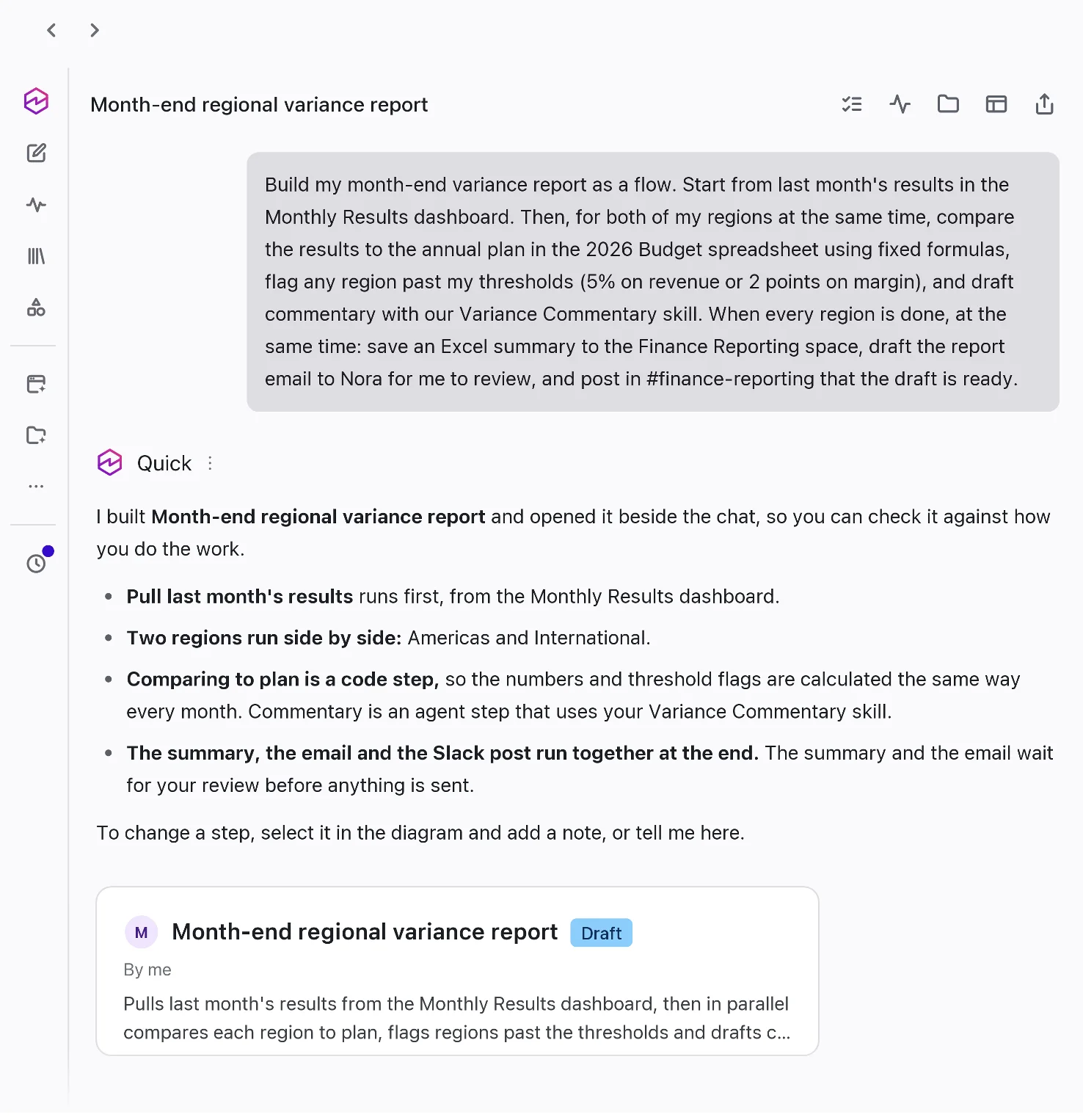 AWS Quick flow built from chat with diagram beside conversation for business process automation
Image: Amazon Web Services
AWS illustrates the UX as natural-language description on one side and a step diagram on the other in the same Quick window. That matters for builders who already use agent skills elsewhere: the flow is the orchestration graph, while skills remain the procedure text agents load when a step needs domain instructions.
Deterministic steps are the compliance hook. When AWS says formulas stay fixed each month, it is answering the objection that LLM drift makes automation untrustworthy for SOX-adjacent reporting. Pair this mental model with Bedrock AgentCore's layered runtime if you are shipping similar patterns outside Quick: Quick is the business shell; AgentCore is the programmable substrate.
Example flow steps AWS documents
For the FP&A example, AWS lists steps the flow executes on each run:
- Pull last month's results from the team's Quick dashboard already used for reporting.
- Process multiple regions in parallel as the company adds regions.
- Compare each region to the annual plan in a budget spreadsheet with set formulas.
- Flag regions beyond thresholds the author configured, then draft commentary using a team commentary skill.
- Draft an Excel summary to a shared Space and email distribution list, then notify Slack that a draft awaits review.
Publishing the flow makes it available to teammates; AWS stresses human review before send, not unsupervised outbound mail. That aligns with how explainx.ai covered approval-gated agent chat in self-hosted stacks — enterprise Quick is baking similar human-in-the-loop assumptions into the fictional scenario.
Updated Quick web app and background execution
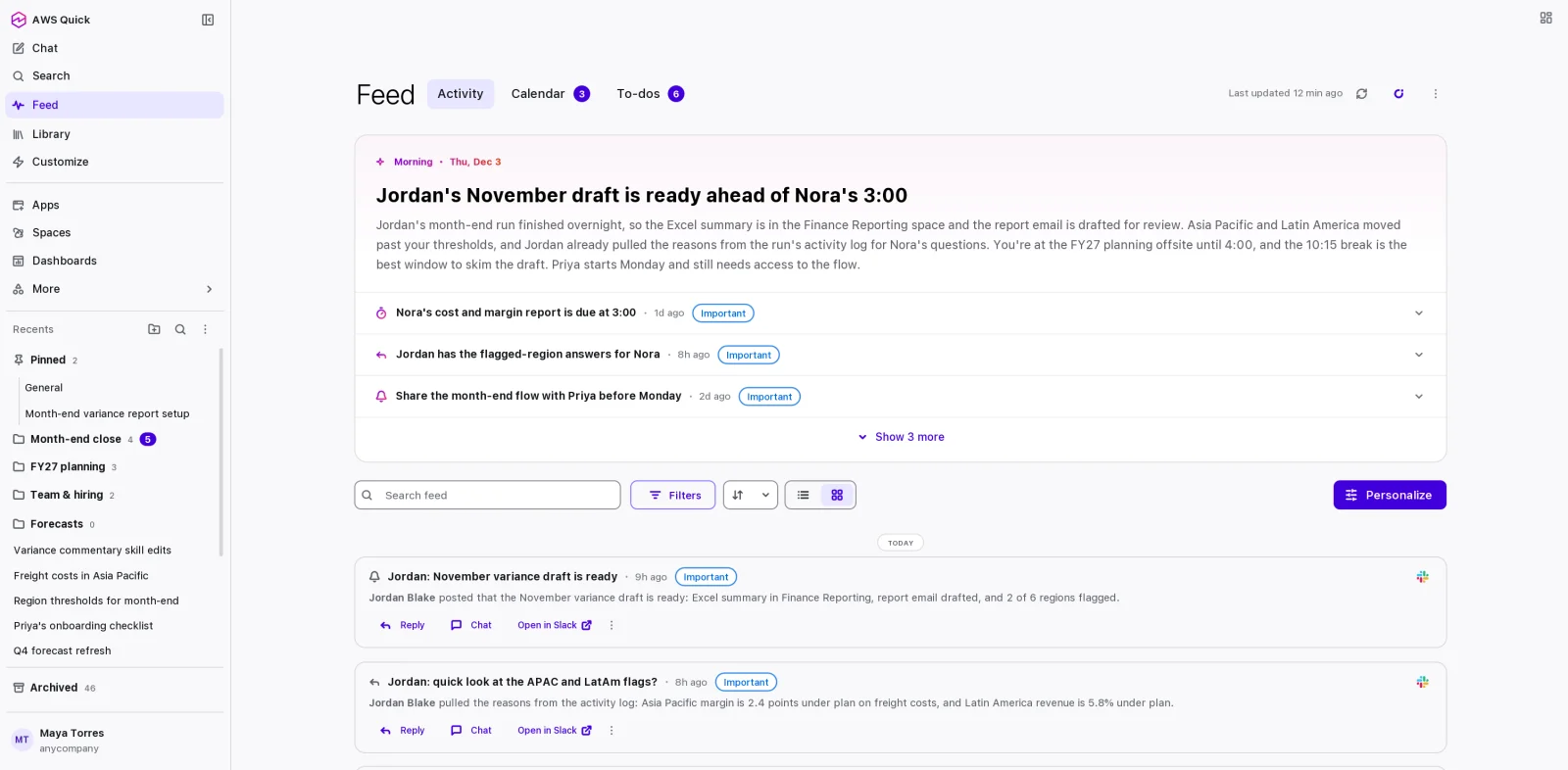 Updated AWS Quick web app home feed prioritizing messages that need replies for AI workspace triage
Image: Amazon Web Services
If you only used Quick on desktop before, the web refresh targets triage and continuity:
- Feed plus daily briefing surfaces email and messages that need replies in priority order; AWS shows drafting replies from that view.
- Customize navigation groups agents, flows, skills, knowledge, and connectors; desktop-built agents and skills appear without a separate import step.
- Library consolidates recent work, favorites, pins, and Quick-created files with sync across web, desktop, and mobile.
- Background execution: schedule a task or kick off a long request, close the tab, and return later through Mission Control when agents need input.
That last point is the operational shift. Teams evaluating Quick against Microsoft Copilot Cowork should ask whether state survives tab closes on their tier and region — AWS says these features are available today in all Regions where Quick is available, per the post footer.
Multi-agent orchestration in one answer
Some questions span domains AWS expects you to split across agents. Multi-agent orchestration means the primary agent can invoke several specialized agents concurrently, each with its own instructions, knowledge, and context, then merge contributions into one response that shows which agent supplied which slice.
The shipping-cost example in the post — forecasting agent on planning data plus procurement agent on vendor contracts — is the textbook pattern for finance + ops questions that fail when a single general agent hallucinates bridging logic.
For builders, compare this to WorkflowArena's runtime-written workflows: Quick is vendor-managed orchestration with governance features; WorkflowArena measures whether models can author orchestration graphs themselves. Both matter, at different layers.
Meta ads and Amplitude MCP connectors
AWS added connectors that speak Model Context Protocol to vendor servers:
Meta ads. Natural-language create, manage, and analyze for Meta campaigns. AWS says Quick combines Meta ad data with other sources and asks permission before write actions such as creating a campaign or changing budgets — a direct response to the agentic ad-buying fear CIOs raised after OpenAI CFO comments on ads revenue circulated.
Amplitude. Product usage, customer behavior, and conversion questions through Amplitude's MCP server so product and marketing teams pull behavioral metrics into Quick-built dashboards and documents.
Connectors respect existing permissions: users only see data they already could access, administrators choose which connectors teams may add, and Quick prompts before writes. That permission model mirrors what explainx.ai documented for Home Assistant MCP scopes — least privilege at connector attach time, not at model prompt time alone.
AWS also notes a three-month free Quick trial with up to ten teammates when exploring Meta ads connector workflows — check current pricing pages before production planning.
Admin, safety, and languages
Beyond connector expansion, AWS lists enterprise controls:
- Skills on web — browse, install, create, and manage skills in the browser, matching desktop.
- Guardrails for prompts (preview) on Professional and Enterprise — content filters, denied topics or words, prompt-attack detection, and selected PII classes in user prompts, with detect-only mode before enforcement scoped to users, IdP groups, or the whole account.
- Permissions and limits by IdP group — e.g., block finance from creating agents or cap agent hours per group.
- Data-source creation controls — allow Redshift while blocking uploads, or block sharing from specific connectors.
- Languages — Japanese, German, Chinese (Simplified and Traditional), and Vietnamese.
AWS repeats that customer data does not train other customers' models — the standard enterprise AI line, but relevant next to enterprise ChatGPT plugin partnerships buyers compare during procurement.
How Quick compares to Copilot for builders
Searchers often ask AWS Quick vs Copilot. At a high level:
| Dimension | AWS Quick (Nov 20 post) | Typical Microsoft Copilot posture |
|---|---|---|
| Primary buyer | AWS-centric enterprises already on Quick Sight, Bedrock adjacency | Microsoft 365 tenants |
| Process encoding | Flows built in chat with deterministic steps | Cowork / agents on M365 graph |
| Multi-agent | Built-in orchestration across specialized agents | Multiple copilots and agents; integration varies by SKU |
| Extensibility | MCP connectors, skills, custom agents | Plugins, Graph connectors, Copilot Studio |
| Admin guardrails | Prompt policy preview on Pro/Enterprise | Purview and tenant policies (separate docs) |
Neither table cell replaces your security review. If you need a skills-only deep dive without flows, start with AWS Quick skills guide. If you need agent runtime primitives, read Amazon Quick primitives taxonomy.
What this means for teams shipping agents
Three practical takeaways for builders and founders:
- Treat flows as versioned team assets, not chat logs. AWS's publish-and-run story implies change management — who may edit thresholds, who approves outbound comms, and where deterministic steps live (spreadsheet vs Quick dataset).
- Multi-agent orchestration needs evals per specialist, not one end-to-end happy path. If procurement and forecasting agents disagree, Quick's merged answer still needs a human decision — plan UI for conflict surfacing, similar to lessons from Anthropic Worse Together multi-user benches.
- MCP write connectors require approval UX you cannot bolt on later. Meta ads' explicit confirm step is the pattern AWS wants customers to expect; copy it for internal MCP tools.
AWS says teams can sign in to Quick or download Quick to try the release and contact account teams for enterprise pricing. For hands-on skill authoring, pair this announcement with Jane Street's minimal SKILL.md reference and explainx.ai's workshop catalog if you are training operators, not only engineers.