



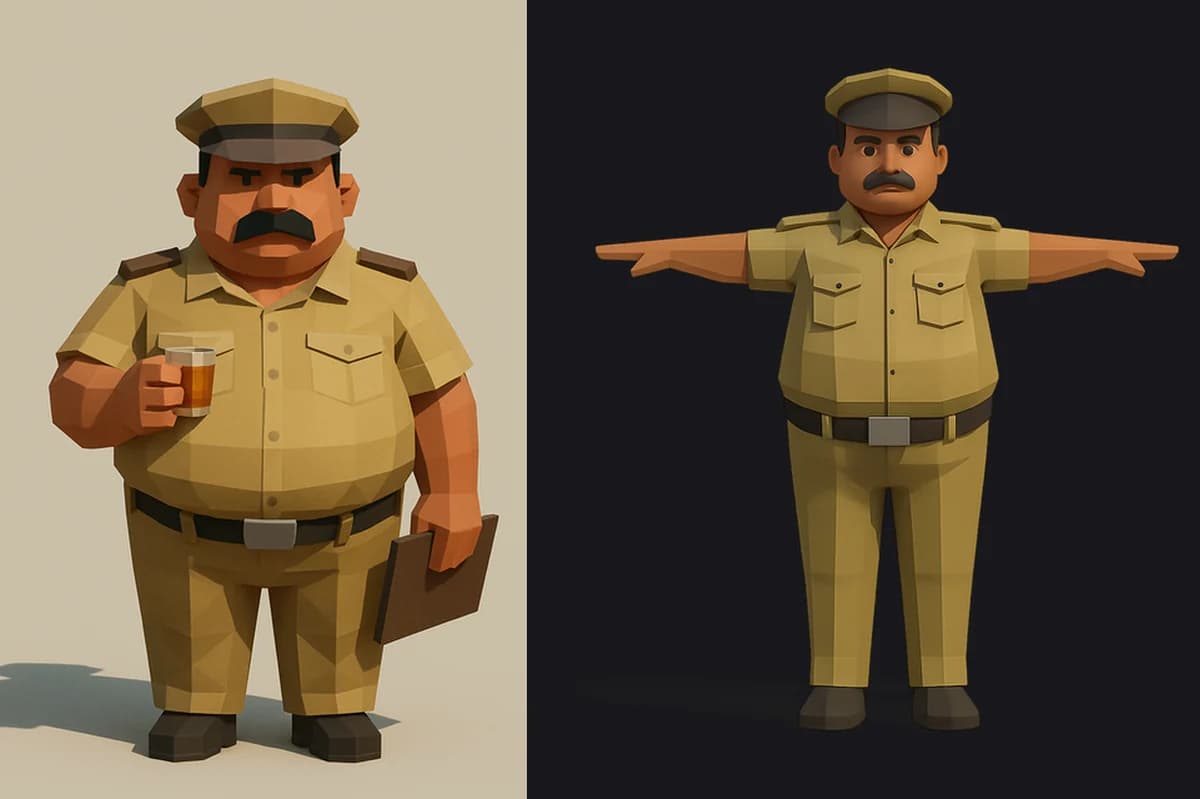
We generated a character from one concept image, dropped the GLB into a Godot game, and had him standing on a railway platform in about ten minutes. Making him walk took the rest of the day, four failed approaches, and one Blender operation we should have run first.
This post is that day, in order, with the numbers. If you are wiring AI 3D generation into a real game pipeline — the neural counterpart to the code-first lane img2threejs and bunpav work in — the short version is: the mesh is riggable, and it does not look riggable, and one line separates those two facts.
Related (October 23, 2026): free sample outputs from many image-to-3D generators are in Scenario's 3D Collection on Hugging Face.
TL;DR
| Question | Answer |
|---|---|
| Is an AI image-to-3D mesh riggable? | Yes — after one merge-by-distance pass. Not before. |
| Why does it report 593 disconnected parts? | Unwelded coincident vertices, one pair per UV seam. Not real disconnection. |
| The one command | bpy.ops.mesh.remove_doubles(threshold=0.0001) → 593 islands became 4 |
| Then what? | Bone-heat weighting (ARMATURE_AUTO). It needs the welded surface to diffuse across. |
| Do hand-written vertex weights work? | No. Four segmentation strategies, four shears. Stop writing your own. |
| Does the ground come with it? | Yes. Detect flat and wide and at-the-floor — all three, or you delete the shoes. |
| Biggest time sink | object.transform_apply silently doing nothing in headless Blender. |
| Do arms need to swing? | We decided no. Legs walk, torso leans, hands hold the tea. |
The setup
The game is Mumbai Local, a first-person courier game on Mumbai's suburban railway. NPCs are normally procedural — shared rig, primitive parts, palette colours. Cheap and a bit anonymous.
We wanted one named character to read as somebody: Havaldar Gadbad, the railway police constable who takes your report and then tells you it is not his station. The plan was: generate a concept in the game's own art style, run image-to-3D, auto-rig onto the game's existing skeleton, let the animation code drive it.
Generation was excellent. Rigging is where this post lives.
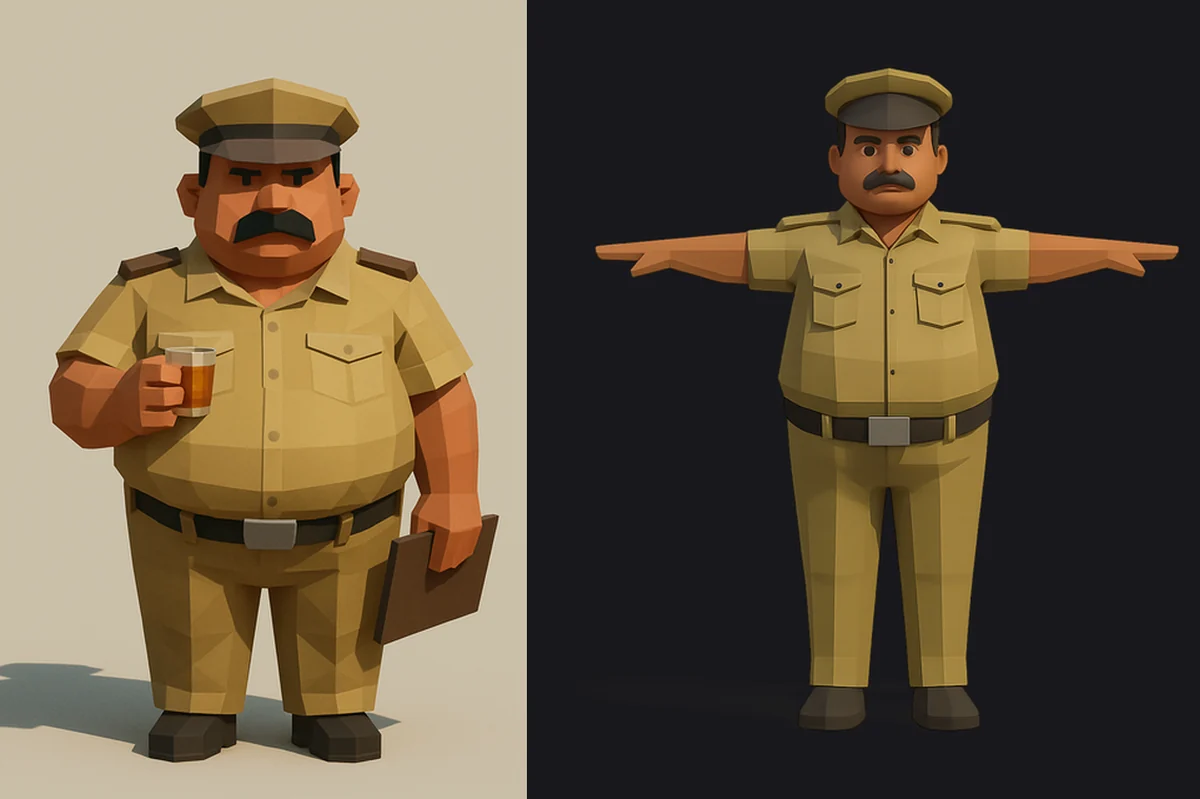 Concept art and T-pose reference for a low-poly Indian railway police constable
Inspect the mesh before you write any rigging code
We did this too late. A headless Blender script over the GLB reported:
OBJECTS 1 ['textured_mesh.obj']
BBOX x -0.889..0.881  y -0.332..0.340  z -0.998..0.989
PARTS 593
  verts= 1198  dx=0.831 dy=0.215 dz=0.590  base_z=0.019
  verts= 1187  dx=0.713 dy=0.672 dz=0.110  base_z=-0.963
  verts= 1122  dx=0.169 dy=0.478 dz=0.968  base_z=-0.948
  verts= 1115  dx=0.717 dy=0.672 dz=0.035  base_z=-0.998
Three things in that dump:
- 593 loose parts. This is the number that sent us down the wrong road for six hours.
- Rows 2 and 4 are the ground. Wide (0.71 × 0.67), flat (
dz0.11 and 0.035), at the very bottom (base_z ≈ -0.98). The generator posed him on a plinth and welded it in. - 40,000 triangles, against roughly 25 primitives for the game's procedural crowd bodies.
Why "593 disconnected parts" makes auto-riggers refuse
Adobe publishes Mixamo's auto-rigger requirements, and the raw export violates most of them:
| Mixamo requires | Raw export |
|---|---|
| Single mesh, no spaces between parts | 593 reported islands |
| No floating parts disjoined from the body | ground slab, fragments |
| No other content in the file | plinth included |
| No large props | tea glass and clipboard |
| Clean, error-free mesh | open shells, split seams |
These are not arbitrary. Every skinning algorithm assumes neighbouring vertices are connected so a weight can propagate between them. Break connectivity and the assumption dies — which is what happens on the raw import, and exactly why the fix below works.
Four ways we tore his arms off
We wrote our own Blender rigger, because the game's rig is unusual: rigid parts on bone attachments, not smooth skinning. So we started the same way — every vertex weighted 1.0 to exactly one bone.
- Plane cuts. Classify each vertex by bounding-box fractions. Legs walked; the arms smeared, because he holds tea and his forearm sits inside the body's own width.
- Fold the arms into the spine. Weight them to the torso so the upper body moves as one. This worked and looked fine — but it is a workaround, not a rig.
- T-pose source. We regenerated the concept in a strict T-pose with empty hands. Segmentation improved; the arms still fanned into flat sheets.
- Cylinder around the arm axis. A plane is the wrong shape for a limb. Arm vertex counts doubled from 358 to 802 — the whole sleeve was finally included — and it still fanned.
At this point we concluded the mesh was unriggable and started writing that up. That conclusion was wrong.
The one step: merge by distance
The 593 shells were never disconnected. They were coincident vertices that had never been welded — every UV and normal seam is two or more vertices at one position, and a loose-parts count reads each side as its own island.
One Blender operation, measured across thresholds:
as imported            islands=593   verts=26843   tris=40000
merge dist 0.0001      islands=4     verts=19963   tris=39980
merge dist 0.0010      islands=4     verts=19862   tris=39776
merge dist 0.0050      islands=3     verts=19073   tris=38239
593 islands to 4, at a threshold of a tenth of a millimetre, for a 25% drop in vertex count and 20 triangles. Not a single surface moved. In script form:
bpy.ops.object.mode_set(mode="EDIT")
bpy.ops.mesh.select_all(action="SELECT")
bpy.ops.mesh.remove_doubles(threshold=0.0001)
bpy.ops.object.mode_set(mode="OBJECT")
Run this before anything else. It is the difference between a mesh that cannot be rigged and one that rigs itself.
Then stop hand-writing weights and use bone heat
With a connected surface, Blender's own bone-heat diffusion works — and it is the right algorithm:
bpy.ops.object.select_all(action="DESELECT")
body.select_set(True)
rig.select_set(True)
bpy.context.view_layer.objects.active = rig
bpy.ops.object.parent_set(type="ARMATURE_AUTO")
The difference is categorical. A hard one-bone-per-vertex assignment shears at every boundary, and smoothing afterwards cannot recover a gradient that was never computed. Bone heat diffuses a weight across the surface, so a hip bends instead of tearing. It had been failing for us not because it is a bad algorithm but because it had nothing to diffuse across.
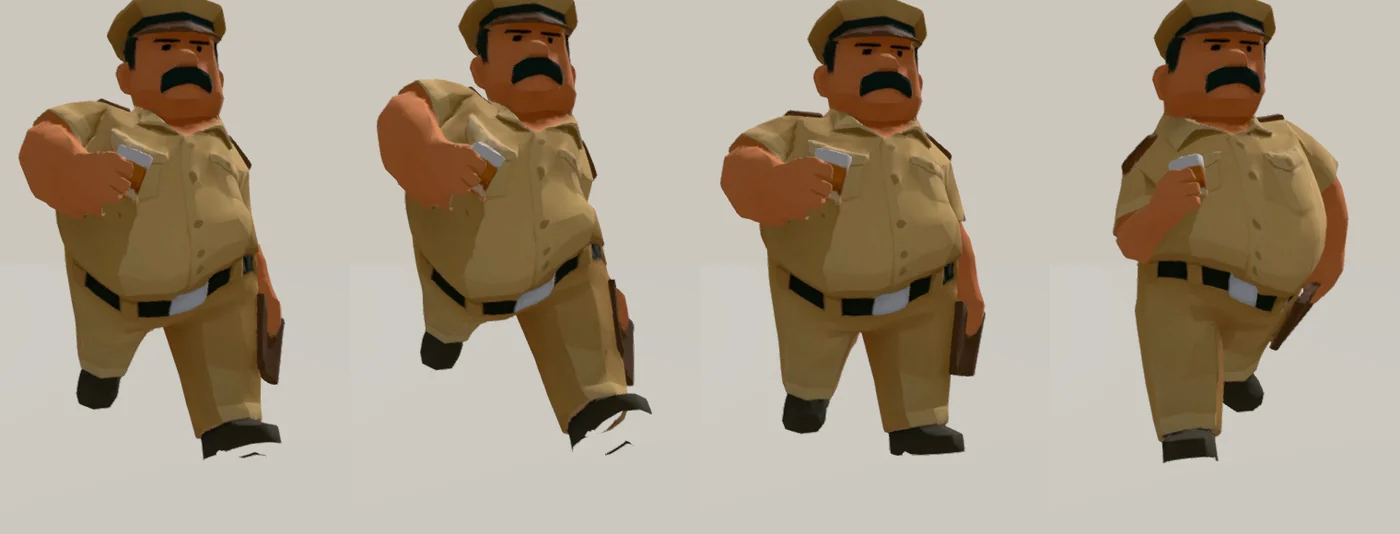 Four frames of a low-poly police constable walking in-engine, legs alternating, tea held steady
The headless Blender bug that ate the afternoon
Worth its own section, because it will happen to you.
In a blender -b -P script, bpy.ops.object.transform_apply() can silently do nothing. It reads the evaluated dependency graph; in a script where nothing has evaluated, it returns without error and changes nothing. No exception, no warning.
A --yaw 180 flag to turn a backwards model appeared to work and did not. Adding bpy.context.view_layer.update() did not help. The diagnostic that caught it was measuring an asymmetric feature before and after — the cap peak juts forward, so the mean Y of the top 15% of vertices should flip sign:
BEFORE head_mean_y 0.0099  n=3068
AFTER  head_mean_y 0.0099  n=3068     # unchanged: the rotation never applied
Skip the operator and transform the data:
from mathutils import Matrix

def bake_transform(obj):
    """Fold the object transform into its vertices and reset it to identity."""
    obj.data.transform(obj.matrix_world)
    obj.data.update()
    obj.matrix_world = Matrix.Identity(4)

obj.data.transform(Matrix.Rotation(math.radians(180), 4, "Z"))
obj.data.update()
Mesh.transform() needs no operator context, no selection, and no depsgraph. In headless Blender, prefer data manipulation over bpy.ops for anything you cannot visually verify.
Removing the ground without removing the shoes
The plinth is recognised by three conditions together:
flat     = dz < 0.16 * height
wide     = max(dx, dy) > 0.45 * width
grounded = base_z < floor + 0.06 * height
if flat and wide and grounded:
    drop(part)
Our first version compared each part's height against the tallest part's and used a 3% threshold. It threw away 434 harmless fragments and left the slab exactly where it was. A later version added "flat and grounded and small" to catch crumbs — and deleted the character's shoes, which are flat, grounded, and small after decimation. All three conditions, no looser.
Run the ground removal before the weld, while the slab is still its own island. Welding joins it to the shoes and there is nothing left to drop.
Make the three calls that decided this rig:
The final pipeline
tools/blender/rig_npc.sh character.glb \
  --tris 14000 --arms none --yaw 180
In order:
- Import and join into one object; bake the transform into the mesh data
- Drop the ground (flat + wide + grounded), while it is still separate
- Merge by distance at 0.0001 — the step everything depends on
- Decimate to a triangle budget (40,000 → 14,000 was visually identical; 6,000 showed faceting)
- Scale to character height and stand on the floor
- Build the armature with your engine's bone names
- Bone-heat weight via
ARMATURE_AUTO - Export GLB with skins
We decided arms should not move
Even with a welded mesh and heat weights, auto-segmenting an arm stayed unreliable — the shoulder fans whichever way the blend is shaped, because "where does the arm stop and the sleeve start" has no clean answer on a generated mesh.
So we stopped trying. Concepts are generated in a natural standing pose holding their props, and rigged with arms fixed. Legs walk, the torso leans, the head moves, and the constable strolls the platform with his tea held steady. It reads correctly and cost nothing — and for a character seen at platform distance, arm swing was never the thing carrying the performance.
That is a genuine finding, not a consolation prize: decide which limbs need to move before you rig, and rig only those.
What people are asking
"Is the raw mesh useless without rigging?" Not at all. Our static modelled constable looked dramatically better than the eight procedural NPCs beside him. Most named background characters barely move — ship them static and spend the rigging budget elsewhere.
"Does this apply to props and environment art?" Barely. Props have no skeleton, so none of this matters. Image-to-3D for a crate, a signboard, or a bench is production-ready today. Rigging is where the constraint bites, which is why the code-first procedural lane stays attractive for objects needing pivots and sockets.
"Should I just use the generator's own auto-rig?" If it has one, yes — Meshy and Tripo both ship retopology and auto-rigging. Our route matters when you need your engine's exact skeleton, which is the case here.
"How does this compare to procedural 3D generation?" Different jobs. Procedural code gives diffable, parameterised geometry with named sockets — see bunpav's procedural 3D and game audio lab and the Hop Earth-style driving game guide. Neural image-to-3D gives a characterful one-off you could not hand-author in the time. Characters lean neural; systems lean procedural.
Honest limitations
- Arm segmentation is still unsolved here. We chose not to need it. If your character must gesture, budget for manual weight painting or a purpose-built auto-rigger.
- Merging by distance averages split UVs. At 0.0001 the visual cost was nil for us, but a mesh with hard texture seams at those vertices may show smearing.
- Rigid vs smooth skinning is a style choice. Our engine uses bone attachments, so seams are acceptable.
- Triangle budgets are art-direction-specific. 14,000 suits a chunky low-poly style at close range.
Where this leaves the pipeline
AI image-to-3D is production-ready for game characters today — but the first thing you do to the mesh decides whether anything after it works. Inspect the loose-part count, weld, then rig. One line of Blender Python would have told us on minute one what four rigging attempts took six hours to say.
Related on explainx.ai
-
img2threejs: Photo-to-Procedural Three.js — and bunpav's Code-First Lane — the procedural counterpart to this neural lane
-
bunpav: Procedural 3D and Game Audio Lab — where the code-first 3D tooling lives
-
How to Build a Hop Earth-Style AI Driving Game — a full game build with AI-assisted assets
-
Tencent Hunyuan HY-World 2 and World Mirror 3D World Model — where generative 3D goes beyond single objects
-
What Are Agent Skills? Complete Guide — packaging a pipeline like this as a reusable skill
-
Claude Opus 5: Top 10 Game Prompts — prompting patterns for game work
-
WebGPU Complete Guide — the rendering side of browser 3D
Official documentation
- Mixamo auto-rigger requirements — Adobe
- Blender
Mesh.transform()API - Meshy AI retopology guide
- Tripo: rigging an AI-generated character for Mixamo
- Mumbai Local — the game this pipeline was built for
Update, November 1, 2026: for hair specifically, see HairDeck, an open model that generates editable hair cards and spring bones from one image.
Vertex counts, island counts, and tool behaviour here were measured on Blender 5.2.1 LTS and Godot 4.7.2 in September 2026. Image-to-3D generators iterate quickly — re-measure against your own export before committing to thresholds.