



Open Instagram or X right now and you'll see it: friends and strangers alike posting a photo that looks like it was pulled from a 1980s family album — feathered hair, a studio backdrop, a direct on-camera flash, faded warm color. It's all AI, generated from a single current-day selfie in ChatGPT or Gemini (running on Google's Nano Banana image model), and it's one of the biggest recurring viral AI photo trends of 2026.
This post gives you the exact prompt structure people are using, a tested copy-paste version, and the one detail — identity lock — that separates a photo that still looks like you from a generic AI face.
TL;DR
| Question | Answer |
|---|---|
| What is it? | Turning a current photo into an authentic-looking 1980s portrait using ChatGPT or Gemini's image editing |
| Where do I run it? | ChatGPT (upload photo + prompt) or Gemini app / AI Studio (Nano Banana model) |
| What's the trick? | Lock identity first, then hair/clothes, then flash/grain/color, then backdrop — in that order |
| Do I need a special photo? | A clear, front-facing, well-lit photo works best — blurry or angled photos give the model more room to drift the face |
| Which model is better? | Depends on the photo — Gemini/Nano Banana tends to hold facial structure more faithfully; ChatGPT sometimes smooths skin toward a generic look. Try both. |
| Does it work on other models? | Yes — the prompt structure transfers to Grok Imagine and other image-editing tools that accept a reference photo |
 A photo split between vintage warm film grain and glowing digital pixels, symbolizing the AI 80s photo trend
Why this trend keeps coming back
This isn't the first time a decade-makeover or era-photo trend has gone viral — a similar pattern played out with Studio Ghibli-style portraits and various "yearbook photo" trends earlier in the AI image boom. The 80s specifically works well for a few reasons that make it a particularly durable trend format:
- The 80s has an extremely recognizable, codified visual language. Feathered hair, shoulder pads, direct studio flash, and a specific warm-faded film-grain look are all things models have seen thousands of times in training data — real family photos, yearbook portraits, and studio glamour shots from the era are abundant and visually consistent.
- It's a "before and after" format, which is inherently shareable. Unlike a purely generated image, the appeal is specifically the transformation — your actual face, recognizably you, dropped into a completely different visual era. That comparison is what drives shares.
- Nano Banana specifically made this kind of identity-preserving edit good enough to trust. Google's Nano Banana image model, built into Gemini, is explicitly tuned for fast, high-fidelity photo editing that keeps a subject's face consistent while changing everything around it — exactly the capability this trend depends on. Google's newer Nano Banana 2.5 continues pushing on that same identity-preservation strength.
The prompt structure that actually works
Across the examples currently circulating, the prompts that produce convincing results — not a generic "vintage filter" look — consistently follow the same four-part structure, always in this order:
| Block | Purpose |
|---|---|
| Identity lock | Named first, always. Tells the model exactly which features must stay recognizable before anything else changes. |
| Hair and clothing | Period-specific styling — this is where most of the visible "80s-ness" comes from. |
| Photographic texture | Direct flash, film grain, faded warm color — this is what separates "person in a costume" from "photo actually taken in 1985." |
| Backdrop | A period-appropriate studio or environment — mottled studio backdrop, wood paneling, a specific era-correct setting. |
Putting identity lock first matters more than it might seem — models tend to weight earlier instructions more heavily when a prompt asks for multiple simultaneous changes, so leading with "keep this face" before asking for a dozen other changes measurably reduces face drift.
Copy-paste prompt
Upload a clear, front-facing photo of yourself first, then paste this. The short below walks through the same flow — selfie in, prompt pasted, 80s portrait out:
Reimagine this exact photo as an authentic 1980s studio photograph. Keep my face, facial structure, skin tone, eye color, and identity fully recognizable — do not change my facial features, do not smooth or beautify my skin, do not alter my body proportions.

Change my hairstyle to a period-accurate 1980s style (feathered layers, or a voluminous perm, matched to my current hair length and texture). Change my clothing to period-appropriate 1980s fashion that suits the setting (a button-up shirt with a bold collar, a blazer with shoulder pads, or a patterned sweater — pick what fits my apparent age and gender presentation).

Photographic style: mid-1980s studio portrait. Direct on-camera flash lighting, slightly harsh and flat. Soft film grain throughout. Warm, slightly faded color balance, as if the print has aged. Soft focus at the edges of the frame. No digital sharpness, no modern color grading, no HDR.

Background: a mottled studio backdrop in a muted blue-grey or maroon tone, typical of a mall photo studio or school portrait session from the era. Slight vignette at the corners.

Goal: a photo that looks like it was actually taken in a photo studio in 1985 and has been sitting in a family album since — not a costume photo, not a filter, an authentic period photograph.
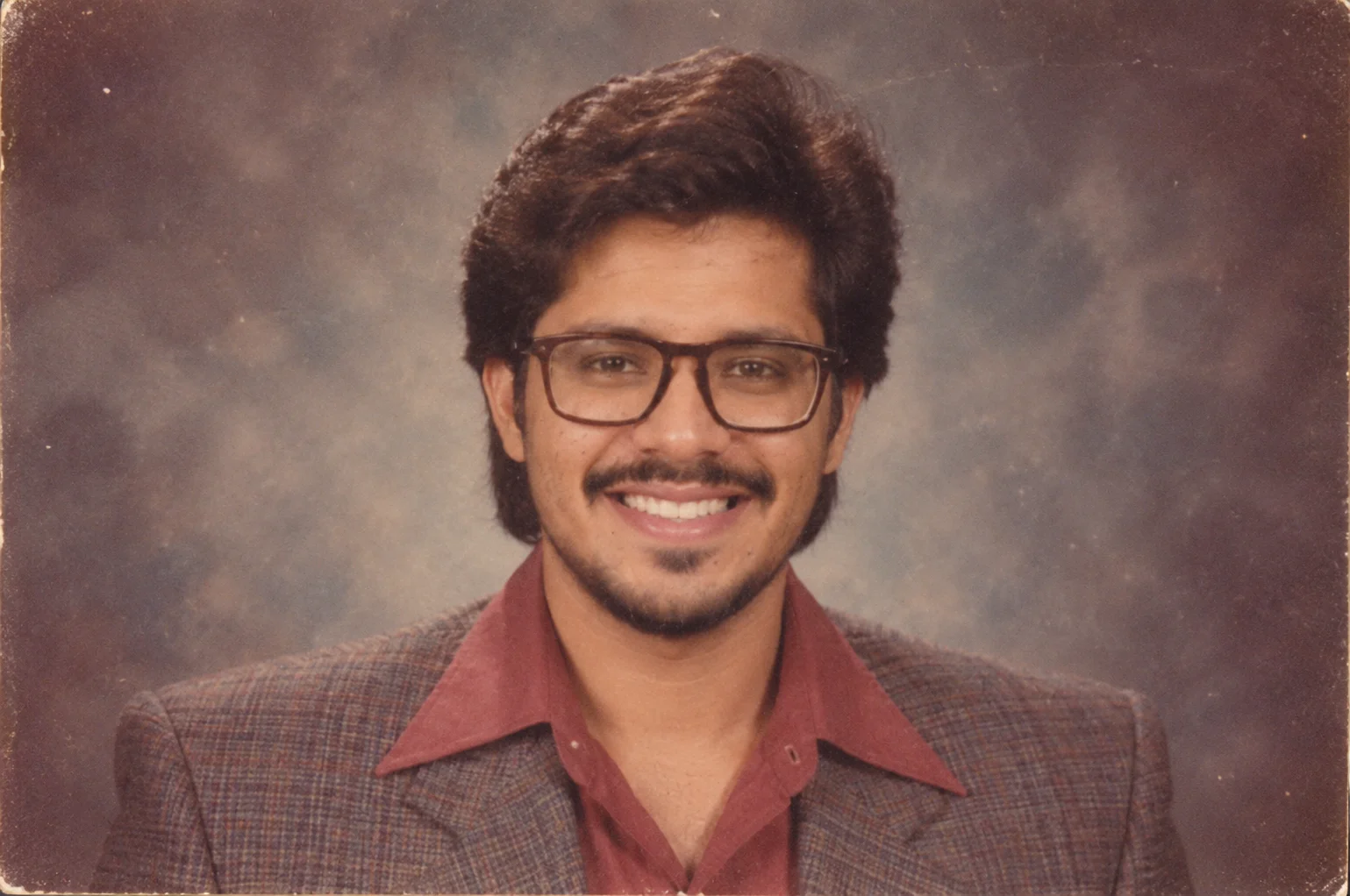 An explainx.ai instructor's modern headshot reimagined as an authentic 1980s studio portrait using the copy-paste prompt above
This is a real result from that exact prompt, run on a current explainx.ai instructor headshot — same face, same glasses (regenerated in a period-appropriate frame), same recognizable smile, dropped into an authentic mid-80s studio setup: the flat direct-flash lighting, the mottled backdrop, the film grain and slightly faded color. Notice what didn't change: the underlying bone structure and expression are still clearly the same person — that's the identity-lock instruction doing its job.
Why each line is doing work
- "Do not change my facial features, do not smooth or beautify my skin" — this is the single most important line in the whole prompt. Without an explicit negative instruction, both ChatGPT and Gemini default toward smoothing and generic beautification, which is exactly what drifts a result away from looking like you.
- "Matched to my current hair length and texture" — prevents the model from defaulting to a stock 80s hairstyle that doesn't fit your actual hair, which is one of the more common "obviously AI" tells.
- "Direct on-camera flash lighting, slightly harsh and flat" — this single phrase does more to sell the era than any clothing description. Studio flash from that period has a specific, flat, slightly overexposed quality that modern phone photos never have.
- "Not a costume photo, not a filter, an authentic period photograph" — closing the prompt with an explicit statement of the overall goal helps the model weigh all the individual instructions correctly rather than treating them as a checklist to satisfy independently.
Where to run it
ChatGPT
- Open a new chat and upload a clear, front-facing photo.
- Paste the prompt above directly under the uploaded image.
- If the first result drifts your face too much, follow up with: "Keep everything about this version except make my face closer to the original photo — same facial structure, same skin tone." Iterating with a follow-up correction usually works better than regenerating from scratch.
Gemini (Nano Banana)
- Open the Gemini app or Google AI Studio and select image generation/editing.
- Upload the same reference photo.
- Paste the identical prompt — the structure transfers directly since Nano Banana is also built for identity-preserving photo edits.
- Gemini tends to hold facial structure a little more faithfully across your first attempt, but can render clothing textures slightly more "synthetic" at default quality — Nano Banana 2.5, if you have access, generally improves on both fronts.
Other tools
The same four-block structure works on any image model that accepts a reference photo alongside a text prompt — Grok Imagine is a common third option people are using for this trend. Results vary by model's specific strength at identity preservation, so it's genuinely worth generating the same prompt in two tools and picking whichever result actually looks like you.
ChatGPT vs Gemini vs Grok — where each tends to win
| Model | Identity preservation | 80s texture (flash/grain) | Common miss |
|---|---|---|---|
| Gemini (Nano Banana) | Strong — face structure usually holds on first try | Good film grain; clothing can look slightly synthetic | Over-smooth skin if you drop the negative line |
| ChatGPT (image edit) | Variable — sometimes drifts toward generic beauty | Strong studio-flash look when prompted explicitly | May "filter" instead of fully re-rendering the scene |
| Grok Imagine | Hit-or-miss by photo; worth testing | Often bold period styling | Less consistent on subtle film fade |
Run the same source selfie through at least two tools before posting. The trend's shareability depends on recognizability — a technically flashier result that doesn't look like you underperforms a slightly softer one that does.
Source photo checklist (before you paste the prompt)
- Front-facing, eyes visible — profile shots give models room to invent a new nose or jaw.
- Even lighting — harsh shadows get misread as bone structure.
- No heavy filters on the input — Instagram smoothing on the source makes identity lock harder.
- Single subject — group photos work for Smart Take-style trends on iPhone Duo; for this prompt, crop to one face.
- Glasses wearers — keep them; ask for period-appropriate frames rather than removing them (removal often triggers face drift).
Common failure modes and how to fix them
| Problem | Likely cause | Fix |
|---|---|---|
| Face looks generic, not like me | Model defaulted to beautification | Add an explicit "do not smooth or beautify skin" line, and try a sharper source photo |
| Hairstyle looks like a costume wig | Prompt described a generic 80s style unrelated to your actual hair | Specify your current hair length/texture and ask for a period style matched to it |
| Looks like a filter over the original photo, not a new photo | Photographic texture instructions were too vague | Be specific about flash, grain, and color fade — "vintage filter" alone won't get you there |
| Background looks digitally added | Backdrop described too briefly | Add specific period details (mottled studio backdrop, specific color tone, vignette) |
What this means beyond the trend
Trends like this are a genuinely useful, low-stakes way to learn how identity-preserving photo editing actually works — the same "lock identity, then layer changes" prompt structure applies well beyond nostalgia photos, to anything from professional headshot generation to product photography where a specific subject needs to stay recognizable across styling changes. If you want to go deeper on how these models actually preserve identity while editing everything around it, our Nano Banana 2.5 coverage covers the underlying model race in more depth.
Update — September 11, 2026: Same identity-lock idea at documentary scale — DeepMind's Love, Rendered reconstructs an unfilmed first meeting with archival restore + pose control.
Update — September 24, 2026: The identity-lock technique from this prompt now has a video sequel — the viral AI duet dance trend merges two photos (same person, two eras, or two different people entirely) into one scene, then animates the result into a dancing duet.
Related reading
- The Viral AI Duet Dance Trend: Merge Two People, Animate the Dance
- Love, Rendered: DeepMind Reconstructs a Memory That Was Never Filmed
- Google DeepMind Tests Nano Banana 2.5 on LMArena to Rival GPT Image 2.5
- A 4B Open-Source VLM Reportedly Beats Qwen 122B on GeoGuessr-Style Benchmarks
- What Is C2PA Content Credentials, Explained
- AI Watermark Removal: The Right and Wrong Way
- Seedance 2.0 Korean Neighborhood Prompt: The 12M-View Recipe Explained
This post reflects the trend and prompt patterns circulating as of September 10, 2026. Model behavior changes over time — if a specific line in the prompt stops working as models update, adjust the wording rather than assuming the whole structure is broken.