



You can run a household-scale private chat model on a Windows gaming PC in about fifteen minutes if you accept quantization and you lock down LAN access. On November 22, 2026, GPU Partner author Jerry James published a beginner walkthrough that Hacker News pushed to 88 points (thread): install Unsloth Desktop, pull a GGUF model sized to your VRAM, tune context, and turn on LAN sharing so other PCs on the home network use the same weights. His reference build uses Qwen3.8-27B at 4-bit on an RTX 5090 (32 GB); the same pattern scales down to 9B-class models on 8–12 GB cards.
This post maps what the guide actually requires, where Thinking Machines Inkling fits versus Qwen, and what builders should verify before copying the recipe.
What you need before you start
Jerry James keeps the shopping list short:
| Piece | Role |
|---|---|
| Windows PC + discrete GPU | Runs the quantized weights; more VRAM means larger models or longer context |
| Unsloth Desktop | Free app that serves models through a chat UI and optional LAN endpoint |
| GGUF (or MLX on Mac) | Compressed weights; full Qwen3.8-27B at 16-bit is ~56 GB per Qwen's model card, far above most consumer GPUs |
His essay is not a lab benchmark. It is an appliance story: replace a subscription chatbot for research dumps, light coding, and household questions without shipping prompts to a third party. That matches the privacy angle The Verge's Hermes + Qwen diary explored on Mac Studio, but targets Windows + NVIDIA buyers who already own a gaming card.
How much VRAM for Qwen3.8-27B?
Quantization trades a little quality for fit and speed. Jerry James publishes a memory-by-precision chart for Qwen3.8-27B with 128K context:
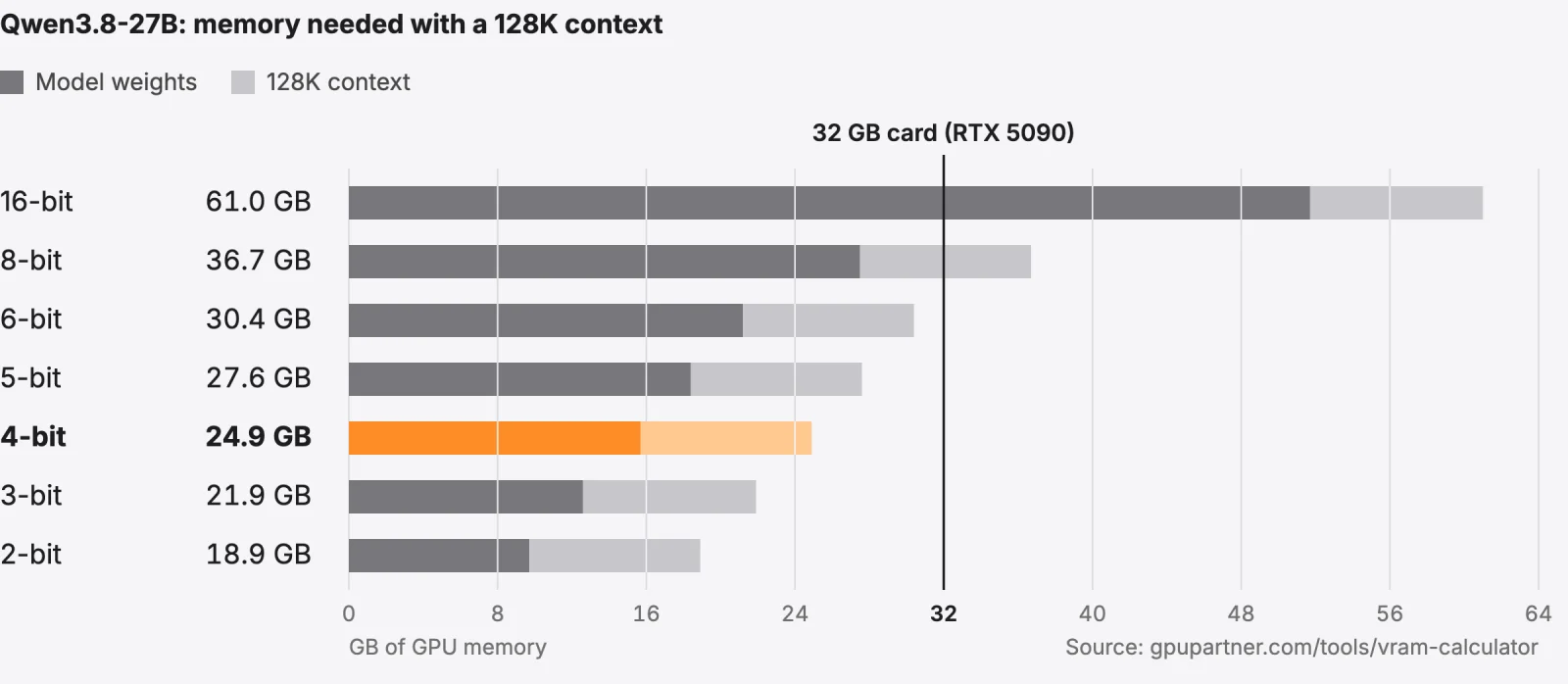 Qwen3.8-27B VRAM by quantization with 128K context for local AI home setup
Image: GPU Partner / Jerry James
| Precision (illustrative) | VRAM at 128K context (per chart) |
|---|---|
| 16-bit | ~61 GB |
| 8-bit | ~36.7 GB |
| 4-bit (Q4) | ~24.9 GB |
| 2-bit | ~18.9 GB |
On 32 GB, James picks Q4 plus a large context window instead of cramming the biggest possible dense model. That is a builder tradeoff: long threads stay coherent, but hard reasoning still lags frontier APIs.
For 8–12 GB cards, he points to 9B–12B quant models—closer to Qwen3.5-9B class hardware—rather than pretending a laptop GPU will host a full 27B at useful context.
Step-by-step: Unsloth Desktop on Windows
The guide's core sequence, aligned with Unsloth LAN documentation:
- Install Unsloth Desktop from the official site and launch it.
- Open the model hub and download a recommended GGUF—James uses Unsloth's Qwen3.8-27B GGUF with UD-Q4_K_XL (~18 GB file).
- Pick context length in settings; longer context consumes VRAM on top of weights (see chart above).
- Start chatting locally to sanity-check latency and obvious hallucinations on tasks you care about.
- Enable LAN access so other devices on the home network hit the same server—useful for family laptops without duplicate downloads.
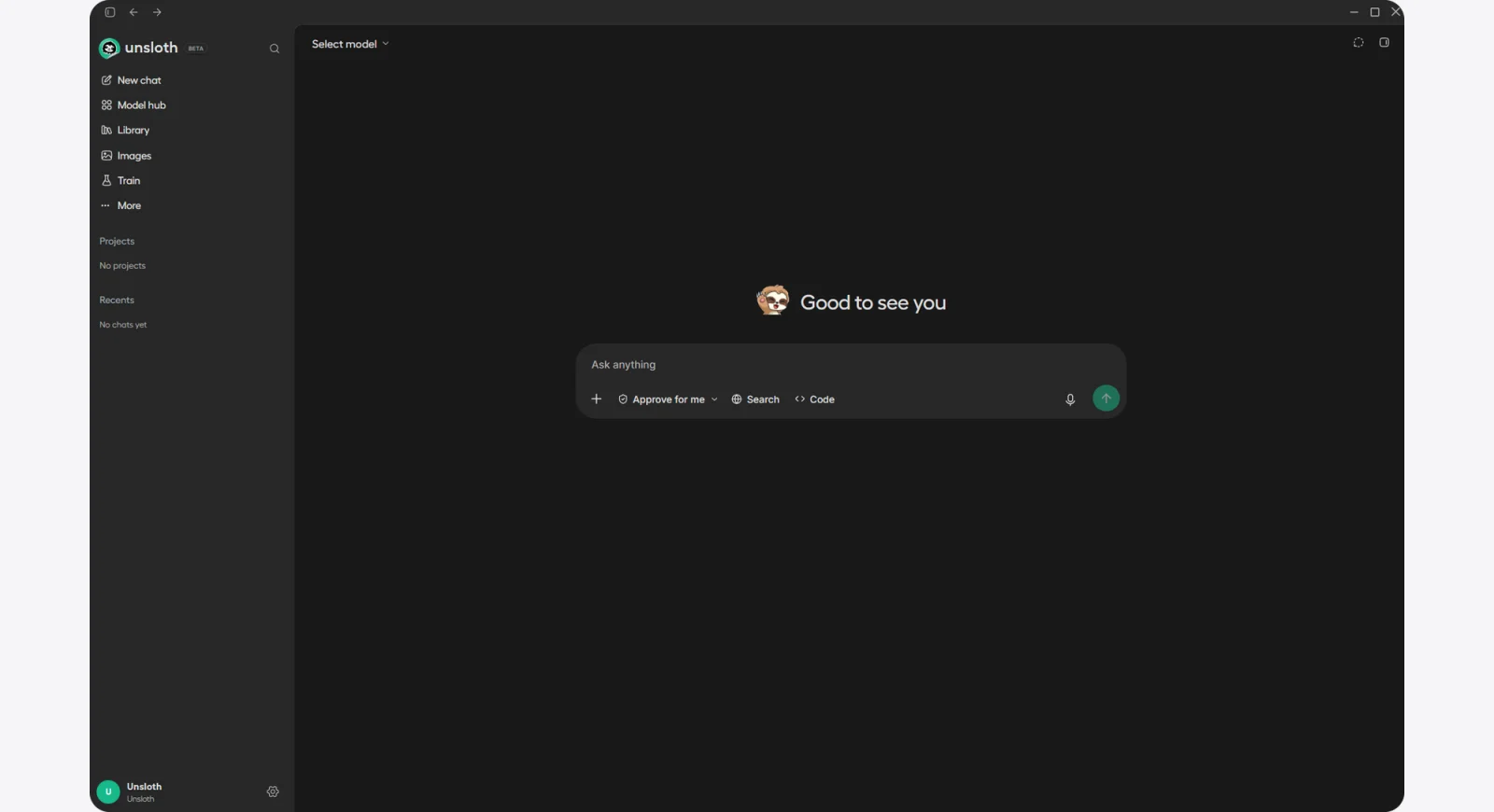 Unsloth Desktop home screen for beginner local AI chat
Image: GPU Partner / Jerry James
James reports no Python venv, no manual pip install, and no cloud account for the baseline chat path. If you later want LoRA fine-tuning in the same app, see explainx.ai's Unsloth Desktop train-and-run coverage; this HN guide stays on inference-only.
Inkling 2 Mini versus Qwen on the same box
The headline says Inkling, Qwen, and Unsloth. In practice:
| Model | Realistic home GPU? | Notes |
|---|---|---|
| Qwen3.8-27B Q4 | Yes on 24–32 GB class cards | Apache-friendly open weights; strong general chat |
| Inkling 2 Mini | Yes at ~17.6 GB Q4 per Unsloth's Inkling 2 Mini guide | 26.4B params, Apache 2.0, 1M context claimed—check VRAM at your context target |
| Inkling 2 Small | No on consumer VRAM | 594B MoE; smallest quant ~171.7 GB in James's table—datacenter territory |
Thinking Machines shipped Inkling 2 Small weights under Apache 2.0 on November 12, with SGLang and vLLM in the runtime list. Unsloth is another supported path for Mini, not a magic shrink-ray for Small.
Pick Qwen when you want the broadest community recipes and tooling. Pick Inkling 2 Mini when you want Thinking Machines' MoE design and are willing to tune SGLang or Unsloth bring-up. Do not confuse Mini with Small in download dialogs—one mistake costs hundreds of gigabytes of disk.
Security: LAN access is a feature and a liability
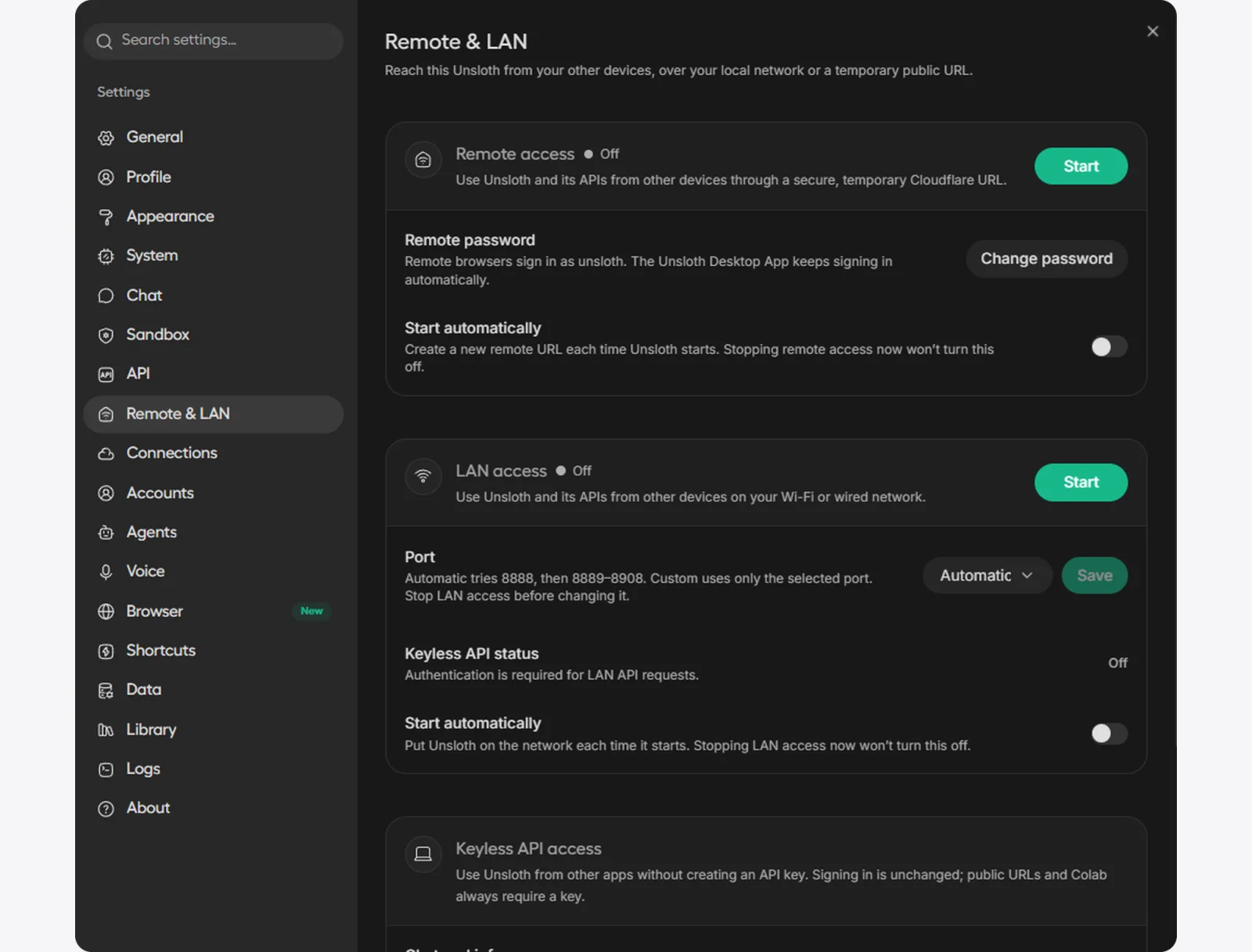 Unsloth Desktop Remote and LAN settings for home network sharing
Image: GPU Partner / Jerry James
James enables LAN access so the whole house shares one GPU. That is convenient and risky.
Hacker News user angry_octet (comment 50604606) warned that thousands of home PCs exposing unauthenticated LAN inference could become residential proxy swarms—the next step after residential IP abuse in scraping markets.
Treat LAN mode like exposing any dev server:
- Bind to LAN only unless you know how to reverse-proxy with auth.
- Firewall the Unsloth port from the public internet on your router.
- Prefer Tailscale or Tailscale-backed MCP patterns if remote access is required.
- Never point coding agents with shell tools at an untrusted local endpoint.
Local inference does not remove abuse risk; it moves it to your network.
What developers are saying on Hacker News
The thread is mostly practical, not ideological:
- bashhq_r (50604455) asked how much VRAM before Qwen stops feeling sluggish on a normal laptop—still the hardest beginner question.
- IsTom (50604479) pushed back on framing 32 GB+ as required for Qwen3.6-35B @ Q4, highlighting how marketing charts collide with real laptops.
- junga (50604696) reported Unsloth after AMD NPU support, serving Qwen3.5-9B on a ThinkPad at ~12 tok/s—usable for drafts, not frontier reliability.
- amelius (50604638) asked how local-LLM users approximate Claude—plugins, harnesses, system prompts—a gap this guide does not close.
None of these comments verify Jerry James's exact tokens-per-second on RTX 5090; treat them as field reports.
How this fits the wider local-AI stack
Unsloth Desktop sits in a crowded shelf:
| Tool | Best for |
|---|---|
| Unsloth Desktop | GUI chat + optional LAN on Windows/Mac/Linux |
| LM Studio | Model zoo plus OpenAI-compatible local server |
| Ollama | Quick CLI and API for teams already standardized on it |
| Hermes Agent + local backend | Agent harness with Telegram or cron jobs (Verge diary) |
If your goal is agentic coding, you will eventually add a harness—Claude Code, Crush, or MCP hosts—on top of whatever server Unsloth exposes. The November guide stops at chat, which is the right first mile.
Limitations the guide is honest about
Jerry James names cloud drawbacks—quality drift, usage caps, privacy—without claiming parity with paid frontier models. Quantized 27B models will:
- Fail on long-horizon coding without human review.
- Invent citations unless you wire RAG or retrieval tooling.
- Slow down when context fills VRAM and the runtime spills to system RAM.
His follow-up plans—agents, tunneling, allow-listed web tools—mirror what serious local users do after chat works: treat the model as one node in a local agent stack, not a ChatGPT skin.
Cost math: when local beats subscriptions
Jerry James does not print a spreadsheet, but the guide's motivation is economic. A single RTX 5090 at launch pricing is painful; amortized over three years against two household power users on $20–30/month chat tiers, the hardware can break even if the GPU already exists for gaming.
| Cost line | Cloud habit | Local habit |
|---|---|---|
| Marginal query | Metered tokens + rate limits | Electricity + VRAM opportunity cost |
| Privacy-sensitive work | Policy trust + retention settings | Prompts stay on LAN—if you patch the router |
| Model refresh | Provider swaps weights silently | You choose when to download new GGUF |
| Support burden | Vendor status page | You own drivers, quant picks, and crash logs |
None of this argues every team should leave the API. Frontier reasoning, multimodal, and managed compliance still favor OpenAI or Claude for production agents. Local shines when usage is bursty, data is sensitive, or you are learning how quantizers behave before fine-tuning on Snowflake Cortex Training or on-device LoRA.
Windows-specific gotchas
James optimizes for Windows because that is what his household runs. Three issues show up repeatedly in community threads, even when Unsloth hides the CLI:
- Driver stack: Stay on a recent NVIDIA Game Ready or Studio driver; stale drivers cause CUDA OOM errors that look like model bugs.
- Sleep and scheduled jobs: Like The Verge's Hermes cron failure, a PC that sleeps cannot serve LAN chat at 7 a.m. Set power profiles or run the inference box headless.
- Monitor VRAM baseline: HN user afarah1 (50604879) notes Xorg or desktop compositors reserve hundreds of MB on NVIDIA. Leave slack below the chart's headline number if the same GPU drives monitors.
AMD NPU paths Jerry James teases for Unsloth are newer; treat 12 tok/s class throughput as draft quality, not production agent speed.
Bottom line for builders
Copy the recipe if you own a discrete GPU and want a private household chat endpoint. Start with Unsloth Desktop, a Q4 Qwen3.8-27B or smaller Qwen3.5-9B on 8–12 GB, and LAN access only behind a firewall. Swap in Inkling 2 Mini when you want Thinking Machines weights, not Inkling 2 Small. Expect to add a harness before this replaces serious agentic dev work—and read GPU Partner's walkthrough for screenshots and calculator tables the summary above does not duplicate.