



Disclosure: AgentBeam is built by the explainx.ai team. We compare it with Microsoft Perception because both are about AI agents and security, and we say below where each one falls short.
On November 17, 2026, Satya Nadella announced Microsoft Perception as generally available at Ignite. Perception is a team of security agents. Red agents try to break things, blue agents investigate, and green agents fix and harden. It is the first big product to make "agents defend your estate" a GA purchase.
It raises a second question that Perception does not answer: who watches the agents? Your developers also run AI agents, and those agents read secrets, run shell commands and call tools. That is the job of AgentBeam, an open-source layer that records and can gate what coding agents do. This post explains the difference.
TL;DR: Microsoft Perception vs AgentBeam
| Question | Microsoft Perception | AgentBeam |
|---|---|---|
| What is it? | Teams of security agents driven by playbooks | A local CLI and collector for AI coding agents |
| Main job | Find exposure, triage alerts, remediate and harden | Observe agent actions, scan skills and MCP configs, apply policy |
| Whose agents? | Microsoft's, working on your environment | Yours: Claude Code, Codex, Cursor and others, on your machines |
| Where does it run? | Microsoft Defender and the Security portfolio | On the developer machine or container, via hooks |
| Source | Closed, Microsoft service | CLI is open source under AGPL-3.0 |
| Pricing | Consumption-based: pay-as-you-go or AI Flex | CLI is free; hosted workspace is a separate product |
| Human control | Guardrails and approval for high-impact actions | Observe by default; enforce mode can block actions |
| Replaces the other? | No | No |
What does Microsoft Perception do?
Microsoft's Perception page says it "runs comprehensive playbooks that orchestrate teams of agents towards a security outcome." You describe an objective or pick a playbook, and Perception assigns the agents.
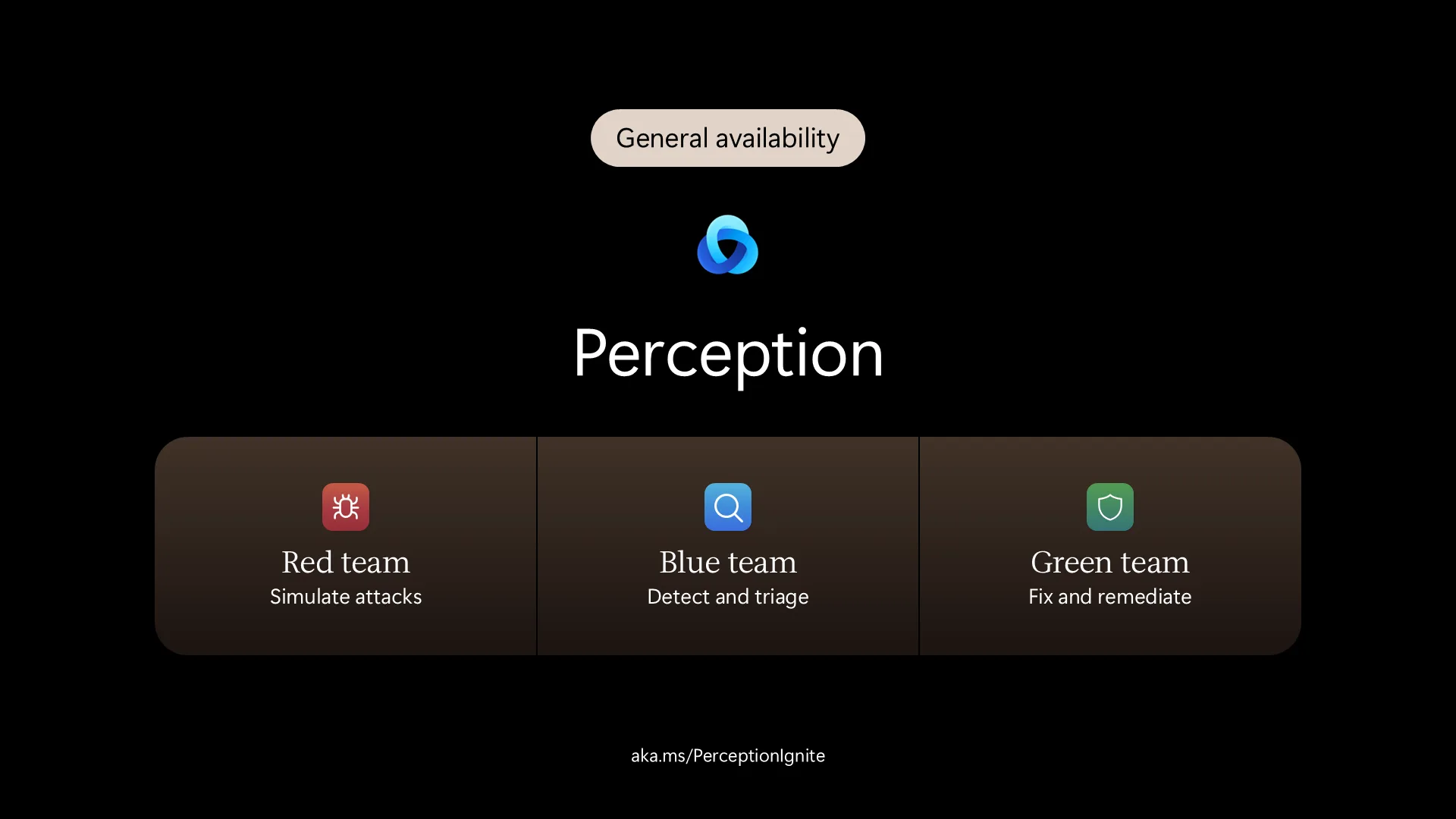 Microsoft Perception slide showing red, blue and green security agents
Microsoft Perception, as shown in Nadella's X thread.
The three roles, in Microsoft's words:
- Red agents simulate attacks and find exploitable weaknesses.
- Blue agents detect, investigate and triage threats.
- Green agents rank risks, remediate and harden.
Control is built in. Per Microsoft, agents run with least-privilege access, ask for approval before critical actions, and log every action. Playbooks can start automatically when an incident meets criteria you define. Sensors in the Microsoft Security portfolio feed the agents real-time signals, and actuators let them act on findings.
Our Ignite coverage lists the surrounding pieces from Microsoft's Book of News: a Triage Agent that Microsoft says covers about 80% of alerts in a typical Defender queue, a Web App Pen Test Agent in preview, and a pipeline called MDASH that runs 100+ specialized agents. Treat the 80% figure as a vendor claim until you test it on your own queue.
What does AgentBeam do?
AgentBeam works on the other side. Per its documentation, Beam is "a local collector and command-line interface for AI coding assistants." It normalizes agent events, redacts recognized secrets and flags patterns for review.
- Hooks.
beam agent installmerges a Beam hook into each assistant's own configuration. Adapters exist for Claude Code, Codex, Cursor, Copilot CLI, Gemini CLI, Hermes and OpenClaw, with different levels of verification. - Collector. Each hook event goes to a local collector that stores bounded records and detects patterns, such as a credential read followed by network activity.
- Scanning.
beam scan SKILL.mdandbeam scan .mcp.json --mcprun offline checks on skill files and MCP configurations. Package scanning checks npm and PyPI packages before install. - Policy. A connected workspace can set observe, advisory or enforce mode, with blocked tools, agents and command patterns.
- CVE database. agentbeam.com/cve tracks vulnerabilities in the AI tools you run.
Why are these two different problems?
Perception asks: is my environment secure, and can agents help me secure it? AgentBeam asks: what did the agents on my machines just do?
The second question is not hypothetical. In the same week as Ignite, a PyPI credential stealer hit the Microsoft Agent Framework package. A security agent in the Defender portal does not see which developer laptop installed that package through a coding agent, or what that agent did next. A hook on the developer machine does.
Forrester's early analysis of Project Perception makes the same point from the vendor side. It warns that agents are nondeterministic, that "agents can suffer cascading failures," and that excess permissions could let an agent take irreversible actions. Its advice: require observability by default, give each agent least-privilege access, and feed it clean data. Those are the controls a runtime layer provides, and Perception's own audit log and approvals cover the Perception agents only.
Microsoft now ships part of this itself. Per the Book of News, Defender runtime protection for local agents is generally available on Windows and covers Claude Code, GitHub Copilot CLI and VS Code extensions. It needs Defender for Endpoint P2. Entra Agent ID for local agents is in preview. If you are a Microsoft shop on Windows, that is the closest first-party equivalent to AgentBeam's hooks, and you should evaluate it.
Where is AgentBeam an open-source alternative?
Be precise. AgentBeam is not an alternative to Perception for security operations. It does not triage Defender alerts, run pen tests or remediate anything.
It is an open-source alternative for the agent-oversight layer. The Beam CLI is published under AGPL-3.0 on GitHub and installs with npm i @agent-beam/beam -g.
| Concern | Vendor-run agent controls | Open-source local layer |
|---|---|---|
| Can you read the detection rules? | Depends on the vendor | Yes: beam rule list, plus custom rules in ~/.beam/rules.json |
| Where do records go? | To the vendor's cloud service | Local by default; forwarding to a workspace is opt-in |
| Does it cover several vendors' agents? | Covers the products it integrates with | Hooks into several assistants, so one view spans them |
| Can you audit or fork it? | No | Yes, under AGPL terms |
| Does it need a Microsoft licence? | Yes, for example Defender for Endpoint P2 | No |
The AGPL license has consequences. If you modify Beam and offer it as a network service, you must share your changes. Read it before building on it commercially.
What are the limits of each?
Perception, from the sources we could verify:
- Part of the stack is still preview. Nadella announced GA, but the Book of News still lists the Web App Pen Test Agent and the Reduce exposure risk playbook as preview, and Secure AI agents playbooks as private preview.
- Microsoft-centred. Forrester's early write-up said it was limited to Microsoft Defender. Microsoft says the Triage Agent now handles AWS and Salesforce signals, so check current coverage for your stack.
- Cost is open-ended. Pricing is consumption-based and Microsoft's page gives no unit prices. Budget with the cost estimator, and test on a bounded playbook first.
- Demos are narrow. Forrester notes Microsoft's demos only cover hardening web apps, and that production constraints may only show after deployment.
AgentBeam, from its own docs:
- Userspace, not kernel-level. The public CLI cannot see everything an agent does outside its hooks.
- Observe by default. An unconnected Beam does not block. A heuristic finding is not proof that a command ran.
- Blocking is adapter-specific. Denial output is wired for Claude Code and Codex hooks. Other adapters do not have a verified blocking response yet.
- It does not defend your estate. No alert triage, no exposure management, no remediation.
How do you use them together?
- Use Perception for the estate. Start with one playbook, set approval for high-impact actions, and watch the cost.
- Install Beam on machines where developers run agents. Run
beam setupso it finds the assistants and wires hooks. - Start in observe mode. Read a week of recorded actions before turning on enforce.
- Scan what agents load. Run
beam scanon skills and MCP configs, and check packages before install. - Compare with Defender runtime protection if you run Windows and Defender for Endpoint P2. Decide whether you want a vendor-neutral, open-source layer, the Microsoft one, or both.
- Keep humans in the loop for every irreversible action, whichever agent proposes it.
For the wider picture, see GPT-6 Cyber vs AgentBeam, which draws the same line between a security model and a runtime guard, and cyber AI models compared, which covers Microsoft's MAI Cyber models.
Our recommendation
If your question is "how do I find and fix exposure faster with agents," evaluate Perception, with eyes open on preview parts and consumption cost. If your question is "how do I see and limit what the agents on my machines do," run an open-source layer such as Beam in observe mode first. Most teams adopting security agents will want both, because the first group of agents you must trust is the one you are about to give access to your environment.
Information on Perception is from Microsoft's Ignite 2026 live blog and Perception page, Nadella's X thread, our Ignite coverage of the Book of News, and Forrester's early analysis of Project Perception. Information on AgentBeam is from its documentation and repository as of November 18, 2026 and may change. AgentBeam is built by the explainx.ai team.