



LangChain has open-sourced Content Studio, the Slack design agent it says produced more than 3,000 internal assets, under the Apache 2.0 license. The company's write-up, How We Built Our Design Agent, and the design-agent repository describe an agent that turns a Slack thread into finished, on-brand decks, graphics and code-based video. It is a useful blueprint for anyone building a company-specific agent, and an honest look at what it took. The usage and cost numbers are LangChain's own.
TL;DR
| Question | Answer |
|---|---|
| What is it? | A Slack design agent that outputs on-brand decks, stills, charts and motion graphics |
| License? | Apache 2.0 |
| Built on? | Deep Agents and Managed Deep Agents (public beta on LangSmith Cloud) |
| Default model? | Claude Opus 5.5; OpenAI, Google, OpenAI-compatible also supported |
| Reported results | 3,000+ assets, 80+ decks, median request about $8 to about 50 cents |
| Where? | github.com/langchain-ai/design-agent |
What it does
Teammates mention the agent in a Slack thread with a brief and files, and get finished work back in the same thread. Everything is code: a slide, a chart or a video scene is a project file, so changing a value and re-rendering replaces starting over. LangChain says three in four requests come from outside marketing and 75 percent of users return weekly.
The README lists the features: a per-thread Linux sandbox with Chrome, FFmpeg, HyperFrames, D2 and fonts; about 35 skills picked by a router skill, plus a design wiki and brand pack; video through HyperFrames; storyboard and layout editing on the Paper canvas; image, voice and music tools; MCP connections to Notion, Linear, GitHub and Figma with each user signed in as themselves; async subagents; and team and personal memory.
Architecture in plain terms
- A sandbox per thread. Each Slack thread gets an isolated machine, so project files persist between turns and the agent can render its own frames and inspect them.
- A main agent plus background subagents. The main agent plans and posts progress updates; heavy parts run asynchronously.
- Skills and a wiki. LangChain's post says 48 job-scoped skills route requests to specialist workflows, and a wiki holds brand, platform and motion reference. The README counts about 35 skills in the open version, which is a reasonable difference between the internal agent and the release.
- Self-review. The agent renders and looks at its output, and code checks colours, fonts, contrast, sizes and chart math.
- Memory with limits. An early memory index grew very large, so the team capped it at a 200-line index.
For the framework underneath, see our coverage of Managed Deep Agents 0.8 and user memory. The same company's coding agent is covered in Open SWE and its model router.
The cost number, and why it matters
LangChain reports that median model spend per request dropped from about $8 in mid-September to about 50 cents. The blog does not break down every cause in the text we read, but its lessons point to two: removing hard-coded workarounds once a newer model made them unnecessary, and enforcing process rules in code rather than in long prompts. Treat the figure as LangChain's measurement on its own workload, not a benchmark you will reproduce.
It also fits a pattern we have followed: spend per task can fall sharply once an agent's harness is tuned, as in the Open SWE router that cut cost 64 percent.
How LangChain says it built it
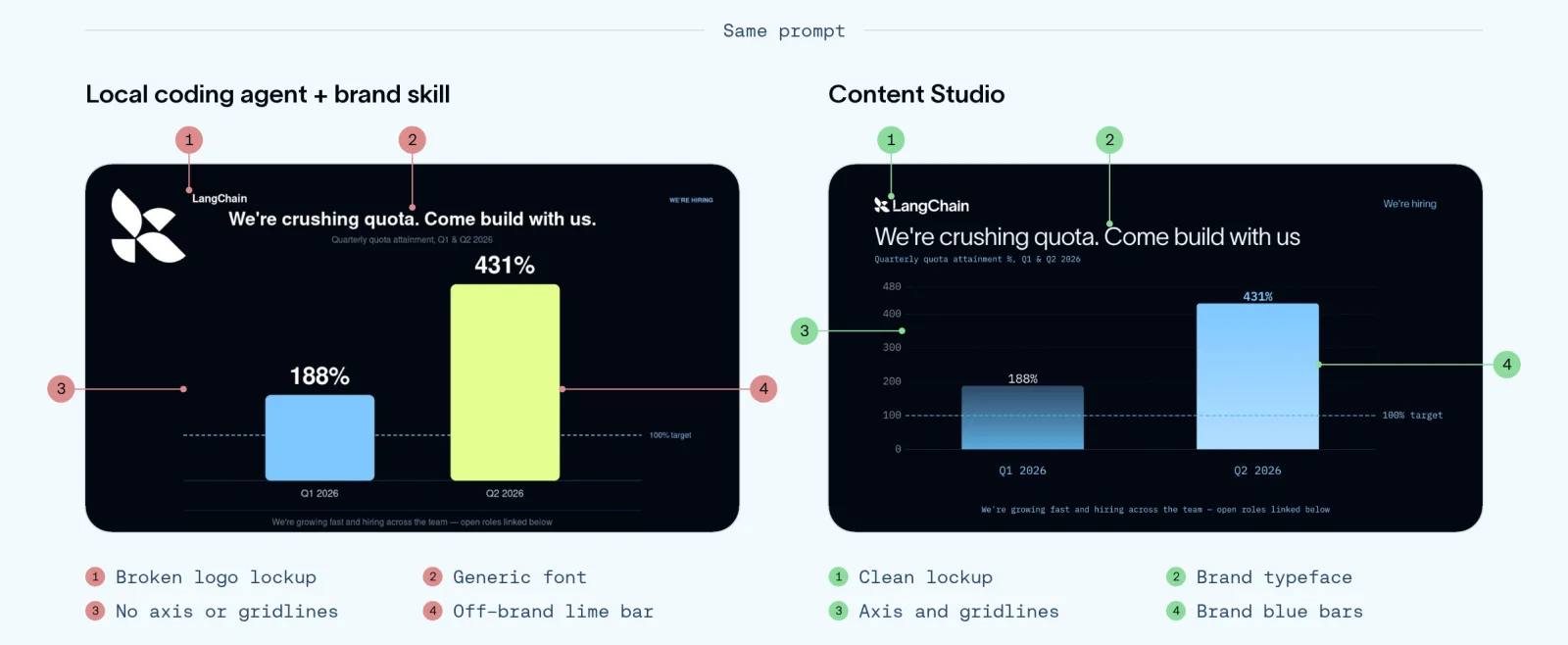 Output from a local coding agent with a brand skill compared with the Content Studio design agent from the same prompt
Image: LangChain
Output from a local coding agent with a brand skill compared with the Content Studio design agent from the same prompt
Image: LangChain
LangChain's own comparison above shows why it built a full harness instead of relying on a coding agent with a brand skill: the same prompt gave visibly different results, with the left side from a local coding agent and the right side from Content Studio. The comparison is the company's selection, so judge it against your own briefs.
- Encode taste. Designers' principles, brand rules and the reasoning behind feedback went into skills and automated checks, along with guards against common AI-design patterns.
- Build the environment. The agent got a designer's computer: editing and animation tools and a project folder it can inspect.
- Design the workflow. Work moves from storyboard to animatic to production, with approval gates before anything ships.
Lessons worth copying
- Context decides quality. Without brand and design direction, the model falls back on generic patterns.
- Workarounds expire. After a newer model arrived the team removed most hard-coded rules and kept high-level principles.
- Hard rules in code, judgment in prompts. Must-hold process rules belong in checks, creative choices in instructions.
- Long jobs need multiplayer UX. A visible plan, live status, approvals and the ability for anyone to steer mid-run.
- Cap memory. Unbounded memory indexes bloat.
These echo points in our guide on shared agent memory and the argument that agents need documentation more than memory.
How to deploy your own
From the README:
uv sync
uv run design-agent config set      # sets LANGSMITH_API_KEY and ANTHROPIC_API_KEY
uv run design-agent sandbox publish # once per workspace
uv run mda deploy                   # a test copy can use --name
For a local demo with no API keys, run uv run design-agent sandbox build and then uv run design-agent demo; this needs Docker. Optional keys enable image generation (OpenAI) and voice, music and sound (ElevenLabs). Add your brand tokens, fonts and skills under the brand pack before deploying. Generated files land in workspace/out/<thread>/.
What the repository layout tells you
The README groups the code in a way that doubles as a design checklist for any company agent.
| Area | Folders and files | What it is for |
|---|---|---|
| Core | agent.py, instructions.md, memory.py, identity.py | The agent loop, its standing instructions, memory and per-user identity |
| Capabilities | skills, tools, config, sandbox, schedules, channels | Specialist workflows, tool wrappers, the sandbox image, scheduled jobs and Slack channels |
| Assets and data | fonts, workspace, examples/brands, skill-binaries | Brand material and example brand packs |
| Docs and ops | docs, deploy/self-host, scripts, tests, OPERATIONS.md, CHANGELOG.md | Operating notes, a self-hosting path and tests |
Two details stand out. First, identity is a first-class file: with MCP connections to Notion, Linear, GitHub and Figma, each user is signed in as themselves, so the agent acts with that person's permissions rather than a shared bot token. Second, there is a learn_from_job step that records notes after each job and prunes unhelpful ones, which is LangChain's answer to memory that only grows.
When to use it, and when not to
A good fit: a team that produces many similar, brand-bound assets (launch graphics, conference decks, release videos, weekly charts), already lives in Slack, and has someone who can write down its design rules. The code-based output means a designer can step in, change a value and re-render, which keeps a human in the loop without redoing the work.
A weaker fit: one-off creative work where the brief is vague, teams without brand guidelines to encode, or organisations that cannot send content and files to third-party model APIs. LangChain's own lesson is that without direction the model produces generic output. If you have no taste to encode, the agent will not supply it.
Questions to answer before adopting:
- Who approves what ships, and where is that enforced?
- Which files and documents may the agent read, and under whose account?
- What does a request cost on your chosen model, measured on ten real briefs?
- Who maintains the skills and wiki when the brand changes?
- How will you review the agent's memory notes for sensitive information?
A starter plan for your team
- Run the local demo with Docker to see the loop without keys.
- Replace the example brand pack with your tokens, fonts and three real example assets.
- Write five skills for your five most common requests, and put the must-hold rules (logo placement, legal lines) in checks.
- Deploy a test copy with the
--nameoption to a single Slack channel. - Track edit rounds and spend per request for two weeks, then expand.
Caveats
- Young repo. When we read it, the repository had 18 stars, one fork and 44 commits, so expect rough edges.
- Platform dependence. Deployment goes through Managed Deep Agents, which is in public beta on LangSmith Cloud, and a self-host folder exists under
deploy/self-host/. - Model dependence. The default is Claude Opus 5.5; see our Opus 5.5 launch and pricing coverage for what that costs.
- Self-reported results. Engagement and cost figures come from LangChain.
- Brand risk. An agent that publishes on-brand assets needs approval gates; the design uses them, but your policy matters.
What it means for builders
Content Studio is less a design tool than a pattern: sandbox per task, skills for specialist work, a shared wiki for taste, memory with caps, and code checks for rules. If your team makes repeatable assets such as decks, social graphics or release videos, forking it and swapping in your brand is faster than designing the harness yourself. If you are choosing between an agent and a design SaaS, test both on ten real requests and compare output quality, edit time and cost.
Related reading
- LangChain Managed Deep Agents 0.8 and user memory
- LangChain Open SWE: model router and harness
- LangChain restock agent with Stripe Link
- Claude Opus 5.5 launch, benchmarks and pricing
- Shared agent memory handoff guide
- Agents need documentation, not memory
Details are from LangChain's post and repository as read on October 27, 2026 and may change.