



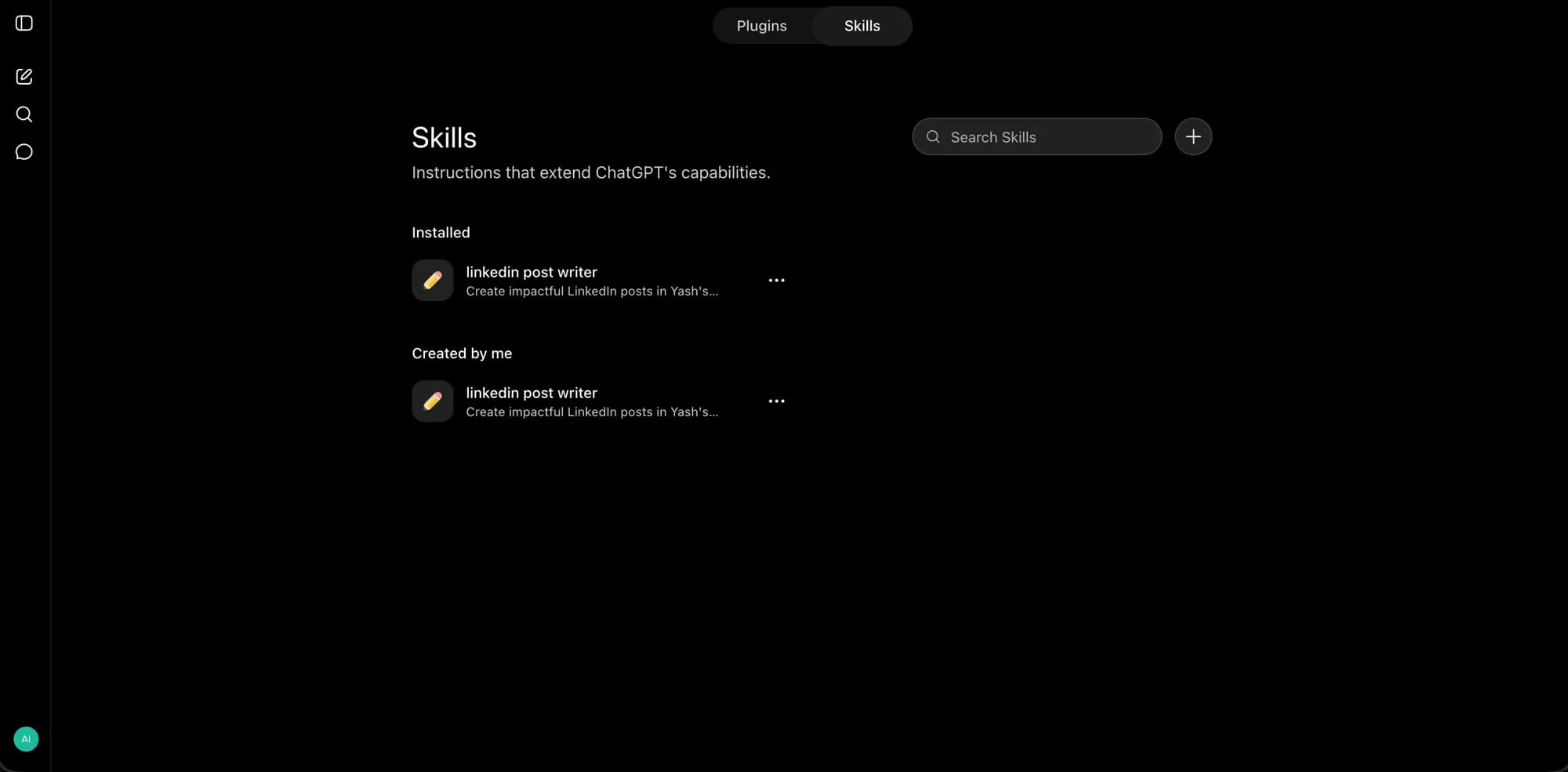
ChatGPT Skills don't live where you'd expect. There's no "Skills" item in the sidebar — the nav entry is still labeled Plugins, and Skills is a tab inside that same Plugin Directory. It's an easy thing to miss if you're looking for a dedicated menu, and it's also the first clue to how OpenAI is actually structuring this feature: Skills and Plugins are related but distinct concepts, not two names for the same thing.
The more interesting fact underneath the UI: ChatGPT Skills use the exact SKILL.md format Anthropic created and open-sourced for Claude Code in December 2025. OpenAI adopted the same standard rather than inventing a competing one, which means a skill written well enough to be format-agnostic can move between Claude Code and ChatGPT — the same portability idea covered in explainx.ai's guide to npx skills install and the Claude Code skills registry.
TL;DR
| Question | Direct answer |
|---|---|
| Where do I find Skills? | Sidebar → Plugins (still labeled that) → Skills tab in the Plugin Directory |
| Is this the same format as Claude Code skills? | Yes — the SKILL.md standard, open-sourced by Anthropic, adopted by OpenAI |
| How many ways to create one? | Three: Create with chat, Create with editor, Upload from your computer — plus Record & Replay |
| Does it load automatically? | Yes — ChatGPT can pick a matching skill on its own, or you invoke one explicitly with @skill-name |
| Who has access? | Business, Enterprise, Healthcare, and Edu workspaces — not Free, Plus, or Pro, as of the documented rollout |
| Is it free? | The feature itself has no separate charge, but it's gated to the plan tiers above |
Where Skills actually live in the UI
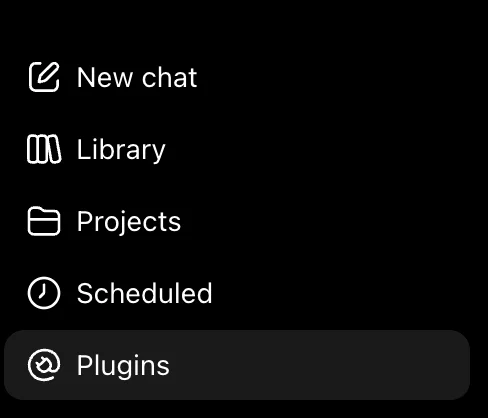 The ChatGPT sidebar showing New chat, Library, Projects, Scheduled, and Plugins — Skills has no separate entry of its own
Click Plugins in the sidebar — it sits alongside New chat, Library, Projects, and Scheduled. That opens the Plugin Directory, which has a segmented toggle at the top: Plugins and Skills. Switch to Skills, and you land on a page with two sections:
- Installed — skills you've added and use in conversations
- Created by me — skills you've authored, whether or not you've installed them
Each skill card shows an icon, a name, and a one-line description — the same information ChatGPT reads to decide when to auto-load it. A search bar and a + button sit in the top right for finding or creating new ones.
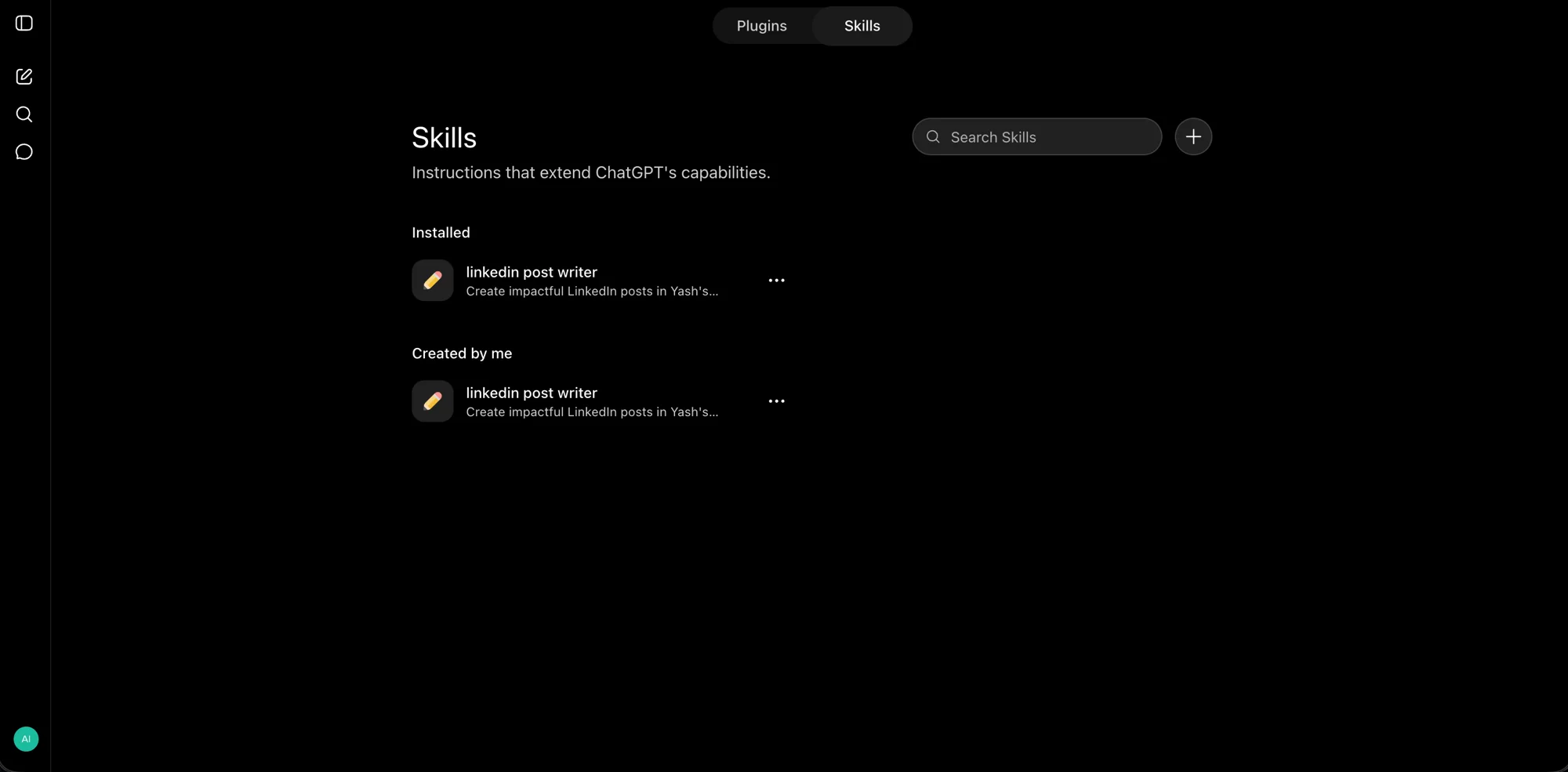 The ChatGPT Skills directory page, showing the Plugins/Skills toggle at top, an Installed section, and a Created by me section with a custom LinkedIn post writer skill
The three ways to create a skill
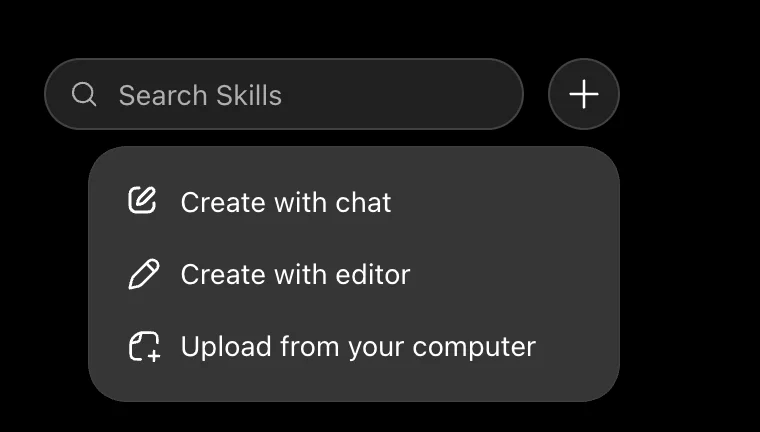 The Skills "+" menu expanded, showing three creation options: Create with chat, Create with editor, and Upload from your computer
Clicking + next to the search bar opens three options:
- Create with chat — describe what you want in plain language and let ChatGPT draft the skill for you. This is the same idea as invoking
@skill-creatordirectly inside a regular conversation (or$skill-creatorin Codex), where you walk through the goal, the workflow steps, the expected output format, and examples, and ChatGPT builds the SKILL.md content from that. - Create with editor — write the instructions yourself with direct control over the exact wording, rather than going through a conversational back-and-forth.
- Upload from your computer — bring an existing SKILL.md package, including one built for or exported from Claude Code, since it's the same underlying format.
There's a fourth path not shown in the + menu but documented separately: Record & Replay — demonstrate a workflow once, and ChatGPT turns the recording into a reusable skill. It's a lower-effort path than writing instructions from scratch when the task is easier to show than to describe.
Skills vs. Plugins: the actual distinction
This is worth being precise about, since the UI puts both under one directory:
| Skill | Plugin | |
|---|---|---|
| What it is | A SKILL.md file — name, description, instructions, and supporting resources for one task | An installable bundle that can contain skills, MCP connectors, or both |
| Scope | One specific, repeatable workflow | A larger product integration — potentially multiple skills plus live connections to other tools |
| Where it's distributed | Inside a plugin, or standalone via upload | Through the Plugin Directory, shared between ChatGPT and Codex |
In practice: a skill is the instructions. A plugin is the delivery mechanism. This maps directly onto the distinction explainx.ai covered in Agent Plugins: OpenAI's New Open Standard for Packaging AI Agent Tooling — that August 2026 standard, built with AWS, Cursor, GitHub, VS Code, and Vercel, is the cross-client packaging format for exactly this kind of bundle. ChatGPT's own Plugin Directory is OpenAI's first-party implementation of that same idea inside its own product.
How ChatGPT decides when to use a skill
Two paths, same as Claude Code's progressive-disclosure model:
- Automatic — ChatGPT reads each installed skill's name and description (without loading its full instructions) and can select a matching one when your request lines up with what the skill claims to do. This keeps context usage low: only the chosen skill's full instructions get loaded, not every skill you have installed.
- Explicit — type
@followed by the skill's name in ChatGPT (or$in Codex) to invoke it directly, bypassing the matching step entirely.
If you've used Claude Code's own skill-loading behavior, this will feel identical, because it's built on the same underlying mechanism — see What Are Agent Skills? A Complete Guide for the deeper explanation of why that loading pattern matters for context efficiency.
Who actually has access right now
This is the part that catches people off guard: Skills rolled out to ChatGPT Business, Enterprise, Healthcare, and Edu workspaces — not Free, Plus, or Pro. Enterprise workspaces had it turned on by default starting July 23, 2026, unless an admin opted out. If you're on a personal Plus or Pro subscription and don't see the Skills tab under Plugins, that's the documented reason, not a bug on your end.
Individual account access can vary as the rollout continues past its initial announcement, so the reliable way to check is your own Plugins → Skills tab rather than assuming purely from your plan tier — availability windows for gated features like this tend to widen over time without a second announcement.
Building your first skill: a practical example
The fastest way in is Create with chat. Open the + menu under Skills, choose it, and describe a task you do repeatedly — the same instinct behind explainx.ai's top skills in the Claude Code skills registry:
Build a skill that writes LinkedIn posts in my voice: punchy hook in
the first line, 3-5 short paragraphs, no more than one emoji, ends
with a specific question to drive comments. Ask me for the post
topic and any data points I want included before drafting.
ChatGPT drafts the skill, you review and refine it the same way you'd review AI-written code, and it lands in your Created by me list, ready to install. This is precisely the pattern in the screenshot most people run into first — a single-purpose skill (in this example, a "linkedin post writer" skill) installed once and reused across every future post, instead of re-explaining voice and format in every new chat.
Summary
ChatGPT Skills are OpenAI's implementation of the same SKILL.md standard Anthropic created for Claude Code — reusable, shareable task instructions, not one-off prompts. Find them under Plugins → Skills (not a dedicated sidebar item), build one via chat, an editor, upload, or Record & Replay, and expect automatic loading based on your request matching a skill's description, or explicit invocation with @skill-name. The catch: as of the documented rollout, this is a Business/Enterprise/Healthcare/Edu feature, not something Free, Plus, or Pro accounts get by default — check your own account's Plugins tab rather than assuming from your plan.
Test a skill on requests it should not handle
Create three examples before installing a new skill: a normal matching request, a similar request outside its scope, and a request missing a required input. For a LinkedIn-writing skill, those might be a supplied post topic, a private internal memo, and a request to invent a statistic. The skill should handle the first and surface the different requirements of the others.
Review the draft instructions for assumptions about tools, file paths, or access. A portable instruction format does not make every connected tool available in every host. Name required resources and explain what to do when they are absent, so the workflow fails visibly rather than inventing a result.
After revising the skill, repeat the same examples and inspect whether the change solved the specific failure. Keep the test requests with the skill's source. That makes future edits easier to assess and prevents a broad description from turning a focused workflow into something that activates on every vaguely related conversation.
Related reading
- ChatGPT Temporary Chat: save + personalize (Aug 27) — personalized Temporary chats can use plugins without writing new memories
- ChatGPT Business Premium seats — $100/seat, 5× usage (Aug 26)
- npx skills install: How to Use the Claude Code Skills Registry
- What Are Agent Skills? A Complete Guide
- Agent Plugins: OpenAI's New Open Standard for Packaging AI Agent Tooling
- Diagram Design: The Claude Code Skill That Ends Generic AI Diagrams
- Claude vs ChatGPT for Work
- What Is MCP? Model Context Protocol Complete Guide
Official sources: Skills in ChatGPT — OpenAI Help Center · Skills & Plugins — ChatGPT Learn
Screenshots in this post are from a live ChatGPT account.
UI paths, creation methods, and plan availability reflect OpenAI's documentation and rollout as of August 13, 2026. ChatGPT's interface and plan gating change frequently — check Plugins → Skills in your own account for current access.