



Google AI Studio can now provision a Maps Platform demo key, store it as GOOGLE_MAPS_PLATFORM_KEY, and render a live map in the preview when you prompt for location-aware apps, according to Google's November 9, 2026 Developers Blog post and the companion Maps in AI Studio documentation. You describe a store locator, commute planner, or 3D city tour in natural language; the studio detects geospatial intent, enables Maps APIs in-flow, and injects credentials without sending you to Cloud Console for a first test. For builders, the shift is friction: geospatial prototypes move from "create a project, enable billing, copy a key" to a single prompt loop inside the same canvas where you already iterate on Gemini-generated Android apps and other AI Studio experiments.
TL;DR: what changed on November 9, 2026
| Question | Answer per Google |
|---|---|
| What shipped? | Maps Platform integration inside AI Studio with automatic setup |
| Credential | Maps Demo Key stored as GOOGLE_MAPS_PLATFORM_KEY in app secrets |
| Cost to start | No credit card for demo path; optional link to existing Cloud billing |
| Demo quota | 100 calls per day per API, resets every 24 hours |
| Preview | Live interactive map loads in the AI Studio sandbox |
| Full API set | Requires connecting a billed Cloud project (standard Maps pricing) |
| Excluded on demo | Route Optimization, Solar, Nav Connect (billed key only) |
| Announcement | Developers Blog, Google innovation blog, developer docs |
How the flow works inside AI Studio
Google's post outlines three steps builders repeat on every new idea.
First, you prompt in AI Studio with a real-world concept. The blog uses examples like an interactive 3D tour of New York landmarks or a multi-stop road trip planner. That matches how Google has been positioning AI Studio as a prompt-to-app surface rather than a code-only IDE, similar in spirit to agentic video understanding demos where media features appear when the model recognizes the task.
Second, AI Studio enables Maps Platform in the same session. Google's developer docs say the product detects prompts that need maps, places, routes, or environmental data, then configures recommendations and skills without redirecting you through separate onboarding tabs. For newcomers, AI Studio can spin up a Google Hosted Project with a Maps Demo Key. Existing Cloud customers can still start on the demo key for a subset of APIs or attach a billed project immediately for the full portfolio.
Third, the preview sandbox runs your generated code with secrets already wired. The codelab text Google published states that credentials land under GOOGLE_MAPS_PLATFORM_KEY, so generated snippets can read the same environment variable name every time. That consistency matters when you export an app or teach a workshop: students are not debugging "wrong key name" errors on day one.
What you can build on day one
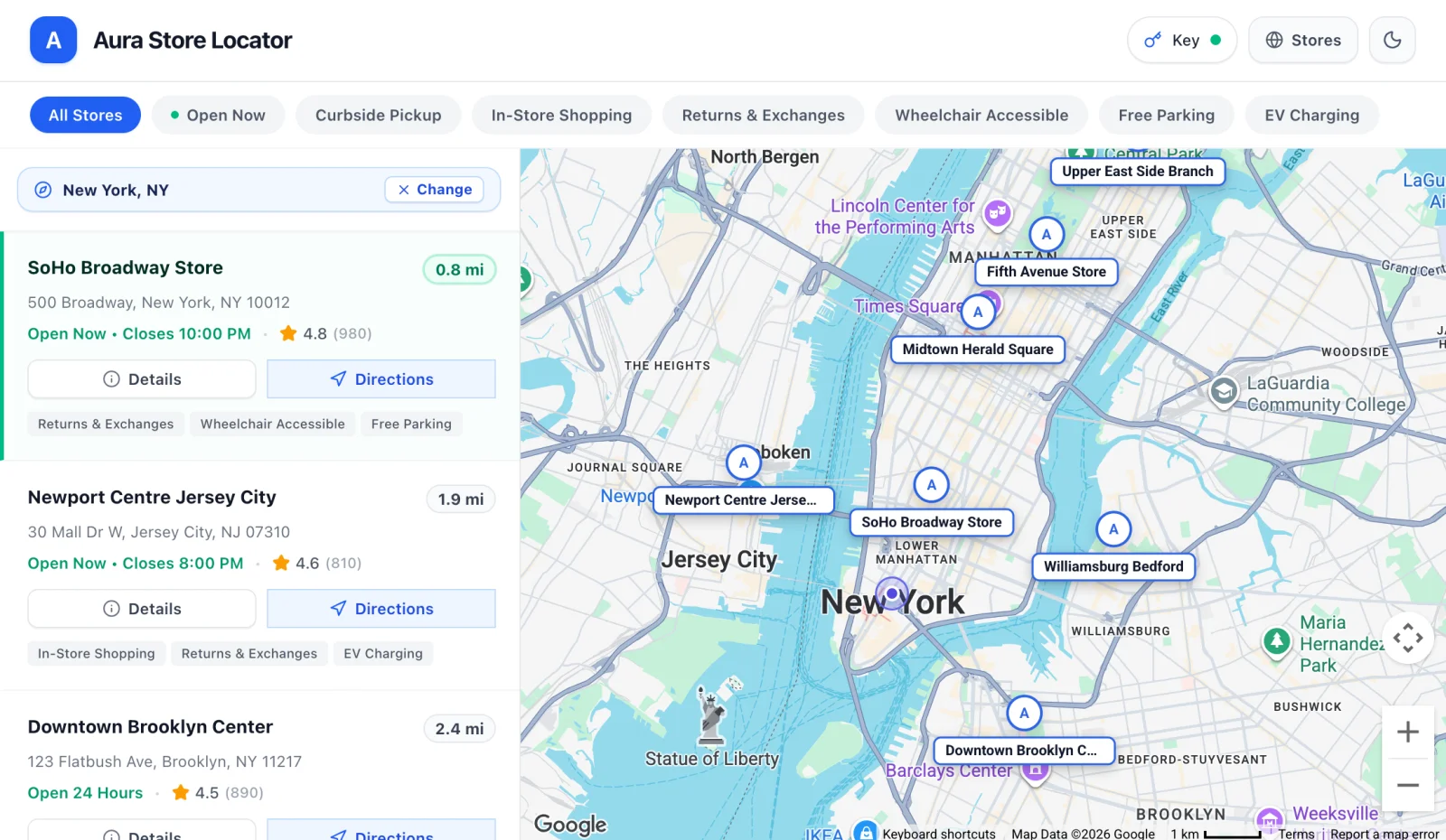 Store locator app built in Google AI Studio with Maps Platform demo key showing interactive map preview
Image: Google
Google groups the capability into four buckets on the blog:
Maps covers styled basemaps, photorealistic 3D cityscapes, and overlays on live data. Places covers conversational local search, place detail panels, and recommendations grounded in Google's place index. Routes covers multi-stop driving, commute timing, and transit-aware planning. Environment covers air quality, pollen, and weather layers on top of geography.
Those categories map to concrete APIs on the demo tier. Google's comparison table on the developer page lists Maps JavaScript API with Places UI Kit, Places API without user-generated content such as photos and reviews, Routes and Compute Routes Matrix, Geocoding, Weather, and Maps Experience agent tools. The last item is the bridge to agents: location context becomes callable from the same agent loop you use for other AI Studio apps, not a one-off iframe hack.
 Photorealistic 3D city view prototype using Google Maps Platform inside AI Studio
Image: Google
Google's blog showcases a Pet Grooming Route Optimizer multi-stop routing example and a store locator pattern. Those are the bread-and-butter prototypes product teams still spell out in PRDs: find a store, filter by amenity, draw a route, show ETA. The news is not that those apps are novel. It is that the time from prompt to working map collapsed inside Google's own builder.
Demo key versus production: the table that matters
Google published an explicit matrix on developers.google.com/maps/ai/ai-studio. The high-level split:
| Path | Billing | API coverage | Daily limits | Typical use |
|---|---|---|---|---|
| New user demo key | None | Broad demo portfolio | 100 calls per API per day | Prototyping in AI Studio |
| Existing user demo key | None | Subset tuned for prototyping | 100 calls per API per day | Quick tests without touching prod keys |
| Billed Cloud project | Required | Full Maps portfolio including Route Optimization, Solar, Nav Connect | Standard quotas plus monthly free usage | Production web and mobile |
Demo keys are governed by Google's Maps Demo Project Terms of Service, separate from ordinary Maps Platform pricing pages. That is the legal line between "classroom and hackathon" and "customer-facing SLA."
When you outgrow the cap, Google says you link Cloud billing or connect an existing billed project inside AI Studio. The demo key can keep working through the transition in some paths, but you should assume pricing and quota enforcement switch to standard Maps Platform rules once billing is attached. Our claimed-vs-verified habit applies here too: treat blog marketing copy about "worry-free building" as direction, then read the live quota page before you load-test.
Why Google bundled Maps into AI Studio now
Maps Platform has been Google's geospatial monetization layer for years. AI Studio is Google's lowest-friction Gemini builder. Connecting them attacks two problems Google keeps stating in public:
-
Dropped prototypes. Teams abandon map demos when API enablement and key restriction work eats an afternoon. Auto-provisioned demo keys remove that wall for the first hundred calls per API per day.
-
Agent-ready location tools. Google's Maps Experience agent tools sit in the same announcement as Gemini app integrations elsewhere. That aligns with the company's Connected Apps Platform story, where third-party capabilities surface inside Search and Gemini through MCP. AI Studio is where many of those partners will sketch the server that later becomes a production MCP endpoint.
There is also competitive context. Open-source stacks and rival clouds sell "chat to map" tutorials, but Google owns the data and the renderer. Putting Maps inside the default Google builder reduces the odds that a startup prototypes on a competitor's map tile API and only switches at launch.
Limits and gotchas builders should plan for
Quota exhaustion is silent until it is not. One hundred calls per API per day is generous for a single developer clicking through a demo. It is tight for a classroom of thirty students running the same assignment, or for an agent loop that geocodes every user message. Budget retries and cache geocode results in anything you promote beyond a personal test.
UGC gaps on demo Places. Google explicitly excludes user-generated content such as photos and reviews from the demo Places API path. If your prototype depends on star ratings or review text, you need the billed project row in Google's table, or you mock that layer.
No Route Optimization, Solar, or Nav Connect on demo. Enterprise logistics and energy installers should not start on the demo key if those SKUs are the product. Google flags them as billed-only.
Secret handling still counts as security work. AI Studio automates injection, but exported apps still need HTTP referrer, IP, or app restrictions on production keys. Follow the same hygiene we recommend for any Gemini API integration in production: never commit keys, rotate after leaks, and scope keys per environment.
Terms of service for minors and schools. This post is for builders, not K-12 procurement. If you ship student-facing map agents, pair this launch with your district's policy work. Google's separate K-12 AI controls story shows how tightly Google couples consumer AI surfaces to institutional rules. A Maps demo in a student AI Studio project is still governed by school admin settings once those roll out.
Step-by-step: try it without leaving the prompt canvas
Google's own codelab narrative is the checklist:
-
Open Google AI Studio and start an app prompt that clearly needs geography, for example "Build a walkable coffee shop map for downtown Austin with filters for outdoor seating."
-
When AI Studio offers Enable Google Maps, accept the Maps Demo Project terms if prompted.
-
Confirm
GOOGLE_MAPS_PLATFORM_KEYappears in secrets and that the preview pane loads a map tile without manual paste. -
Iterate in chat on styling, markers, or route logic until you hit a demo quota wall or need an excluded API.
-
Before any public launch, connect billing, move to a restricted production key, and run load tests against Maps Platform pricing.
If you already live in Antigravity or the Gemini CLI for coding agents, treat AI Studio as the visual prototype stage. Export ideas, then harden them in your repo with CI and secret managers.
How this fits Google's wider builder stack
Think of three lanes:
| Lane | Best for | Maps role |
|---|---|---|
| AI Studio prompt-to-app | Fast UI demos, classrooms, hackathons | Demo key plus live preview |
| Connected Apps plus MCP | Distribution inside Search and Gemini | Production auth plus review |
| Mobile Play personal apps | Shipping Android experiments | Separate from Maps demo, but same account ecosystem |
You might prototype a field-service route assistant in AI Studio on November 9, then register a trimmed MCP server on the Connected Apps Platform if you want Gemini to call your business logic. Maps tiles stay Google's; your differentiation stays in tools and data you attach.
For readers comparing cloud map stacks, also see how Gemini Personal Intelligence already merges Gmail, Photos, and Maps opt-in on Android. AI Studio Maps integration is the developer-facing mirror: you build the app that might later surface as a consumer Gemini experience.
What to watch next
Google did not publish a roadmap slide for international availability, enterprise SSO, or team-shared quota pools on demo keys. Watch the Maps Platform release notes and AI Studio changelog for:
- Higher demo quotas for education accounts
- Clearer split between AI Overviews grounding and custom map apps
- Agent tool schemas that match MCP tools Google accepts in Connected Apps review
If you depend on geospatial agents in production, log usage daily once students or beta users join. The demo tier is a on-ramp, not a hosting plan.
Bottom line
On November 9, 2026, Google merged Maps Platform provisioning into AI Studio: describe the app, get a demo key in secrets, preview a live map, and pay nothing until you need full APIs or higher quotas. That is a real workflow change for prototypes, not a rebranding exercise. Link billing before you ship, respect the 100-calls-per-API daily cap, and keep production keys restricted.
Details reflect Google's November 9, 2026 announcements and documentation. Quotas, API lists, and terms may change.
Related reading
- Google Connected Apps Platform preview
- Google Play personal apps from AI Studio
- Gemini agentic video understanding in AI Studio
- Google AI Studio Android app generation stats
- Gemini Personal Intelligence with Maps opt-in
- Google AI product names glossary
- Official announcement on the Developers Blog
- Maps in AI Studio documentation