



Cloudflare now lets a site owner see which personal AI agents visit their site, and set a different rule for each one. The company announced the change on November 4, 2026, in its post See the agents, set the terms. It has two parts: a new Personal Assistants traffic category in analytics, and per-agent access policies that sit on top of the Search, Agent and Training controls from this summer.
This matters because a request from a personal agent is not a crawler hit. A person asked the agent to do something, and a customer may be waiting. Blocking all of it can lose sales. Allowing all of it hides risk. Cloudflare's pitch is that visibility comes first, and policy second.
TL;DR: what changed and what did not
| Question | Answer |
|---|---|
| What is new? | A Personal Assistants category in Security Analytics and a per-agent widget |
| What can I set? | Allow (do not block), Block on pages with ads, or Block, per supported agent |
| Where? | Security Settings, section renamed AI Crawler and Agent access policies |
| Does it change Search and Training rules? | No, Cloudflare says they stay as they are |
| Can I see which user an agent represents? | Only with Account Abuse Protection, in early access |
| Is user context passed through agents yet? | No. Cloudflare lists it as a next goal |
| Which agents are supported? | Cloudflare says "supported personal agents" and the post names none |
What Cloudflare launched
Cloudflare says it maintains "the largest verified bot directory in the world" and is now bringing that data into traffic details. In Security Analytics, the Bot Analysis chart gains Personal Assistants as a category. It sits next to Verified Bot, Likely Human, Likely Automated and Automated. A security team can select it to see only personal agent traffic over time.
A new Personal Assistants widget in Top statistics lists which agents visit and how many requests each sends. Filtering on one agent updates every other widget. You then see the paths it requests, the status codes it gets, and the networks it comes from. Cloudflare says this shows whether an agent is "logging in, reading your product pages, reaching your checkout, or hitting errors on pages it cannot use."
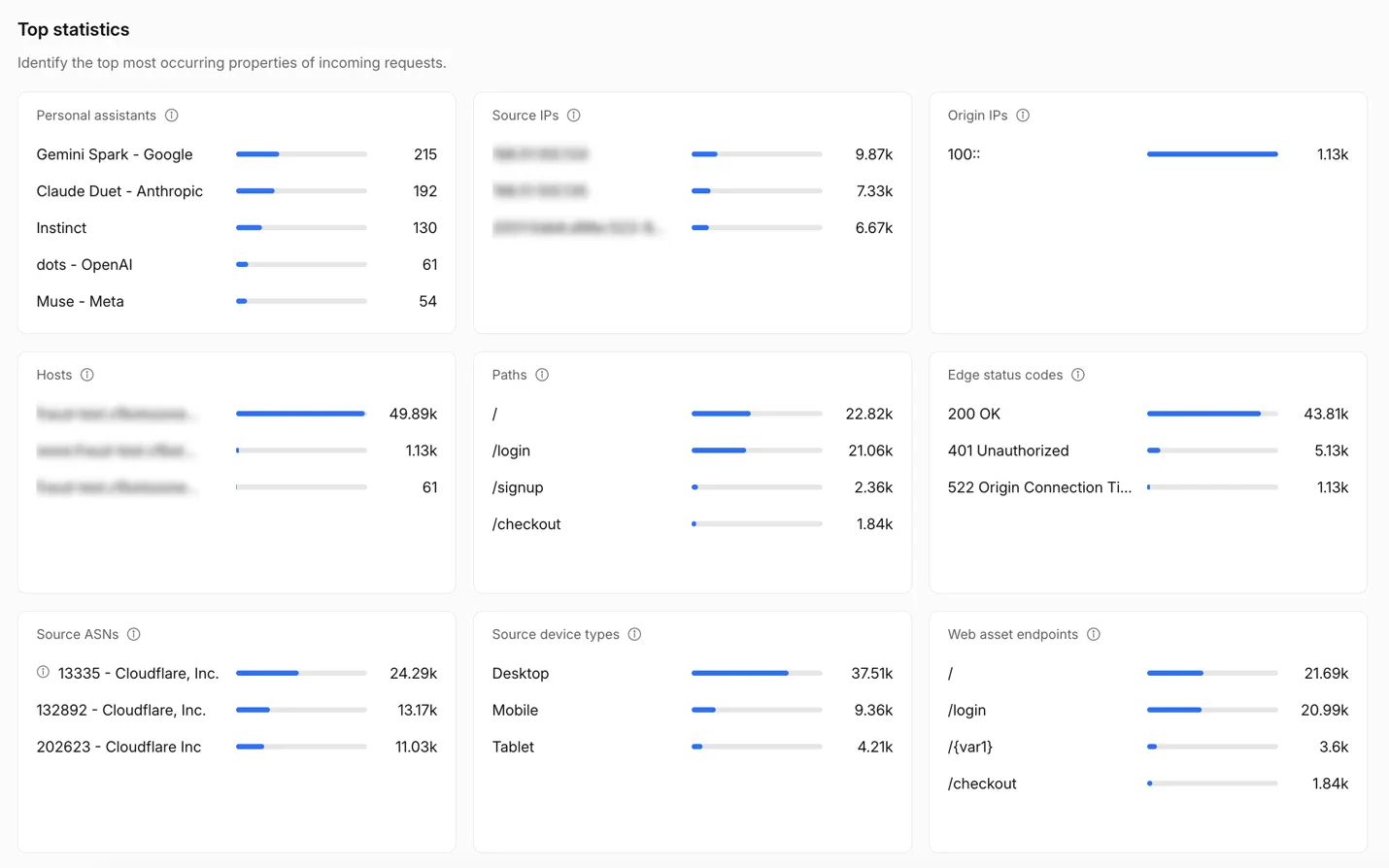 Cloudflare personal agents analytics widget listing which agents visit a site and how many requests each sends
Image: Cloudflare
The screenshot is Cloudflare's own. It shows the widget the post describes. Treat it as a product shot, not as data about any real site.
Per-agent access policies
In July, Cloudflare split AI bots into Search, Training and Agent behaviors. Our guide to that change is Cloudflare AI Traffic: Search, Agent, Training. The new release widens the Agents policy. You set an overall Agents policy, then choose a different one for each supported personal agent.
| Policy | What it does | Example use |
|---|---|---|
| Allow (do not block) | Lets the agent through | A support site that wants agents to find help articles |
| Block on pages with ads | Blocks the agent only where ads fund the page | A publisher that sells ads on article pages |
| Block | Blocks the agent everywhere | A site that wants no agent access |
Cloudflare gives a concrete combination. Set the overall Agents policy to Block on pages with ads, then choose Allow for one agent you want to welcome. The company also adds a question during new-zone onboarding: do you monetize pages with ads? It then tailors the recommended policies to the answer.
The setting is now called AI Crawler and Agent access policies. That is a rename, so anyone who followed the July setup should look under the new name.
Fraud teams get account-level views
The most concrete part for security teams is account-level data. Cloudflare says that for sites using Account Abuse Protection, which is "currently in early access," fraud teams can see which user each agent represents. The population overview shows which personal agents are active across users and how many accounts use them. Every login and sign-up event shows whether a personal agent made it, and which one.
The post describes one workflow. A fraud analyst looks at an unusual login. The account page shows whether the request came from an agent the customer has used for weeks, or from one that appeared today. If an attacker seems to be using an agent on the account, the analyst can act on that account with a WAF rule on its Hashed User ID. The agent stays unblocked for other users.
That design avoids a blunt choice. Without it, a team that sees agent-driven account takeover would have to block the agent for everyone. If you run agents or build with them, the same logic applies to your own traffic. Our post on the Personal Agent Protocol covers a related standards effort on the agent side.
Why this matters for builders and site owners
Agents are no longer a fringe source of traffic. We covered this shift in AI traffic overtakes humans, and in the small-site bot flood thread on Hacker News. The practical question has changed from "is this a bot?" to "which agent, for whom, doing what?"
Three groups should care.
- Publishers and ad-funded sites. The Block on pages with ads option fits their model. An agent that summarizes an article removes the ad view. An agent that finds the right article does not.
- Commerce and support sites. Agents that compare products or complete a purchase may be customers. Blocking them may cost revenue.
- Fraud and security teams. Agents act inside accounts. Knowing which agent made a login helps tell a helpful assistant from an attacker's tool.
If you build agents, expect more sites to treat you differently by identity. Agents that identify themselves clearly will get a fair hearing. Anonymous ones will be easy to block.
The same direction shows in Cloudflare's other agent work, such as Cloudflare Wallets for agent payments and its monetization gateway. Cloudflare is building the layer that sits between agents and sites: identity, rules and payment.
 A key passing through a narrow opening in a fence to show a per-agent permission boundary for Cloudflare personal agents
What the post does not say
The post is short on specifics. Read it with these gaps in mind.
- No agent list. It says "supported personal agents" but does not name them in the text we read. Check your own dashboard to see which agents appear.
- No traffic numbers. There is no data on how much of the traffic on Cloudflare's network comes from personal agents.
- No detection method. It does not explain how Cloudflare tells a personal agent from a verified bot or an automated client. The verified bot directory is the stated basis.
- Early access dependency. The account-level views need Account Abuse Protection, which is not generally available.
- No pricing or plan details. The post does not say which plans get which features.
Treat these as open questions. We did not find answers on the page, and we have not tested the dashboard ourselves.
The next step Cloudflare names: carrying user context
The last section of the post is its most interesting. Cloudflare says a site may recognize the agent making a request but lack what it would otherwise know about the user. That includes whether the person is an existing customer, what they authorized the agent to do, whether they have a subscription, and which protections apply.
Cloudflare says fixing this needs privacy-aware ways to carry user context through an agent, to help sites assess reputation, and to establish accountability when something goes wrong. It says it will share more as it works with agent operators. No timeline is given.
This is a hard problem. Context that helps a site also exposes the user. A design that passes "this is a paying customer" must not also leak who the customer is to every site. Standards work such as the protocol in our Personal Agent Protocol post tries to define these handoffs, and Cloudflare's own direction suggests it will take part.
How to act this week
- Open Security Analytics and look for the Personal Assistants category in Bot Analysis. If it is empty, your traffic may not include supported agents yet.
- Review the Top statistics widget. Note which agents hit login, checkout and error pages.
- Go to Security Settings and find AI Crawler and Agent access policies. Confirm that your July Search and Training choices are unchanged.
- Decide a default. Ad-funded sites can start with Block on pages with ads. Support and commerce sites may start with Allow for agents they recognize.
- If you have Account Abuse Protection access, test the account views on a few known customers.
- Treat agent traffic that touches accounts as a security signal. If you also run coding agents inside your own company, a tool such as AgentBeam covers the other side: stopping your own agents before they take dangerous actions.
Limits of this coverage
We read Cloudflare's announcement and our earlier coverage of its July policy change. We did not find independent hands-on tests on publication day, and we have not run the new dashboard. The claims about capability come from Cloudflare. Check the product against your own zone before you change production rules.
Related reading
- Cloudflare AI Traffic: Search, Agent, Training
- AI traffic overtakes humans
- Small-site AI bot traffic flood
- Personal Agent Protocol
- Cloudflare Wallets for AI agent payments
- Cloudflare monetization gateway and x402
- Official: Cloudflare announcement and Your site, your rules
Details are accurate as of November 4, 2026. Cloudflare dashboards and plan access can change.