ScrAPI lets you scrape any website with ease, bypassing bot detection and captchas using residential proxies for reliabl
 by deventerprisesoftware·
Fetch and extract information from websites automatically
Example: Research competitor pricing, scrape product reviews, monitor news mentions
Automate 5-10 hours/week of manual web research
Track website changes, new content, price updates
Example: Monitor competitor blog for new posts, track stock availability, watch for pricing changes
Stay informed without manual checking, never miss important updates
Extract structured data from multiple websites
Example: Compile product listings from 10 e-commerce sites, aggregate job postings, collect real estate data
Build datasets 100x faster than manual copying
Interact with services that don't offer APIs
Example: Check form submissions, validate website functionality, test user flows
Automate interactions with any website, even without API
Oxylabs Web Scraping
Integrate with Oxylabs web scraping for real-time data extraction, cleaning, and analysis. Easily scrape any website for
AgentQL
AgentQL lets you scrape any website and extract structured data to JSON easily—no custom web scraping code needed.
ZoomEye MCP Server
ZoomEye MCP Server — lightweight ZoomEye client to query the ZoomEye API for fast internet asset search and discovery.
Mini Search
Mini Search offers a lightweight google web search api solution, connecting effortlessly to OpenAI or OpenRouter.ai sear
Google Custom Search
Integrate Google Custom Search API for real-time web searches, fact-checking, and research using reliable Google data.
According to our notes, ScrAPI benefits from clear Model Context Protocol framing — fewer ambiguous “AI plugin” claims.
ScrAPI reduced integration guesswork — categories and install configs on the listing matched the upstream repo.
I recommend ScrAPI for teams standardizing on MCP; the explainx.ai page compares cleanly with sibling servers.
ScrAPI has been reliable for tool-calling workflows; the MCP profile page is a good permalink for internal docs.
ScrAPI reduced integration guesswork — categories and install configs on the listing matched the upstream repo.
ScrAPI has been reliable for tool-calling workflows; the MCP profile page is a good permalink for internal docs.
Strong directory entry: ScrAPI surfaces stars and publisher context so we could sanity-check maintenance before adopting.
ScrAPI is a well-scoped MCP server in the explainx.ai directory — install snippets and categories matched our Claude Code setup.
Useful MCP listing: ScrAPI is the kind of server we cite when onboarding engineers to host + tool permissions.
We wired ScrAPI into a staging workspace; the listing’s GitHub and npm pointers saved time versus hunting across READMEs.
showing 1-10 of 30
Share your MCP server with the developer community
Select a client to integrate this server.
Claude Desktop configuration
{
  "mcpServers": {
    "scrapi": {
      "command": "npx",
      "args": [
        "-y",
        "@deventerprisesoftware/scrapi-mcp"
      ],
      "env": {
        "SCRAPI_API_KEY": "\u003CYOUR_API_KEY\u003E"
      }
    }
  }
}Scrapes websites that block regular bots by using residential proxies and automated captcha solving. Returns content in HTML or Markdown format.
ScrAPI is an official MCP server published by deventerprisesoftware that provides AI assistants with tools and capabilities via the Model Context Protocol. ScrAPI lets you scrape any website with ease, bypassing bot detection and captchas using residential proxies for reliabl It is categorized under search web.
You can install ScrAPI in your AI client of choice. Use the install panel on this page to get one-click setup for Cursor, Claude Desktop, VS Code, and other MCP-compatible clients. This server runs locally on your machine via the stdio transport.




MCP server for using ScrAPI to scrape web pages.
ScrAPI is your ultimate web scraping solution, offering powerful, reliable, and easy-to-use features to extract data from any website effortlessly.
<a href="https://glama.ai/mcp/servers/@DevEnterpriseSoftware/scrapi-mcp"> <img width="380" height="200" src="https://glama.ai/mcp/servers/@DevEnterpriseSoftware/scrapi-mcp/badge" alt="ScrAPI Server MCP server" /> </a>scrape_url_html
url (string, required): The URL to scrapebrowserCommands (string, optional): JSON array of browser commands to execute before scrapingscrape_url_markdown
url (string, required): The URL to scrapebrowserCommands (string, optional): JSON array of browser commands to execute before scrapingBoth tools support optional browser commands that allow you to interact with the page before scraping. This is useful for:
Commands are provided as a JSON array string. All commands are executed with human-like behavior (random mouse movements, variable typing speed, etc.):
| Command | Format | Description |
|---|---|---|
| Click | {"click": "#buttonId"} | Click an element using CSS selector |
| Input | {"input": {"input[name='email']": "value"}} | Fill an input field |
| Select | {"select": {"select[name='country']": "USA"}} | Select from dropdown (by value or text) |
| Scroll | {"scroll": 1000} | Scroll down by pixels (negative values scroll up) |
| Wait | {"wait": 5000} | Wait for milliseconds (max 15000) |
| WaitFor | {"waitfor": "#elementId"} | Wait for element to appear in DOM |
| JavaScript | {"javascript": "console.log('test')"} | Execute custom JavaScript code |
[
  {"click": "#accept-cookies"},
  {"wait": 2000},
  {"input": {"input[name='search']": "web scraping"}},
  {"click": "button[type='submit']"},
  {"waitfor": "#results"},
  {"scroll": 500}
]
Need help finding CSS selectors? Try the Rayrun browser extension to easily select elements and generate selectors.
For more details, see the Browser Commands documentation.
Optionally get an API key from the ScrAPI website.
Without an API key you will be limited to one concurrent call and twenty free calls per day with minimal queuing capabilities.
The ScrAPI MCP Server is also available in the cloud over SSE at https://api.scrapi.tech/mcp/sse and streamable HTTP at https://api.scrapi.tech/mcp
Cloud MCP servers are not widely supported yet but you can access this directly from your own custom clients or use MCP Inspector to test it. There is currently no facility to pass through your API key when connecting to the cloud MCP server.
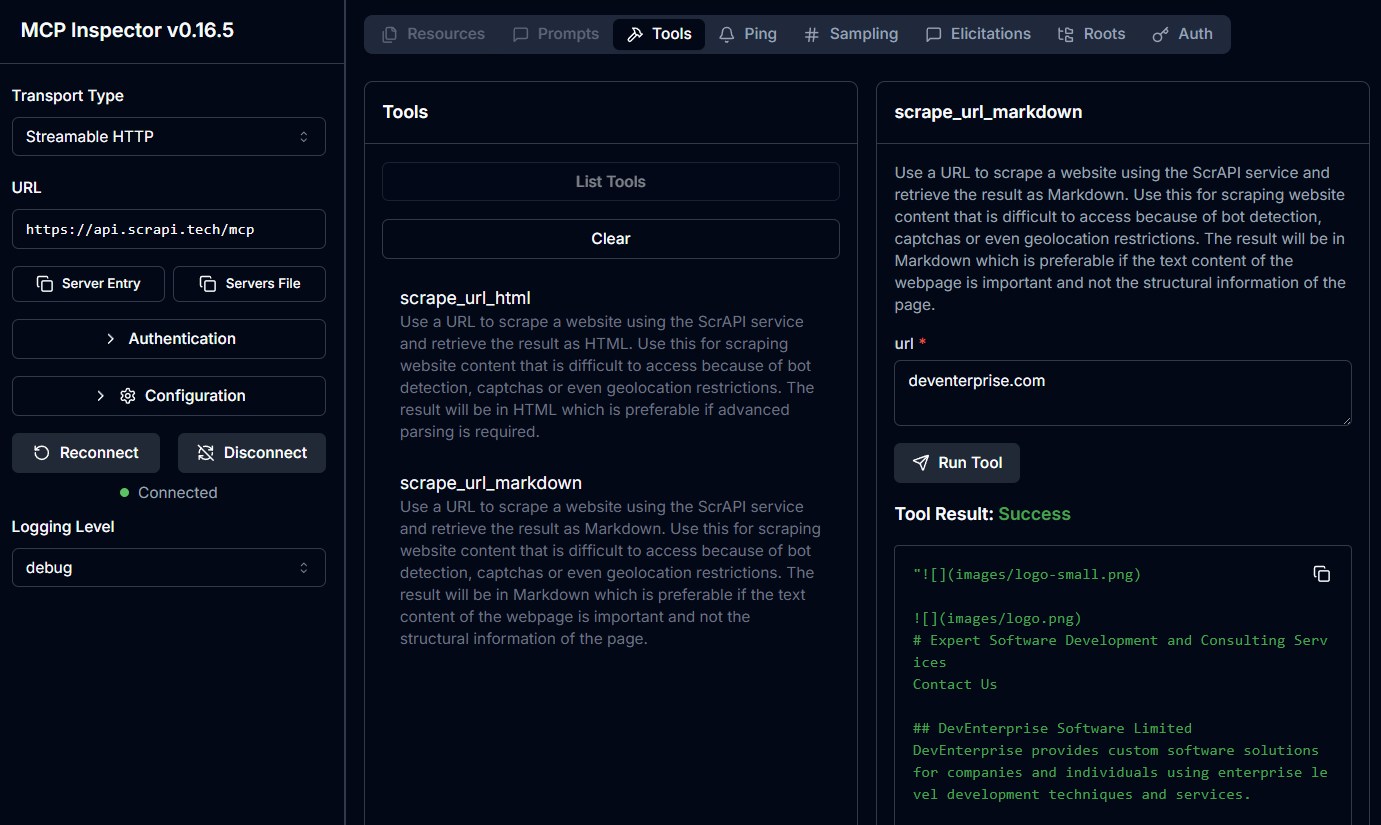
Add the following to your claude_desktop_config.json:
{
  "mcpServers": {
    "ScrAPI": {
      "command": "docker",
      "args": [
        "run",
        "-i",
        "--rm",
        "-e",
        "SCRAPI_API_KEY",
        "deventerprisesoftware/scrapi-mcp"
      ],
      "env": {
        "SCRAPI_API_KEY": "<YOUR_API_KEY>"
      }
    }
  }
}
{
  "mcpServers": {
    "ScrAPI": {
      "command": "npx",
      "args": [
        "-y",
        "@deventerprisesoftware/scrapi-mcp"
      ],
      "env": {
        "SCRAPI_API_KEY": "<YOUR_API_KEY>"
      }
    }
  }
}
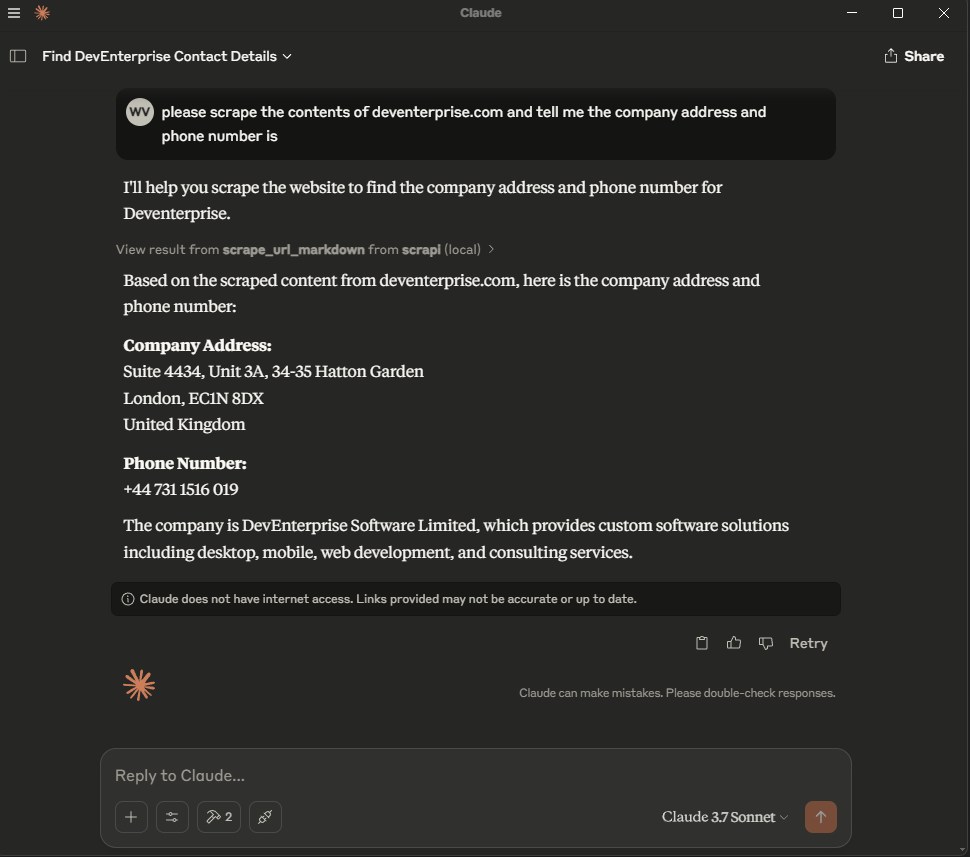
Docker build:
docker build -t deventerprisesoftware/scrapi-mcp -f Dockerfile .
This MCP server is licensed under the MIT License. This means you are free to use, modify, and distribute the software, subject to the terms and conditions of the MIT License. For more details, please see the LICENSE file in the project repository.
Time estimate: 20-40 minutes including configuration and testing
Prerequisites
Steps
Troubleshooting
✓ Do
✗ Don't
💡 Pro Tips
Architecture
MCP server handles HTTP requests, HTML parsing, JavaScript rendering (if headless browser), and returns structured data to Claude.
Protocols
Compatibility
✓ Use when
Use for research automation, content monitoring, data aggregation from multiple sources, and when official APIs don't exist. Best for read-only information gathering.
✗ Avoid when
Avoid for sites with APIs (use API instead), sites that explicitly forbid scraping, when data is copyrighted, or for login-required content without proper authorization.



