



Pruna AI has released P-H3-Image, an open image generation and editing model built on MiniMax-H3, the video model MiniMax opened in July. According to its Hugging Face model card, it renders 8-megapixel images in 8 steps with no classifier-free guidance, edits with up to 8 input images, and ships with a prompt upsampler. A ComfyUI build brings the memory need down to about 21 GB of VRAM. The catch is the license: the card says it excludes the US, EU, UK and South Korea unless you hold a separate MiniMax license.
That mix makes this release worth a careful read. It is a real technical result, since a video model has been turned into a still-image model. It is also a license puzzle that decides who can legally use it.
TL;DR: P-H3-Image at a glance
| Question | Answer from the model card |
|---|---|
| Who made it? | Pruna AI, an AI model efficiency company, on top of MiniMax-H3 |
| What does it do? | Text-to-image, and image editing with 1 to 8 input images |
| How many steps? | 8 steps, no CFG, no negative prompt |
| Resolution | 8 MP for text-to-image; 4 or 8 MP for edits |
| Size | 33.1B-parameter transformer, 4B text encoder, VAE, prompt upsampler; 100 GB in bf16 |
| GPU memory (bf16, 8 MP) | About 101 GB with the upsampler, 83 GB without |
| Smallest ComfyUI set | About 20 GB download, about 21 GB VRAM at 8 MP |
| Speed (one B200, Pruna's number) | About 9 s per image; upsampler adds 6 to 11 s |
| License | MiniMax H3 Community License; excludes US, EU, UK, South Korea without a separate license |
| Video or audio? | No. Single images only |
What did Pruna actually release?
Two Hugging Face repositories. PrunaAI/P-H3-Image holds the diffusers pipeline. PrunaAI/P-H3-Image-Comfy holds ComfyUI files in bf16, int8 and 4-bit formats. The first was created on October 27, 2026, according to the Hugging Face API, and had 33 likes and 111 downloads when we checked on November 3. Those are early numbers, not a verdict.
The card describes the model as "based on" MiniMax-H3 and lists the relation as a finetune. MiniMax-H3 is a multimodal model for text, image, audio and video generation. Our MiniMax H3 launch coverage covers that base release, and a later developer projects guide shows what people built with it. P-H3-Image is the first widely visible spin-off that drops motion and sound and keeps the still frame.
Pruna's own site also links a launch post at pruna.ai/blog/oss-p-h3-image-launch. When we fetched it, the page returned only the company's generic landing content, so this article relies on the model card for every number.
How does an 8-step image model at 8 megapixels work?
The headline spec is 8 steps. Most open diffusion models need 20 to 50 sampling steps, or they use classifier-free guidance, which runs the network twice per step. P-H3-Image uses neither guidance nor a negative prompt. The card says the 8 steps run over the checkpoint's own sampling grid, and you can pass your own sigmas to use another one.
The speed claim follows from that. On one NVIDIA B200 in bf16, at batch size 1 and 8 MP, with no compilation or offloading, Pruna reports about 9 seconds for text-to-image when the prompt is written as is. The prompt upsampler adds 6 to 11 seconds and raises peak memory from 83 GB to 101 GB. These figures come from Pruna. We have not reproduced them, and the card does not publish quality benchmarks against other models.
This is a common pattern in efficient generation. Few-step models trade some flexibility for latency. We covered the same direction in Apple's four-step normalizing trajectory image models and in the FastH3 Omni 8-step video work, which also builds on the same H3 base.
Why does resolution matter so much here?
The card says P-H3-Image works best at 8 MP. At 2 and 4 MP it can still produce good images, but artifacts get more frequent, especially in faces, hands and small details. Pruna publishes a table of 8 MP sizes by aspect ratio, from 2912 by 2912 for 1:1 to 3872 by 2176 for 16:9. Edits work best at 4 or 8 MP.
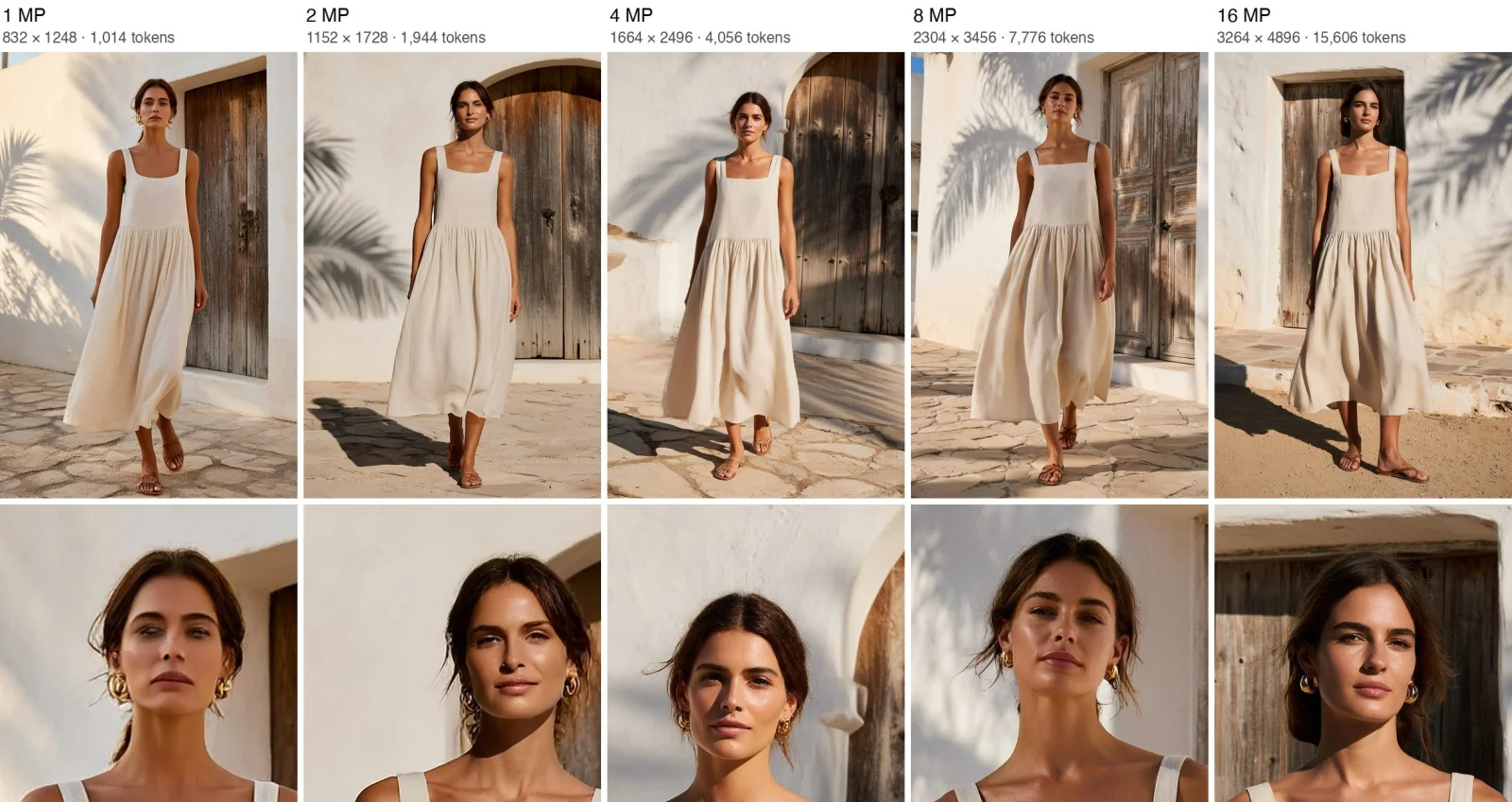 P-H3-Image 8 megapixel output compared with lower resolutions, same prompt and seed
Image: Pruna AI
Pruna's own figure shows one prompt and seed from 1 to 16 MP. At 1 MP the face looks smooth and waxy. From 8 MP on, skin texture, stray hairs and gold earrings come through. Pruna adds that the composition shifts between sizes because the noise changes with image size. In practice this means you should not judge the model from small previews. It also means a smaller VRAM budget costs you quality if you cut resolution to fit.
How do you prompt it?
Pruna says P-H3-Image is sensitive to prompting. It renders full, specific prompts much better than short requests. That is why the pipeline runs a prompt upsampler, based on Qwen3.5-9B, on every request. The upsampler writes a detailed prompt for the chosen aspect ratio, or an edit brief for edits. The rewritten prompt comes back as an output, so you can inspect it.
If you write prompts by hand, the card gives four rules:
- Say what the image is. Open with one sentence naming the real object, such as a photograph by an experienced street photographer, a two-color risograph print, or a frame from a Japanese anime TV series.
- Describe one scene. Give a viewpoint, one main subject in a moment, a few supporting elements, and light with a source and a direction.
- Spell out every word. Text without its exact words turns into pseudo-text. Quote each string, keep it short, say where it sits, and end with "no other text".
- Leave out hype words. Pruna lists stunning, epic, cinematic, vibrant, hyper-detailed, 8k and masterpiece as words that push the output toward a glossy, oversaturated, airbrushed look.
The card says the model is strongest at photorealism, film and editorial looks, and graphic styles with short quoted text. Styles that work especially well include documentary photography, portraits with real skin texture, TV-frame anime, ink and charcoal drawings, and screen-printed posters. For comparison with other open image models and their text rendering, see our posts on Moss-Image and Flux 3 Klein.
What can it do for editing?
Editing is the second half of the release. You pass one image, or a list of up to 8. Picture 1 is the image to edit. The others are references that the request can name as Picture 2, Picture 3 and so on. The upsampler turns a short request such as "make the pickup truck red" into a brief that names what to keep and what to change.
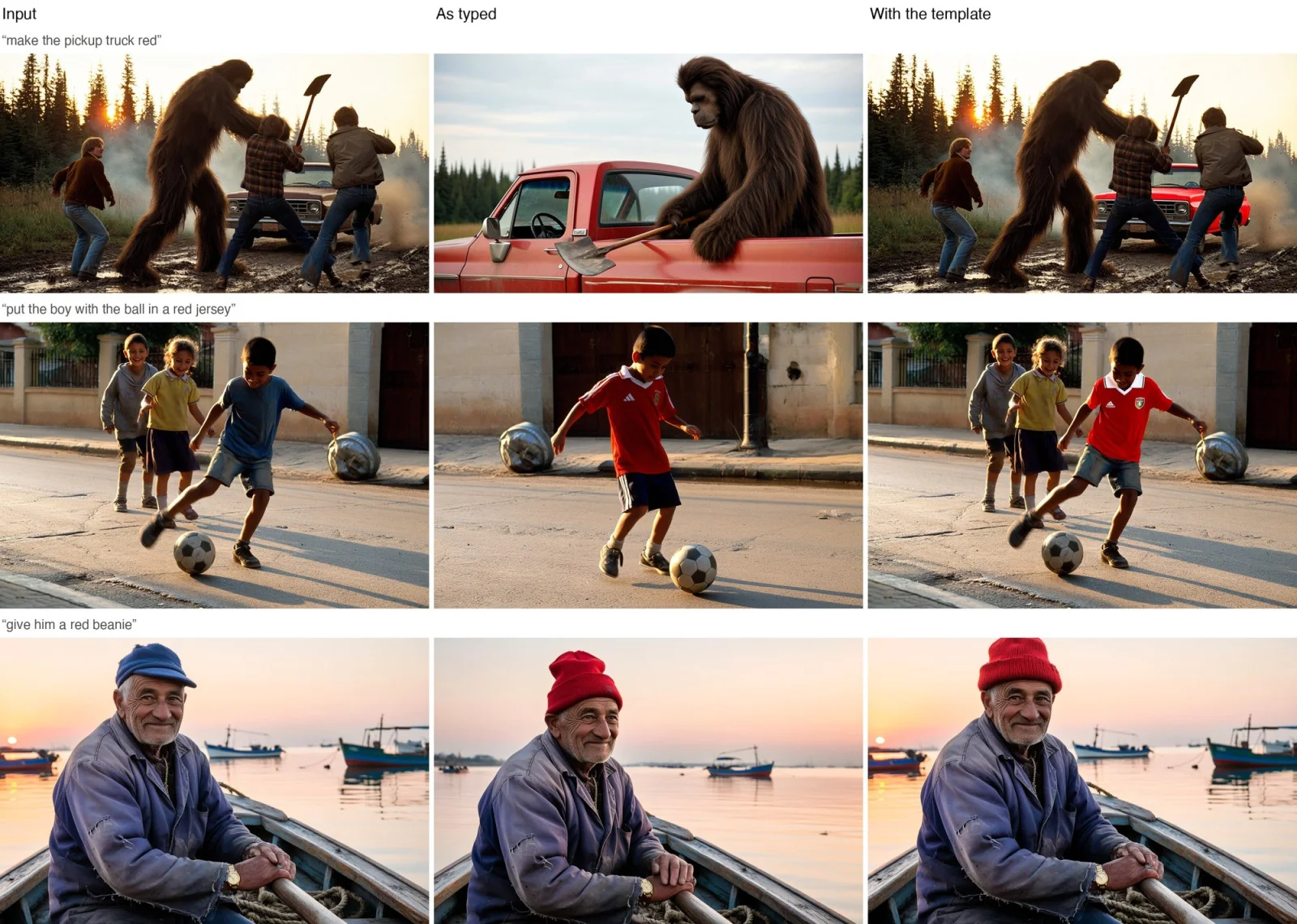 P-H3-Image open image editing example comparing a typed edit request with an edit prompt that names what to keep
Image: Pruna AI
Pruna's figure compares the same request typed as is and written as an edit prompt. As typed, the model often redraws the whole scene. As an edit prompt that names what must stay, only the requested part changes. If you skip the upsampler, the card recommends this form:
Edit <Picture 1>. <The change, described as the finished result>. Keep <everything that must stay> exactly as it is.
Three tips follow from it. Point to the exact object ("the old man's faded blue cap" rather than "his hat"). Describe the result, not the action, and size new things against something already in the frame. And list what must not change, such as faces, poses, background and light. Pruna also shows multi-image composition, where eight reference portraits become one dinner-party scene from a one-sentence request. Those are Pruna's showcase outputs, so treat them as best cases.
How do you run it?
The diffusers route is short. The card uses ModularPipeline from diffusers:
import torch
from diffusers import ModularPipeline

pipe = ModularPipeline.from_pretrained("PrunaAI/P-H3-Image")
pipe.load_components(dtype=torch.bfloat16)
pipe.to("cuda")

image = pipe(
    prompt="A German Expressionist oil painting of a Berlin street at night, gaunt figures hurrying past a glowing gas lamp.",
    height=3360, width=2496,
    output="images",
)[0]
image.save("berlin.png")
You need a recent diffusers installed from source, per the card. At 8 MP in bf16 that wants a GPU with about 101 GB, such as one H200 or B200, or about 80 GB with offloading. The card shows enable_auto_cpu_offload for that case.
What if you only have a consumer GPU?
Use the ComfyUI repository. ComfyUI supports the model natively with no custom nodes, according to the card. Every component comes in bf16 and in ComfyUI's native int8 and 4-bit formats. The smallest set is a 20 GB download that peaks at about 21 GB of VRAM at 8 MP, against 143 GB of weights for MiniMax-H3. That puts it inside a 24 GB card, though the card does not publish quality loss numbers for the 4-bit files. Expect some trade-off and test on your own prompts.
The license catch: who can legally use it?
This is the part many readers will miss. The model card says P-H3-Image is released under the MiniMax H3 Community License. In its words, the license "excludes the European Union, the United Kingdom, the Republic of Korea and the United States unless you have a separate license from MiniMax". Products built on it must show "Powered by MiniMax H3". The text encoder's Qwen3-VL-4B parts and the prompt upsampler are under Apache 2.0.
We read this as the card states it. We did not review the full license text, and we are not lawyers. Two practical points follow. First, the model is "open" in the sense that weights are downloadable, not in the sense of a permissive license such as Apache 2.0. Second, a team in the US or EU that wants to ship a product on it needs to talk to MiniMax first. If you need a clean commercial license, compare it with open image models under standard terms, for example the Apache-licensed Moss-Image line covered above.
What are the limits?
The card lists limitations itself. Prompting matters a lot: hype words and very long prompts make images worse, and very short prompts give weak results without the upsampler. It handles single images only, with no video or audio, which is a step back from its parent. Lower resolutions show more artifacts. And the memory bar in bf16 is high enough that only data-center GPUs run it comfortably.
Notably absent: independent benchmarks. Pruna publishes example images and its own timing, but no side-by-side score against Flux, Qwen-Image or others. Until someone runs those tests, the quality claim rests on Pruna's examples.
What should builders do with this?
- If you are outside the excluded regions and want fast 8 MP output, try the ComfyUI int8 files first and compare with the 4-bit set on your own prompts.
- If you are in the US or EU, treat it as a research reference. Use it to learn how a video backbone can be adapted for stills, and pick a model with clear terms for production.
- If you edit with references, the 8-image input and the upsampler's "keep this exactly as it is" style are the interesting parts to test against your current workflow.
- Watch for independent tests. Early likes and downloads are low, and no third-party quality numbers exist yet.
Specs and license terms reflect the Hugging Face model cards as read on November 3, 2026, and may change.
Related reading
- MiniMax H3 open video model and Hailuo
- MiniMax H3 Max API and local developer projects
- FastH3 Omni: open 8-step reference-to-video with audio
- Apple's four-step normalizing trajectory image generation
- Moss-Image: open text-to-image with text rendering
- Flux 3 Klein open weights guide
- Bria FIBO 2.0: claimed vs verified
- Official: P-H3-Image on Hugging Face, ComfyUI files, MiniMax-H3