




NVIDIA published Part 1 of a two-part series on October 23, 2026 about the Global Performance Tuner in TensorRT 11.1. The one-line version: instead of trusting a single built-in recipe for turning your model into a GPU engine, TensorRT can now build the engine along several "build routes," measure each one end to end, throw out any that miss your accuracy tolerance, and keep the fastest.
Part 1 is conceptual. It contains no speed-up numbers, so this post explains the idea, what NVIDIA's TensorRT 11.1.0 release notes confirm about the feature, why it matters for anyone serving models, and what to wait for before claiming a gain.
Quick reference
| Item | What NVIDIA says |
|---|---|
| Feature | Global Performance Tuner |
| Version | TensorRT 11.1 |
| What it does | Searches build routes, benchmarks candidate engines, optionally validates accuracy, selects the fastest valid route |
| How you reach it | Through trtexec, per the release notes |
| Three principles | Accuracy-aware tuning, customizable build routes, a large solution space |
| Evidence in Part 1 | A chef analogy and a mathematical framework; no benchmark results |
| Next | Part 2: algorithm, architecture design and best practices |
The problem: one recipe does not fit every model
When TensorRT builds an engine, NVIDIA explains, it makes interdependent decisions about graph transformations, fusion, implementation selection, memory placement and quantization. It calls this process scheduling. Different choices can preserve what the model computes yet produce very different inference speed.
The difficulty is that no single strategy wins everywhere. A transformation that speeds up one network can slow another. A kernel that is fastest in isolation can interact badly with fusion, tensor layouts or memory traffic elsewhere in the graph. Aggressive choices can also push numerical results past what an application tolerates. These effects often show up only after the whole engine is built and measured.
NVIDIA's chef analogy makes the point: a chef whose one standard dish pleases three regulars (spice, sweet-and-sour, extra salt) hits trouble when a fourth customer dislikes spice. Removing chili risks the first customer. The scalable fix is to keep the base dish and make the seasonings configurable, then offer samples to a new customer and keep the favorite.
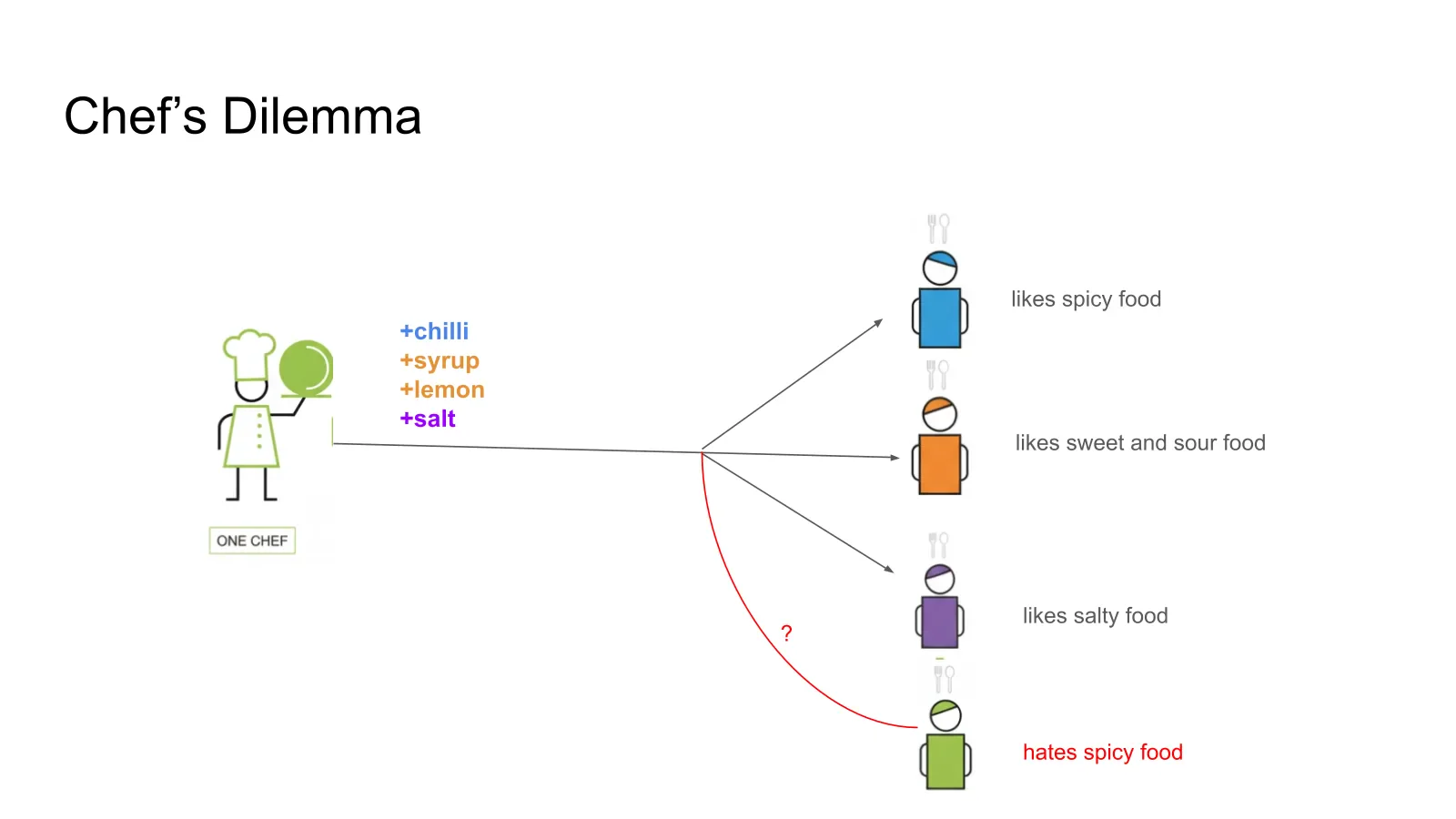 NVIDIA's chef analogy: one fixed recipe cannot satisfy four customers with conflicting tastes
Image: NVIDIA
NVIDIA's chef analogy: one fixed recipe cannot satisfy four customers with conflicting tastes
Image: NVIDIA
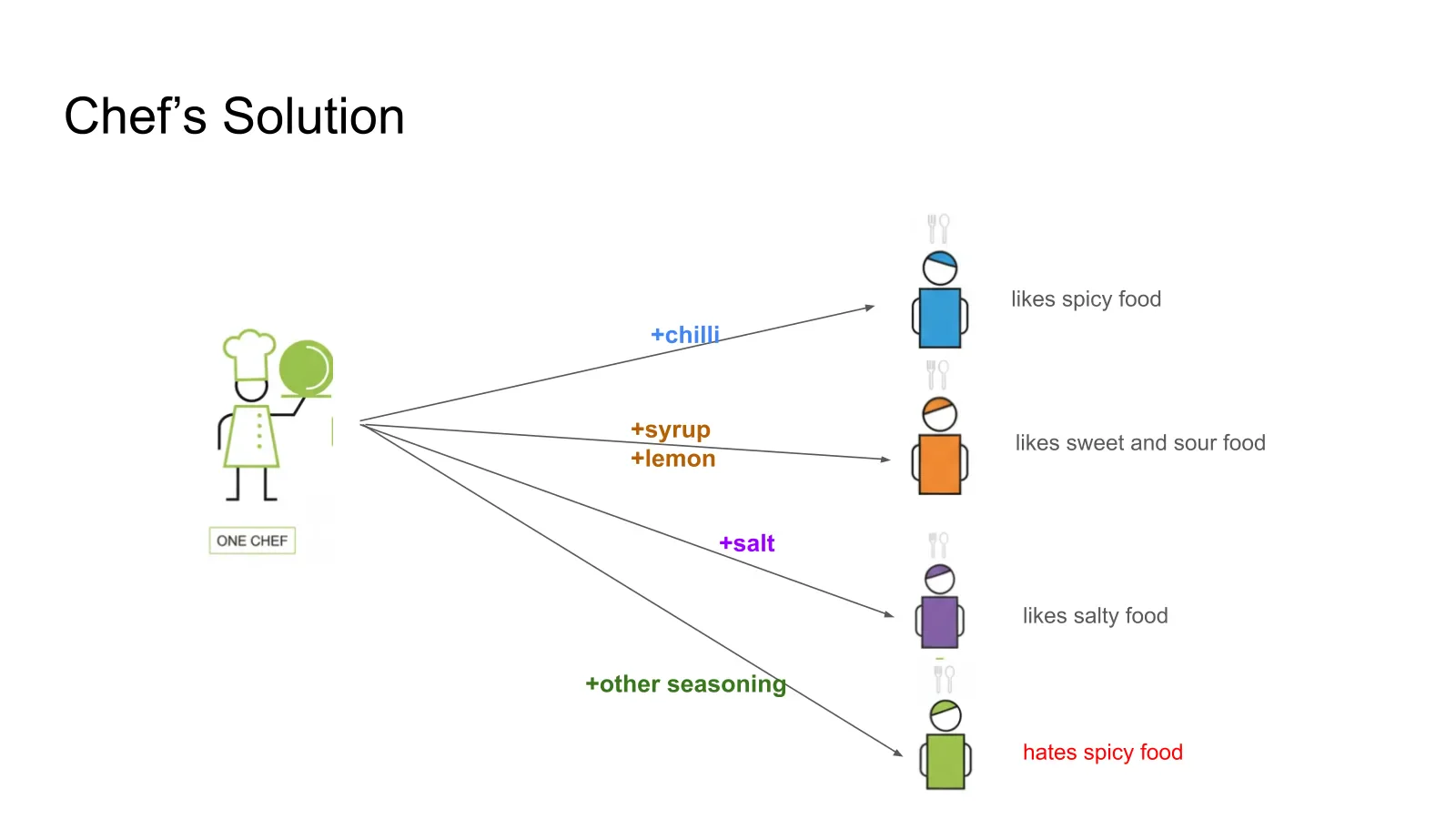 NVIDIA's chef analogy: a base dish with configurable seasonings tailored to each customer
Image: NVIDIA
NVIDIA's chef analogy: a base dish with configurable seasonings tailored to each customer
Image: NVIDIA
In the mapping, TensorRT is the chef, its shared pipeline the base recipe, tunable compiler settings the seasonings, the compiled engine the dish, and each ONNX model a customer.
Three problems the tuner is meant to address
NVIDIA lists three related failure modes of the traditional approach, where engineers study internal KPI models and encode what they learn as heuristics in the default strategy:
- Heuristic sprawl. Each new model-specific rule must be understood alongside every existing rule. As rules pile up, the code gets hard to maintain, and an improvement for one family of models can regress another.
- Performance-accuracy entanglement. Reduced-precision kernels and other aggressive optimizations can be faster but introduce numerical differences beyond an application's tolerance. Higher precision lowers the risk but costs speed, so the two cannot always be optimized separately.
- Performance customization. What works on one model or GPU may not work on another. Putting every winning choice into one universal strategy makes it hard to specialize for a growing range of models, hardware and requirements.
NVIDIA calls tuning "a scalable complement to heuristic optimization." Note the word complement: the default heuristics stay, and tuning adds a measured search on top.
How the framework works
The post builds a small mathematical model of a compiler. The pieces, in plain terms:
- A model is the computation to compile (an ONNX graph, a TensorRT network, a PyTorch model).
- A solution is one way of realizing it on the hardware, such as one TensorRT engine. The set of possibilities is the solution space.
- A run time function maps each solution to its run time on a fixed device and environment. NVIDIA treats repeated measurements as noisy and averages them.
- A builder algorithm generates candidate solutions that meet an accuracy requirement, defined as outputs staying within a tolerance of reference values.
- A searching algorithm picks one candidate, ideally the fastest.
Two gaps explain why the default can miss the best engine. First, heuristics inside the search can remove a candidate before it is ever tried as part of a full engine, for example filtering certain convolution tactics by a channel-dimension threshold. If that tactic belonged to the fastest end-to-end engine, it is gone. Second, kernels are profiled individually during tactic selection but run together in a larger graph, so the sum of isolated timings does not equal the end-to-end time. NVIDIA gives the example of adaptive grid sizing on Blackwell GPUs as a difference between isolated and in-graph execution.
The key move is to widen the builder rather than perfect the search. A compiler is a sequence of passes, each turning one intermediate representation into another, so a builder is a composition of passes, which NVIDIA calls a build route. Different models can have different best routes: model A may be fastest through route 3 and model B through route 1. The Global Performance Tuner takes the union of candidates from several customizable routes, validates each against the accuracy criterion, measures end-to-end speed, and returns the fastest that passes.
What the documentation confirms
The TensorRT 11.1.0 release notes describe the feature as adding automated end-to-end performance tuning through build-route searching through trtexec, to explore internal builder knobs, benchmark candidate engines and optionally validate accuracy before selecting the fastest valid route. That matches the blog post and shows the entry point is the trtexec command-line tool rather than a new Python API. We did not find the specific flag names in the pages we could open, so read the Global Performance Tuning page in the TensorRT documentation for the exact options.
The same release notes list other changes you may meet when upgrading, such as a CUDA 13.3 baseline, and they note that strongly typed networks became the default in TensorRT 11.0. Several trtexec flags that used to be on by default were deprecated in 11.0 and have no effect, so check the migration page if your build scripts rely on them.
What is not in Part 1
- Any measured gain. There are no speed-ups, model names or hardware comparisons. Do not repeat a percentage you read elsewhere unless it traces to NVIDIA or to your own test.
- The algorithm. How routes are chosen, how many are tried and how build time is bounded are promised for Part 2.
- Accuracy metrics. How tolerance is specified, and on what data, is left to the documentation.
- Which models benefit. NVIDIA's framing says benefits are model-dependent, so some models may see no gain over the default.
What this means for what you build or pay
If you serve models on NVIDIA GPUs with TensorRT, this is a way to buy speed with build time rather than hand-tuning. Inference cost is mostly GPU-hours, so even a modest per-model gain compounds across a fleet. The practical workflow is straightforward:
- Pick a representative model and a fixed deployment target. Tuning results are specific to the model and hardware.
- Decide your accuracy tolerance and reference data before tuning, since it is the constraint that gates every candidate.
- Run the tuner, then compare the selected engine to the default engine on your own latency and throughput tests, plus your quality evaluation.
- Pin the tuned engine as a build artifact and re-tune when the model, TensorRT version, or GPU changes.
Treat the accuracy tolerance as a real product decision. A tuner that is allowed to trade numerical error for speed will use that room, so set the threshold where your application's quality actually breaks, not where it is convenient.
Where it fits in the inference stack
TensorRT sits at the compile step of a larger inference stack. At the serving layer, NVIDIA's open-source work looks different; see how Dynamo's shadow engine cut recovery time and what the TokenSpeed engine targets for agentic workloads. At the model layer, NVIDIA's ReplaySSM work changes what is cached during decoding. Outside NVIDIA, DeepSeek's DeepInfer release is another example of how much inference engineering now matters. For the hardware context, see our guide to AI chip architectures and the Groq 3 LPX and Nebius throughput post.
The common thread is that serving cost is increasingly decided below the model, in compilers, schedulers and caches. Search-based tuning is a familiar idea in compilers; what is notable is NVIDIA making accuracy a first-class constraint of the search instead of an afterthought.
What to watch next
- NVIDIA's Part 2 with the algorithm, architecture and best practices.
- Published speed-ups on named models and GPUs, ideally with the accuracy tolerance used.
- Build-time cost reports from people who try it on large models.
- Whether the tuner expands beyond
trtexecinto other TensorRT interfaces.
Related reading
- NVIDIA Dynamo shadow engine recovery
- TokenSpeed inference engine for agentic workloads
- NVIDIA ReplaySSM
- DeepSeek DeepInfer, claimed vs verified
- AI chip architectures guide
- Groq 3 LPX on Nebius
- Sources: NVIDIA Technical Blog, Part 1, TensorRT 11.1.0 release notes
Details are accurate as of October 23, 2026 and come from NVIDIA's Part 1 post and release notes; no performance results had been published.