



If macOS just showed you “Malware Blocked and Moved to Trash” and the victim was codex, you are not alone — and you probably do not have a trojan.
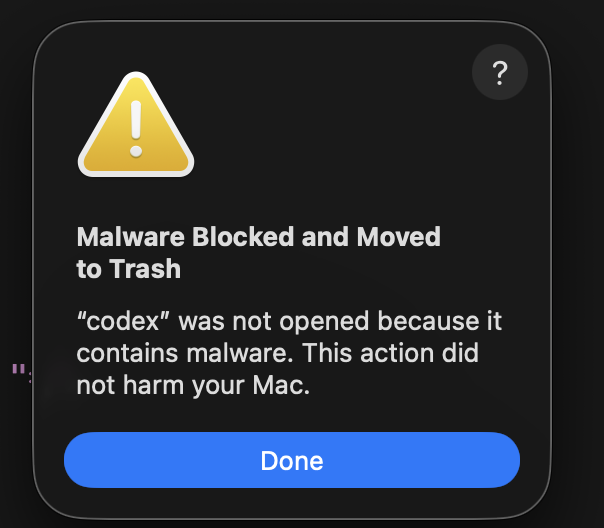 macOS alert: codex was not opened because it contains malware — Malware Blocked and Moved to Trash, July 2026
This dialog is appearing for OpenAI Codex users on Mac — tracked on GitHub since May 18, 2026 (#23195, still open with fresh reports two days ago as of July 19). Triggers include mid-session kills, post-update launches, opening Cursor/Kiro while Codex runs in the background, and tmux CLI sessions with the desktop app open.
For developers running Codex + ChatGPT Work as their daily agent stack, it feels catastrophic. It usually is not — it is a signing / signature false positive on a build Apple’s rules no longer trust.
GitHub hub: #23195 (May 2026 → ongoing) · #31377 CLI · #23308 Sparkle Updater · #24246 · Heise: macOS throws ChatGPT/Codex into trash
TL;DR — what to do right now
| Question | Answer |
|---|---|
| Real malware? | Almost certainly no — stale OpenAI binary vs updated XProtect rules |
| What got deleted? | codex CLI native binary and/or Codex.app |
| Fast CLI fix | npm install -g --include=optional @openai/codex@latest |
| Fast app fix | Delete old app → download from openai.com/codex → reinstall |
| Verify | codex --version, which -a codex, hash -r after PATH change |
| ENOENT after reinstall? | Stale npm wrapper still first on PATH — see failure chain below |
| Data loss risk? | Some users report lost Codex threads after the kill — not restored by reinstall |
| Prevention | Stay on latest builds; avoid orphaned npm global binaries |
What the alert means
macOS shows:
"codex" was not opened because it contains malware. This action did not harm your Mac.
That is XProtect + Gatekeeper, not a third-party antivirus product. Apple ships YARA signature updates (e.g. XProtect 5347, May 2026) that can suddenly invalidate a binary that worked yesterday — especially after reboot clears a cached “allow” verdict.
Two separate failure modes show up in GitHub:
OpenAI’s team ID is 2DC432GLL2 (OpenAI OpCo, LLC). Current notarized builds pass; stale installs do not. Commenters including TomasHubelbauer (2 weeks before July 19) argue the root issue is package signing — “Fixing the package signature shouldn't be out of reach of one of the most valuable companies in the world.”
GitHub #23195 — what the thread shows (May–July 2026)
Issue #23195 — “Mac OS could not open codex because it's malware” — is the main tracker. Open since May 18, 2026, labels: app, bug, session. It is not closed; new comments landed ~2 days before July 19.
Original report (May 18)
@JoanR112 — Codex.app 26.513.31313, Business subscription, macOS:
- Malware warning mid-session after a Codex update
- App kept running after dismissing the dialog
- 1–2 months of conversation history deleted from the sidebar
- Restart did not restore threads
OpenAI’s bot flagged possible duplicates; JoanR112 replied it is a mix of two issues — malware block plus session loss (#21734, #23052).
Related open issues (same root cause family)
| Issue | What it tracks |
|---|---|
| #22194 | “Cannot open Codex because of malware” |
| #22135 | codex-aarch64-apple-darwin malware dialog |
| #23308 | Sparkle Updater.app flagged by XProtect |
| #24246 | Malware blocked on Codex 26.519.41501 |
| #21734 | Sidebar empty after auto-update; local data intact |
| #31377 | npm CLI @openai/codex-darwin-arm64 false positive |
The Sparkle angle matters: Codex.app self-updates via Sparkle. If Sparkle Updater or an old app bundle gets quarantined, the next launch or background helper spawn can cascade into the malware dialog even when you did nothing in Terminal.
How people trigger it (reported patterns)
| Trigger | Example from thread |
|---|---|
| After Codex.app update | JoanR112, hankmika — popup right post-update |
| IDE opens while Codex runs | adkandari (Cursor), daryllundy (Kiro IDE) — Codex already in background |
| CLI in tmux | kerodem — July 17, 2026 — alert while running codex in tmux, desktop app still open |
| DMG install + CLI use | M-M-Mujtaba — installed Codex.dmg from OpenAI, CLI failed until npm install -g @openai/codex |
| Alternate wording | grudelsud — “codex will damage your computer. you should move it to the bin” |
What actually fixed it (community consensus)
Ranked by how often it worked in #23195 comments:
| Fix | Who reported success |
|---|---|
npm install -g @openai/codex | niagr, M-M-Mujtaba, grudelsud (after install.sh + SIGKILL failed) |
| Reinstall CLI + desktop app | VladSez (Sonoma 14.6.1) |
| Reinstall from codex website / DMG | aadeshAvoma, aryanstan |
| Close and restart app only | adkandari — resolved without full reinstall, then updated |
| Full clean recovery (this post) | When npm + standalone + brew conflict — see script below |
grudelsud’s path matches the failure chain in our terminal screenshots exactly: install.sh detected brew, offered reinstall, still SIGKILL, then npm install -g @openai/codex finally worked.
Status: OpenAI has not marked #23195 resolved. Treat this as an ongoing signing/XProtect mismatch, not a one-day incident.
Real-world failure chain (July 2026)
This is the sequence many Mac developers hit after the malware dialog — including a broken reinstall loop where install.sh reports success but codex still fails.
Step 1 — zsh: killed codex
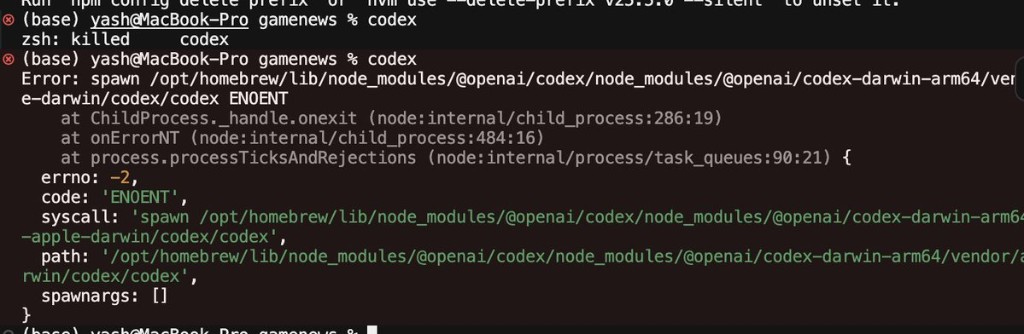 Terminal: zsh killed codex then spawn ENOENT to homebrew npm darwin-arm64 path
zsh: killed codex is macOS SIGKILL — XProtect terminating the native binary before Node finishes spawning it. Immediately after, you may see:
Error: spawn /opt/homebrew/lib/node_modules/@openai/codex/node_modules/@openai/codex-darwin-arm64/vendor/apple-darwin/codex/codex ENOENT
That path is the npm optional dependency @openai/codex-darwin-arm64. Apple trashed codex/codex inside it; the JavaScript launcher in /opt/homebrew/bin/codex still exists and still tries to exec the missing file → ENOENT.
Step 2 — install.sh succeeds, CLI still broken
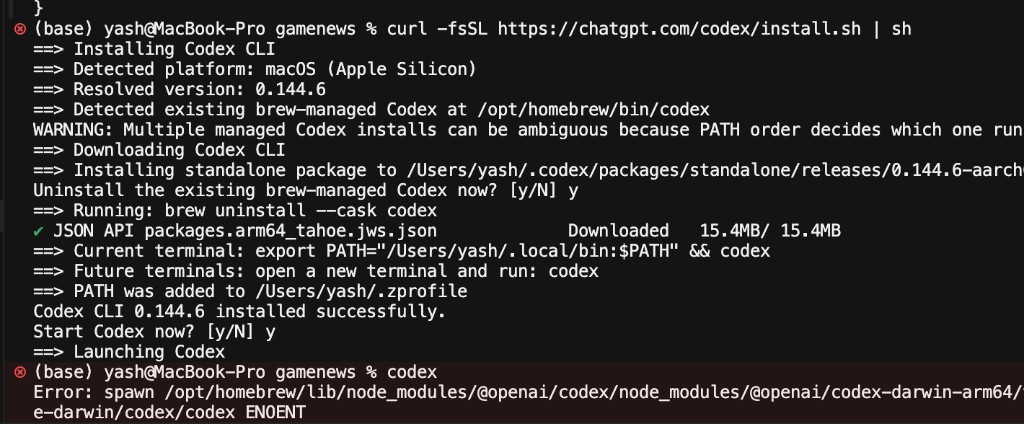 Terminal: curl install.sh uninstalls brew codex, installs 0.144.6 standalone, then ENOENT on old npm path
Running the official installer:
curl -fsSL https://chatgpt.com/codex/install.sh | sh
On a machine that previously had Homebrew cask + npm global installs, the script typically:
- Detects brew-managed
codexat/opt/homebrew/bin/codex - Offers to
brew uninstall --cask codex - Installs standalone
0.144.6-aarch64under~/.codex/packages/standalone/releases/... - Writes
~/.local/bininto~/.zprofile - Prints “Codex CLI 0.144.6 installed successfully”
Then codex in the same terminal session can still error with ENOENT to the old npm path — because:
| Problem | Why |
|---|---|
| PATH not refreshed | ~/.zprofile changes need source ~/.zprofile or a new terminal |
| Stale npm wrapper | npm install -g @openai/codex left a shim under /opt/homebrew/bin or node_modules that which codex resolves first |
| zsh command hash | Cached path to old binary — run hash -r after PATH fix |
| Triple install | Brew cask + npm global + standalone = three different codex executables (#31863) |
OpenAI’s own installer warns: “Multiple installs can be ambiguous due to PATH order.” After a malware quarantine, that ambiguity becomes a hard failure.
Step 3 — Clean recovery (copy-paste)
Run in order:
# 1. Remove stale npm global (if ever installed)
npm uninstall -g @openai/codex 2>/dev/null || true

# 2. Confirm brew cask is gone (install.sh may have done this)
brew uninstall --cask codex 2>/dev/null || true

# 3. Fresh standalone install
curl -fsSL https://chatgpt.com/codex/install.sh | sh

# 4. Load new PATH (install.sh edits ~/.zprofile)
source ~/.zprofile
export PATH="$HOME/.local/bin:$PATH"

# 5. Clear zsh's cached command locations
hash -r

# 6. Audit — should show ONE codex, ideally under ~/.local/bin
which -a codex
type codex
ls -la "$(which codex)"

# 7. Smoke test
codex --version
Expected after fix: which codex → /Users/you/.local/bin/codex (often a symlink into ~/.codex/packages/standalone/current/bin/codex).
If you still see /opt/homebrew/lib/node_modules/@openai/codex/... in error output, an npm wrapper is still winning PATH. Either remove that directory manually or ensure ~/.local/bin is before /opt/homebrew/bin in $PATH.
Alternative — npm-only path (if you prefer Node global over standalone):
brew uninstall --cask codex 2>/dev/null || true
rm -f ~/.local/bin/codex   # avoid two launchers
npm install -g --include=optional @openai/codex@latest
hash -r
codex --version
The --include=optional flag matters: without it, npm may skip @openai/codex-darwin-arm64 and you get a different class of spawn errors (#31377).
Fix — Codex desktop app
Heise and GitHub users report the same dialog for Codex.app and sometimes ChatGPT.app when versions lag.
- Quit Codex / ChatGPT
- Remove the app from
/Applications(and broken Dock entries) - Download fresh from OpenAI’s site only
- Install and sign in
Confusing July 2026 state: Some installs download an app named ChatGPT.app that opens the Codex interface, while a separate updated ChatGPT app stays classic GPT (#31866). After malware scares, a clean reinstall from the Codex download page is the least ambiguous path.
Minimum safe versions (Heise, May 2026):
| Product | Minimum version |
|---|---|
| ChatGPT Desktop | 1.2026.051+ |
| Codex app | 26.406.40811+ |
| Codex CLI | 0.119.0+ |
| Atlas browser | 1.2026.84.2+ |
Why this keeps happening to Codex specifically
Scale + velocity. Codex ships CLI native binaries via npm optional dependencies, desktop apps via Sparkle self-update, and merges with ChatGPT Work — multiple install paths, multiple signing pipelines. Any one stale artifact on disk can trip XProtect when Apple updates rules.
Certificate rotation. OpenAI worked with Apple so old certificates cannot be re-notarized (Heise). Good for supply-chain hygiene; painful if you never updated.
Side-effect launches. Tools like CodexBar that probe for codex on install can surface a latent quarantine (#977) — the scanner was always going to fire; the helper just triggered it early.
This is not unique to OpenAI — any widely distributed native binary can hit false positives — but Codex’s agentic CLI + app dual install makes duplicate/stale binaries common.
Data loss: the part Apple’s dialog does not mention
GitHub #23195 is labeled session for a reason — the malware popup and thread deletion are separate but correlated failures.
JoanR112 — 1–2 months of Business chats gone
The opening report (May 18, 2026) is the worst case documented in the thread:
- Codex.app 26.513.31313, ChatGPT Business
- Malware alert during an active session after update
- User dismissed dialog; app appeared to keep working
- Sidebar emptied — 1–2 months of work threads missing
- Restart and reinstall did not bring history back (per initial report)
Related issues suggest local data may still exist on disk while the UI fails to load it (#21734 — “local data is intact” but sidebar empty). That is cold comfort if OpenAI provides no recovery UI.
Why sessions vanish
Likely mechanisms (not confirmed by OpenAI):
| Mechanism | What happens |
|---|---|
| Binary kill mid-write | XProtect SIGKILL during session persistence |
| Update + quarantine race | Sparkle update leaves app in broken state; index corrupt |
| Separate session bug | #23052 — accidental deletion unrelated to Apple |
Apple’s dialog says your Mac was not harmed; it says nothing about OpenAI local state.
Treat long Codex threads like uncommitted WIP:
- Commit code the agent produced
- Paste critical plans into docs or tickets
- Do not assume reinstall restores UI history
If you were mid-run on GPT-5.6 Sol agentic work, recovery may mean restarting the task, not reopening the thread.
False positive vs real compromise — how to tell
| Signal | False positive (likely) | Real concern |
|---|---|---|
| Binary source | Official npm / openai.com | Unknown download, pirated mirror |
| Version | Months old | N/A |
| Fix | Reinstall @latest → works | Reinstall → blocked again |
| OpenAI statement | No compromise found (May 2026) | Would be CVE + revocation |
| Other Macs | Same version blocked after XProtect update | Isolated weird behavior |
When in doubt: hash-compare your binary path against a fresh install on the same machine after npm install -g @openai/codex@latest.
Enterprise / IT angle
If your org mandates Codex for agentic coding but MDM pins old builds, expect help-desk tickets exactly like this screenshot. Policy should require:
- Minimum Codex CLI version aligned with OpenAI’s current release
- No blocking of
chatgpt.com/ npm registry for@openai/codex - Documented reinstall SOP (not “ignore Apple security”)
Pair with your AI ROI / build-vs-buy review — agent downtime from quarantined binaries is a real cost line item, even when the alert is wrong.
Summary
macOS “Malware Blocked and Moved to Trash” for codex in July 2026 is overwhelmingly a false positive: XProtect quarantining stale Codex binaries. After the alert, many users see zsh: killed codex then spawn ... ENOENT — the npm wrapper survives while Apple trashes the native binary. Fix with the clean recovery script above (npm uninstall, standalone install.sh, source ~/.zprofile, hash -r, which -a codex). Watch for lost session history after the kill.
Related on explainx.ai
- Codex + ChatGPT Work — 8M users, GPT-5.6 Sol
- ChatGPT Work vs Codex — complete guide
- Codex 5-hour limit removed — weekly reset
- Codex GPT-5.6 — home deletion full-access controversy
- OpenAI Codex plugin for Claude Code
- AI ROI framework for executives
- Corporate AI mania — Ludicity essay
Official / issue tracker: #23195 hub · #22194 · #22135 · #23308 Sparkle · #24246 · #21734 session · #31377 CLI · #31866 app reinstall · Heise analysis
Alert text, GitHub #23195 thread, XProtect references, and minimum safe version numbers reflect public reports through July 19, 2026. Issue #23195 remains open — reinstall from official OpenAI sources only; verify codex --version after any security dialog.