



If you have used a coding copilot in a browser, you already know the gap: the session ends when you close the tab, the tooling is whatever the host ships, and your phone is not in the loop. Hermes Agent is one answer from Nous Research: an MIT-licensed, self-hosted agent runtime that is meant to stay on, remember, and meet you where you already talk—terminal, Telegram, Discord, Slack, and more—while still feeling like a serious developer tool, not a toy chat.
This post is a blog-style explainer: what Hermes is trying to be, how the pieces fit together at a conceptual level, and where hosting and model choice land in real life. For command lists, every flag, and security hardening, treat the official docs and the repository README as the source of truth—here we stay at the “understand the machine” altitude.
What Hermes is
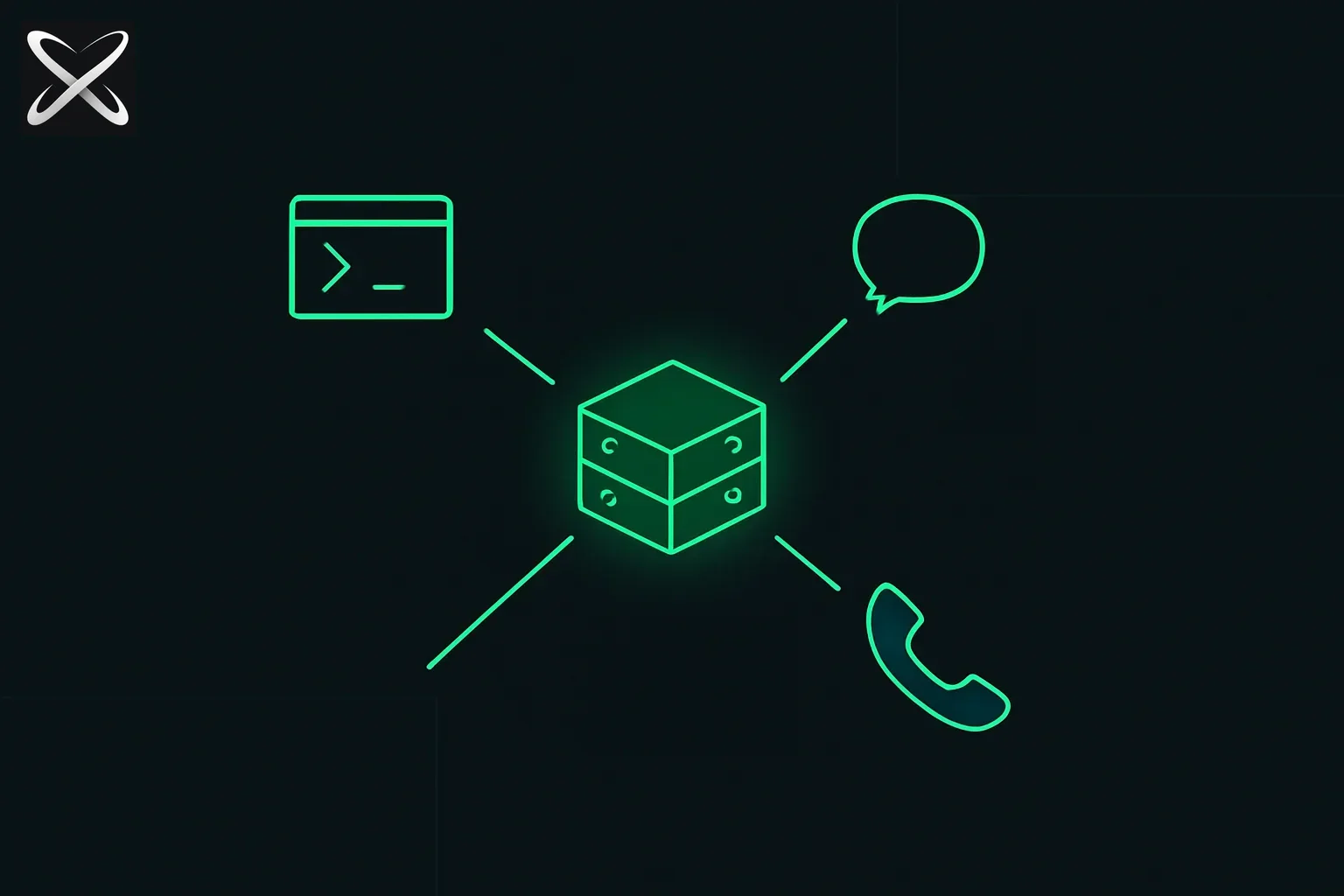 Hermes Agent explained — a persistent server box connected simultaneously to terminal, chat, and phone interfaces
At its core, Hermes is a long-running process (plus configuration on disk) that connects three things:
- One or more language models you select (Nous Portal, OpenRouter, OpenAI, Anthropic, and many others—what is wired up depends on the version you installed and the keys you provide).
- A big bag of tools—file access, terminals, browsers, platform integrations, MCP servers, and more—governed by what you turn on and how you scope it.
- Persistence: memory, skills, session search, and user modeling so the agent is not reinventing you from scratch every Monday.
The product story is explicitly not “a slightly smarter autocomplete.” It is infrastructure-shaped: run the same logical agent on a cheap VPS, a home server, a cluster, or serverless-style hosts that can hibernate when idle, while you punch in from SSH, Cursor, or a messaging app. That framing matters because it changes what you optimize for: uptime, secrets handling, and who is allowed to talk to the bot—not just “token quality on this one prompt.”
If you are already deep in the portable skills ecosystem (agentskills.io), Hermes lines up with that culture: structured procedures you can reuse, not one-off prompts. Our agent skills guide explains that pattern in the abstract; Hermes implements its own skills hub and learning loop inside one mature harness. The explainx.ai skills directory is the wider public registry picture—related idea, different packaging.
How it works
Think of Hermes as layers you can explain to a teammate in one whiteboard pass.
Two doors in: terminal vs gateway
hermesopens the terminal UI: slash commands, history, streaming tool output—the “I am at my desk” experience.hermes gatewayis how you attach Telegram, Discord, Slack, WhatsApp, Signal, email, and similar surfaces so the same agent answers off the laptop.
You will use hermes setup when you want a wizard to walk configuration, hermes model to change provider/model, hermes tools to shape what the agent can touch, and hermes doctor when something is wrong. Both paths share many slash affordances (things like /new, /model, /compress, /usage, /skills—see upstream tables for the exact list in your release).
The turn: tools, approval, and backends
When the model decides to act, it does not just emit text—it can invoke tools. The harness is responsible for showing you what will run, honoring your approval settings, and executing in the right environment. The README advertises multiple terminal backends (local, Docker, SSH, Daytona, Singularity, Modal, and so on—check your version’s docs for the authoritative set). That is how “run this in a container” or “run this on another box” becomes a first-class idea instead of a hack.
Security is not automatic trust. The docs cover command approval, DM pairing, and isolation patterns. Before you point Hermes at production repos or sensitive inboxes, read that material: a capable agent with a shell is a powerful and dangerous thing.
Memory, skills, and the “learning loop”
Where a stateless chat forgets, Hermes is built to accumulate:
- Memory that persists and can be nudged back into attention.
- Skills that can be created and refined from experience—so repeated workflows become lighter over time.
- Session search (the project cites FTS5 plus LLM summarization) so the agent can find past work instead of pretending the last message is the whole world.
- User modeling so preferences and context can deepen across sessions.
You do not have to buy the marketing language to find the engineering point useful: state and retrieval are what make “agent” feel different from “chat.”
Delegation and time
Subagents let the main agent spawn isolated workers for parallel tracks. Cron-style scheduling lets automations run on a clock and deliver results back to a platform. Together, those features push Hermes toward “ops for knowledge work,” not just “one thread in a TUI.”
If you are coming from OpenClaw
hermes claw migrate exists because many early adopters already had files, skills, and configs in another stack. Do a dry run on a copy of your home config before you trust migration on the machine you care about.
How model choice fits an agent “stack”
Hermes does not lock you to a single vendor—hermes model is the knob—so in practice every user ends up with a mental model of which model to use for planning, which for cheap tool-heavy execution, and which for local or nearly free routing.
Community builders publish tier charts to make that intuitive. One example is Graeme (@gkisokay)’s “Gkisokay LLM Model Stack” (April 2026): a four-tier framing from frontier reasoning down to local micro models, with rough per-million token costs, context sizes, and “use it for” notes. It is independent opinion, not Nous Research canon, but it matches how people actually talk about Hermes-class harnesses: frontier for hard strategy, agent execution tiers for long tool chains, balanced day-to-day work, local for summarization and always-on loops.
Infographic — “The Gkisokay LLM Model Stack” (April 2026), by Graeme @gkisokay. Third-party routing guide; verify pricing and model IDs on each provider before buying.
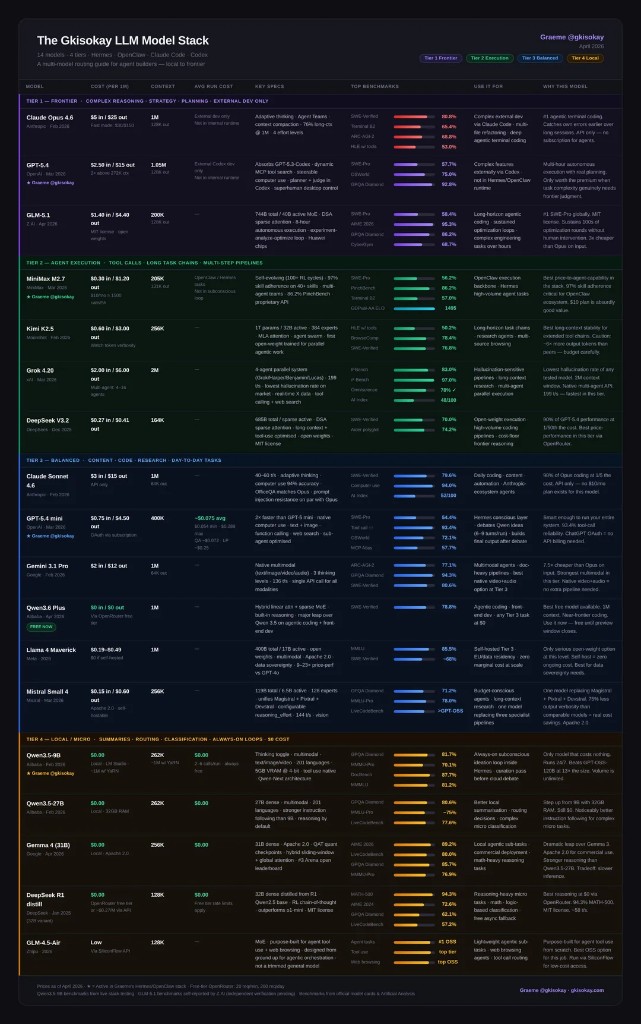 The Gkisokay LLM Model Stack — April 2026 — tiers from frontier and agent execution through balanced and local/micro models, with cost and context columns
Charts like this go stale fast: API prices change, model names get version bumps, and free tiers move. Use the shape of the argument—when to spend vs when to route—and double-check every dollar figure on the billing page you actually use with Hermes.
Where it runs (and why people argue about VPS)
The harness itself is not a GPU training job; most of the time it is waiting on network I/O and LLM APIs. That is why a small VPS can feel fine, while a Raspberry Pi might feel slow if storage or OS choices are wrong—community threads often blame the SD card before the Python stack.
There is no single “correct” host: cloud VPS for a stable public presence, home lab for custody, laptop-only for experiments. What is universal is deliberate networking: who can SSH, how your bot is ACL’d, and where secrets live.
The diagram below is a community “one possible remote stack”: VPS, Tailscale mesh, UFW so SSH is only where you expect, phone and IDE access, Hermes install, Telegram env vars, and sandboxed project folders. Treat curl installers and price callouts in artwork as hints—always match the install line to the GitHub scripts/install.sh for your pinned revision if you care about reproducibility.
Community reference: remote Hermes — network, access, install, bot, sandboxes.
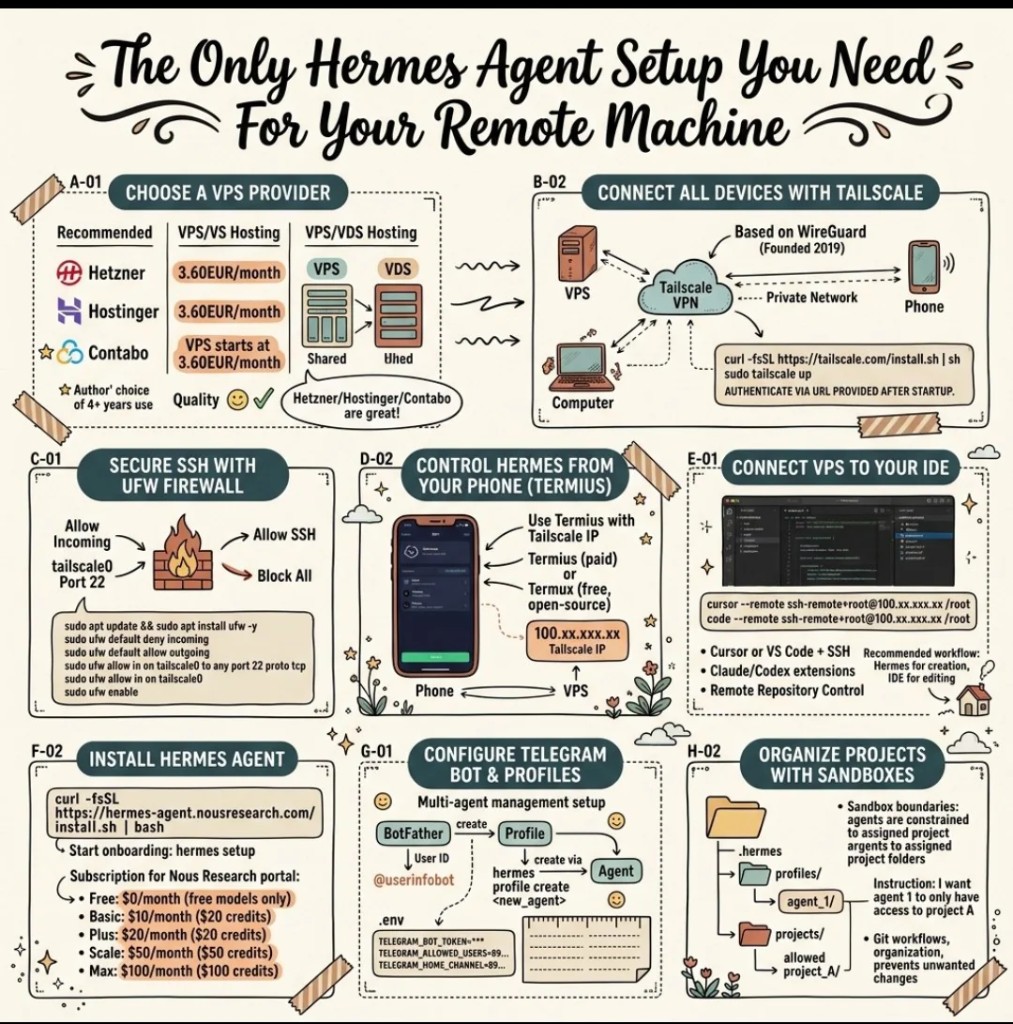 Community infographic: remote Hermes setup with VPS, Tailscale, UFW, Termius, Cursor or VS Code remote, install, and Telegram/sandbox notes
That pattern is one story; you might prefer plain SSH keys, WireGuard without Tailscale, or no messaging surface at all. The blog point is simpler: Hermes is designed to be operated, not merely demoed.
First boot, without pasting a manual here
You will see a one-liner in the README that pipes an install.sh from the default branch into bash, then tells you to source your shell profile and run hermes. Windows users are directed to WSL2; Android users get a Termux path with a smaller dependency set so voice stacks do not break the install. Contributors cloning the repo follow a different script (setup-hermes.sh with uv)—do not mix the two mental models.
When something breaks, hermes doctor is the honest first move; when something is unclear, the docs site wins over any blog paragraph.
Bottom line
Hermes Agent is easiest to understand as a hosted life for an agent: models you can swap, tools you can scope, memory and skills that persist, surfaces beyond the terminal, and operations (subagents, schedules) that match how real work actually runs. Model tier graphics help you budget and route; network diagrams help you not expose a god-mode shell to the whole internet. Everything else—the exact flags, exact tools, exact security guarantees for your org—belongs in your runbook and in Nous’s official pages, refreshed whenever you upgrade.
More on explainx.ai: what are agent skills · what is MCP · gstack and YC-style agent factories · browse skills
Update — September 22, 2026: A viral harness tier list left Hermes off entirely, and the replies noticed immediately — see does the viral agent harness tier list hold up? for the full reaction and what the list got right and wrong.
Updated June 2026: Hermes Agent has reached 188k GitHub stars and 22 releases, and now ranks #1 on OpenRouter's global token rankings across all categories. See the companion guides for the latest context:
- Top 10 things you can do with Hermes Agent
- Hermes Agent vs OpenClaw: full comparison
- What is OpenClaw?
Updated July 2026: A remote VPS earns its keep for an always-on agent like Hermes. For bounded tasks — like publishing a blog post — that don't need a machine to stay resident, see why a repo that already auto-deploys through Railway doesn't need a VPS at all.