MCP server

by abrinsmead
Create and organize Mermaid diagrams with real-time visualization, export, and git integration—perfect for mermaid js an
Creates and renders Mermaid diagrams locally with a web interface for visualizing code architecture, flows, and processes. Keeps all diagram data local with export capabilities.
Mindpilot (Mermaid Diagrams) is a community-built MCP server published by abrinsmead that provides AI assistants with tools and capabilities via the Model Context Protocol. Create and organize Mermaid diagrams with real-time visualization, export, and git integration—perfect for mermaid js an It is categorized under productivity, developer tools. This server exposes 2 tools that AI clients can invoke during conversations and coding sessions.
You can install Mindpilot (Mermaid Diagrams) in your AI client of choice. Use the install panel on this page to get one-click setup for Cursor, Claude Desktop, VS Code, and other MCP-compatible clients. This server runs locally on your machine via the stdio transport.
MIT
Mindpilot (Mermaid Diagrams) is released under the MIT license. This is a permissive open-source license, meaning you can freely use, modify, and distribute the software.
Add new capabilities to Claude beyond text generation
Example
Access external data sources, execute code, interact with tools and services
Transform Claude from chatbot to action-taking agent
Provide Claude with access to relevant context and data
Example
Load project documentation, access knowledge bases, query databases
Get more accurate, context-aware responses
Automate multi-step workflows combining AI and external tools
Example
Research → Summarize → Create document → Send notification
Complete complex tasks end-to-end without manual steps
Share your MCP server with the developer community
Useful MCP listing: Mindpilot (Mermaid Diagrams) is the kind of server we cite when onboarding engineers to host + tool permissions.
I recommend Mindpilot (Mermaid Diagrams) for teams standardizing on MCP; the explainx.ai page compares cleanly with sibling servers.
Mindpilot (Mermaid Diagrams) has been reliable for tool-calling workflows; the MCP profile page is a good permalink for internal docs.
We evaluated Mindpilot (Mermaid Diagrams) against two servers with overlapping tools; this profile had the clearer scope statement.
Mindpilot (Mermaid Diagrams) is a well-scoped MCP server in the explainx.ai directory — install snippets and categories matched our Claude Code setup.
I recommend Mindpilot (Mermaid Diagrams) for teams standardizing on MCP; the explainx.ai page compares cleanly with sibling servers.
We evaluated Mindpilot (Mermaid Diagrams) against two servers with overlapping tools; this profile had the clearer scope statement.
According to our notes, Mindpilot (Mermaid Diagrams) benefits from clear Model Context Protocol framing — fewer ambiguous “AI plugin” claims.
Strong directory entry: Mindpilot (Mermaid Diagrams) surfaces stars and publisher context so we could sanity-check maintenance before adopting.
We wired Mindpilot (Mermaid Diagrams) into a staging workspace; the listing’s GitHub and npm pointers saved time versus hunting across READMEs.
showing 1-10 of 73


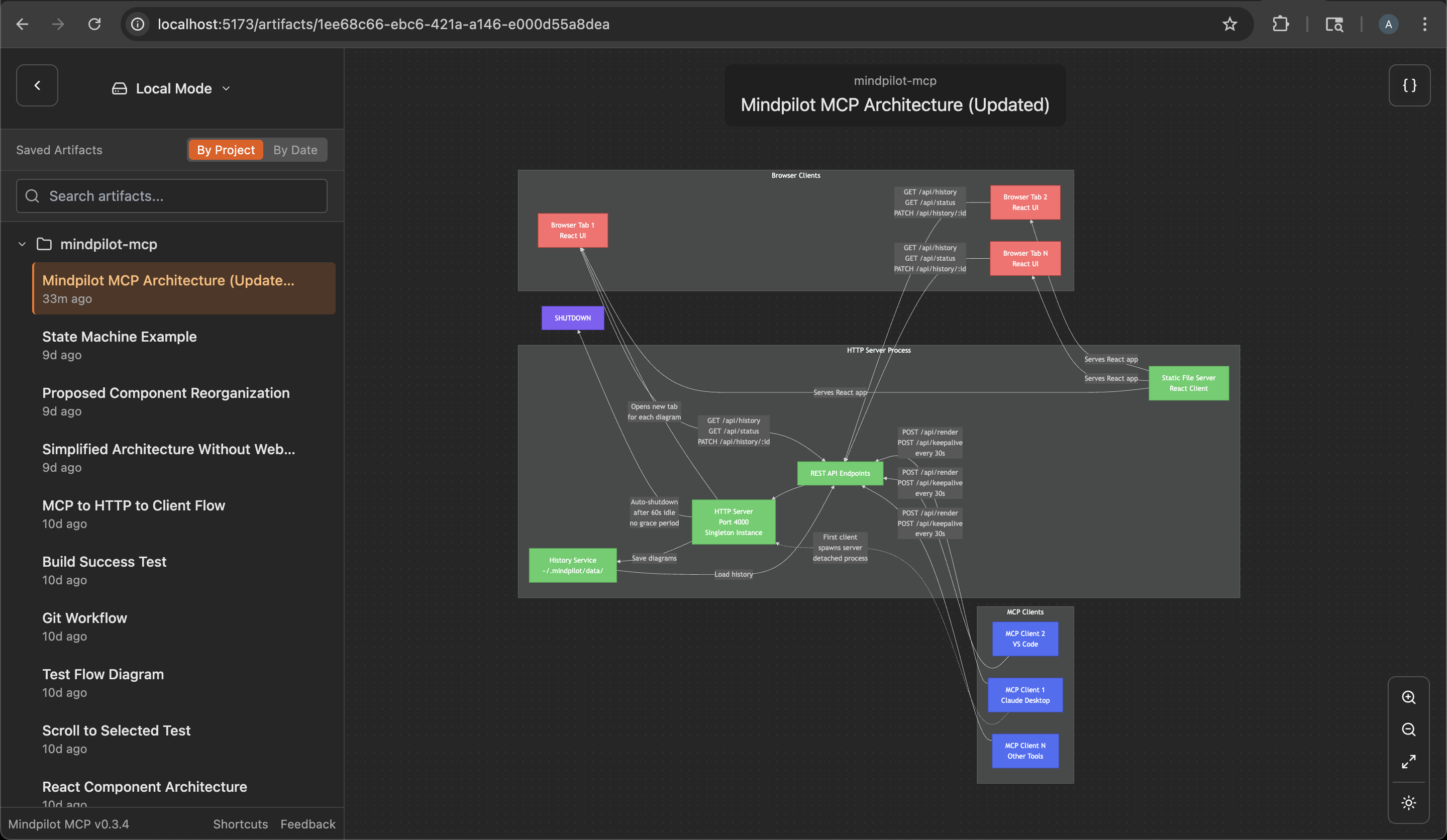
See through your agent's eyes. Visualize legacy code, inspect complex flows, understand everything.
Node.js v20.0.0 or higher.
claude mcp add mindpilot -- npx @mindpilot/mcp@latest
Under Settings > Cursor Settings > MCP > Click Add new global MCP server and configure mindpilot in the mcpServers object.
{
  "mcpServers": {
    "mindpilot": {
      "command": "npx",
      "args": ["@mindpilot/mcp@latest"]
    }
  }
}
Follow the instructions here for enabling MCPs in VS Code: https://code.visualstudio.com/docs/copilot/chat/mcp-servers
Go to Settings > Features > MCP, then click Edit in settings json
Then add mindpilot to your MCP configuration:
{
  "mcp": {
    "servers": {
      "mindpilot": {
        "type": "stdio",
        "command": "npx",
        "args": ["@mindpilot/mcp@latest"]
      }
    }
  }
}
Under Settings > Windsurf Settings > Manage Plugins, click view raw config and configure mindpilot in the mcpServers object:
{
  "mcpServers": {
    "mindpilot": {
      "command": "npx",
      "args": ["@mindpilot/mcp@latest"]
    }
  }
}
In the AI Thread panel click on the three dots ..., then click Add Custom Server...
In the Command to run MCPserver field enter npx @mindpilot/mcp@latest and click Add Server.
--port command line switch.~/.mindpilot/data/. You can specify a custom location using the --data-path command line switch.Mindpilot intelligently handles multiple AI assistants running simultaneously. When you have multiple Claude Desktop windows or IDE instances open:
This means you can work with multiple MCP hosts at once without port conflicts, and they'll all contribute to the same collection of diagrams.
Mindpilot MCP collects anonymous usage data to help us understand how the product is being used and improve the user experience.
If you prefer not to share anonymous usage data, you can disable analytics by adding the --disable-analytics flag to your MCP configuration:
Claude Code:
claude mcp add mindpilot -- npx @mindpilot/mcp@latest --disable-analytics
Other IDEs:
Add "--disable-analytics" to the args array in your configuration:
{
  "command": "npx",
  "args": ["@mindpilot/mcp@latest", "--disable-analytics"]
}
After configuring the MCP in your coding agent you can make requests like "create a diagram about x" and it should use the MCP server to render Mermaid diagrams for you in a browser connected to the MCP server.
You can optionally update your agent's rules file to give specific instructions about when to use mindpilot-mcp.
Frontier LLMs are well trained to generate valid Mermaid syntax. The MCP is designed to accept Mermaid syntax and render diagrams in a web app running on http://localhost:4000 (default port).
If you use port 4000 for another service you can configure the MCP to use a different port.
Claude Code example:
claude mcp add mindpilot -- npx @mindpilot/mcp@latest --port 5555
To save diagrams to a custom location (e.g., for syncing with cloud storage):
Claude Code example:
claude mcp add mindpilot -- npx @mindpilot/mcp@latest --data-path /path/to/custom/location
Other IDEs:
{
  "command": "npx",
  "args": ["@mindpilot/mcp@latest", "--data-path", "/path/to/custom/location"]
}
If you use asdf as a version manager and have trouble getting MCPs to work (not just mindpilot), you may need to set a "global" nodejs version from your home directory.
cd
asdf set nodejs x.x.x
Configure the MCP in your coding agent (using claude in this example)
claude mcp add mindpilot -- npx tsx <path to...>/src/server/server.ts
Run claude with the --debug flag if you need to see MCP errors
Start the development client (Vite) to get hot module reloading while developing.
npm run dev
Open the development client
localhost:5173
Prerequisites
Time Estimate
15-60 minutes depending on server complexity
Steps
Troubleshooting
✓ Do
✗ Don't
💡 Pro Tips
Architecture
Model Context Protocol standardizes how AI hosts (Claude, Cursor) communicate with external tools and data sources through server implementations.
Protocols
Compatibility
✓ Use when
Use when you need Claude to access external data, execute actions, or integrate with tools. Best for extending AI capabilities beyond conversation.
✗ Avoid when
Avoid when native integrations exist (use official APIs directly), for real-time critical systems, or when security/compliance requires zero external dependencies.




