Access decentralized file storage and persistent data on the IPFS Storacha Network using the w3cli interface for reliabl
Read, analyze, and understand files in your project
Example: Summarize README, analyze code structure, find TODO comments across codebase
Navigate large codebases 5x faster, understand projects quickly
Create, move, rename, and organize files based on natural language instructions
Example: Organize downloads by file type, rename files following convention, batch process images
Save hours on manual file organization
Search files for patterns, extract data, find information across directories
Example: Find all config files with API keys, extract emails from documents, search logs for errors
Find information instantly instead of manual grep/find
Generate boilerplate files, apply templates, create project structures
Example: Create React component with tests and styles, generate OpenAPI spec, scaffold new project
Eliminate repetitive file creation work
Salesforce
Unlock seamless Salesforce org management with the secure, flexible Salesforce DX MCP Server. Streamline workflows and b
Railway
Deploy and manage apps easily on Railway's train platform—handle services, environments, and more via conversational wor
Terraform Registry
Integrate Terraform Registry with infrastructure as code tools for seamless provider lookup, module recommendations, and
Okta MCP Server
Official Okta MCP server for managing identity and access management through AI. Automate user provisioning, group manag
Microsoft MCP Servers
Catalog of official Microsoft MCP server implementations. Access Azure, Microsoft 365, Dynamics 365, Power Platform, and
IPFS Storacha Network reduced integration guesswork — categories and install configs on the listing matched the upstream repo.
We wired IPFS Storacha Network into a staging workspace; the listing’s GitHub and npm pointers saved time versus hunting across READMEs.
IPFS Storacha Network is a well-scoped MCP server in the explainx.ai directory — install snippets and categories matched our Claude Code setup.
I recommend IPFS Storacha Network for teams standardizing on MCP; the explainx.ai page compares cleanly with sibling servers.
IPFS Storacha Network reduced integration guesswork — categories and install configs on the listing matched the upstream repo.
Useful MCP listing: IPFS Storacha Network is the kind of server we cite when onboarding engineers to host + tool permissions.
We wired IPFS Storacha Network into a staging workspace; the listing’s GitHub and npm pointers saved time versus hunting across READMEs.
According to our notes, IPFS Storacha Network benefits from clear Model Context Protocol framing — fewer ambiguous “AI plugin” claims.
Useful MCP listing: IPFS Storacha Network is the kind of server we cite when onboarding engineers to host + tool permissions.
IPFS Storacha Network reduced integration guesswork — categories and install configs on the listing matched the upstream repo.
showing 1-10 of 55
Share your MCP server with the developer community

Select a client to integrate this server.
Claude Desktop configuration
{
  "mcpServers": {
    "ipfs": {
      "command": "npx",
      "args": [
        "-y",
        "mcp-ipfs"
      ],
      "env": {
        "W3_LOGIN_EMAIL": "your-email@example.com"
      }
    }
  }
}Connects AI models to the IPFS Storacha Network for decentralized file storage and content-addressed data management. Wraps the w3 CLI to enable persistent, distributed storage operations.
IPFS Storacha Network is a community-built MCP server published by alexbakers that provides AI assistants with tools and capabilities via the Model Context Protocol. Access decentralized file storage and persistent data on the IPFS Storacha Network using the w3cli interface for reliabl It is categorized under cloud infrastructure, file systems.
You can install IPFS Storacha Network in your AI client of choice. Use the install panel on this page to get one-click setup for Cursor, Claude Desktop, VS Code, and other MCP-compatible clients. This server runs locally on your machine via the stdio transport.
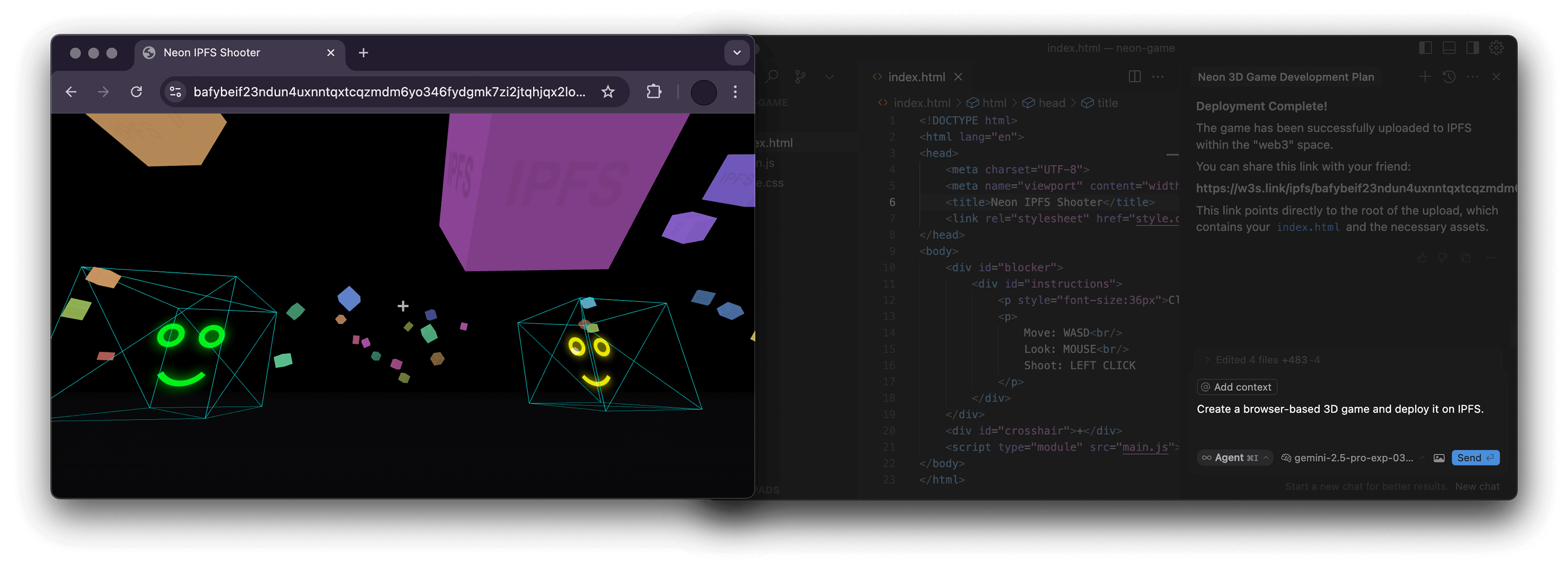



A Node.js server implementing the Model Context Protocol (MCP) for interacting with the storacha.network platform via the w3 command-line interface (@web3-storage/w3cli).
This server empowers language models 🤖 and other MCP clients to manage storacha.network spaces, upload/download data, manage delegations, and perform various other tasks by seamlessly wrapping w3 commands.
w3 CLI for native integration with storacha.network.w3 functionality:
w3_login, w3_reset, w3_account_ls (for checking authorization)w3_space_ls, w3_space_use, w3_space_info, w3_space_add, w3_space_provision (Note: w3_space_create must be run manually due to interactive prompts)w3_up, w3_ls, w3_rmw3_open (generates w3s.link URL)w3_delegation_create, w3_delegation_ls, w3_delegation_revoke, w3_proof_add, w3_proof_lsw3_key_create, w3_bridge_generate_tokensw3 can ...): Blob, CAR, Upload, Index, Access Claim, Filecoin Info managementw3_plan_get, w3_coupon_create, w3_usage_reportnode -v).w3 CLI: The server executes w3 commands directly. Ensure @web3-storage/w3cli is installed globally and configured:
npm install -g @web3-storage/w3cli
w3 login <your-email@example.com>
# Follow email verification steps
w3_login tool requires the W3_LOGIN_EMAIL environment variable to be set to the same email used for w3 login.The codebase is organized as follows:
src/
├── index.ts          # Main server entry point, MCP setup, request routing
├── schemas.ts        # Zod schemas defining input arguments for each tool
├── tool_handlers.ts  # Implementation logic for each MCP tool
├── utils.ts          # Helper functions (e.g., running w3 commands, parsing JSON)
└── utils/
    └── logger.ts     # Basic logger configuration
This server can be used with any MCP-compatible client. You need to configure your client to connect to this server.
This assumes npm and the prerequisites are met.
{
  "mcpServers": {
    "ipfs": {
      "command": "npx",
      "args": ["-y", "mcp-ipfs"],
      "env": {
        "W3_LOGIN_EMAIL": "your-email@example.com"
      }
    }
  }
}
Build the image first (see Build section) or use the pre-built image alexbakers/mcp-ipfs.
{
  "mcpServers": {
    "mcp-ipfs": {
      "command": "docker",
      "args": [
        "run",
        "-i",
        "--rm",
        "-v",
        "/path/to/your/project:/path/to/your/project",
        "-e",
        "W3_LOGIN_EMAIL",
        "alexbakers/mcp-ipfs"
      ],
      "env": {
        "W3_LOGIN_EMAIL": "your-email@example.com"
      }
    }
  }
}
Several w3 commands require absolute filesystem paths (e.g., w3_up, w3_delegation_create --output, w3_proof_add, w3_can_blob_add, w3_can_store_add).
-v flag (e.g., -v /Users/me/project:/Users/me/project) and then use the container path (e.g., /Users/me/project/my_file.txt) in the tool arguments.Clone the repository and install dependencies:
git clone https://github.com/alexbakers/mcp-ipfs.git
cd mcp-ipfs
npm install
Build the TypeScript code:
npm run build
You can then run the server directly:
# Ensure W3_LOGIN_EMAIL is set in your environment
export W3_LOGIN_EMAIL="your-email@example.com"
node dist/index.js
Or publish it (if you have the rights):
npm publish
Build the Docker image:
# Build locally (replace with your username/repo and desired tag)
docker build -t alexbakers/mcp-ipfs .
This MCP server is licensed under the MIT License. See the LICENSE file for details.
Time estimate: 10-20 minutes including configuration
Prerequisites
Steps
Troubleshooting
✓ Do
✗ Don't
💡 Pro Tips
Architecture
MCP server provides file I/O operations (read, write, search, metadata) as tools Claude can invoke with natural language instructions.
Protocols
Compatibility
✓ Use when
Use for code analysis, file organization, content search, template generation, and automating repetitive file operations. Best for local development workflows.
✗ Avoid when
Avoid for system-critical files, sensitive credentials, production environments, or when file integrity is paramount. Don't use on files you can't afford to lose.



